Feed: Matt Segal
Entries found: 57
How I hunt down (and fix) errors in production
Published: 2022-05-03T12:00:00+10:00
Updated: 2022-05-03T12:00:00+10:00
UTC: 2022-05-03 02:00:00+00:00
URL: https://mattsegal.dev/prod-bug-hunt.htmlOnce you’ve deployed your web app to prod there is a moment of satisfaction: a brief respite where you can reflect on your hard work. You sit, adoringly refreshing the homepage of www.mysite.com to watch it load over and over. It’s beautiful, perfect, timeless. A glittering …Content Preview
Once you’ve deployed your web app to prod there is a moment of satisfaction: a brief respite where you can reflect on your hard work. You sit, adoringly refreshing the homepage of www.mysite.com to watch it load over and over. It’s beautiful, perfect, timeless. A glittering crystal palace of logic and reason. Then people start to actually use it in earnest and you begin to receive messages like this in Slack:
Hey Matt. I am not getting reply emails for case ABC123 Jane Doe
Ideally, with a solid monitoring stack , you will be alerted of bugs and crashes as they happen, but some may still slip through the cracks. In any case, you’ve got to find and fix these issues promptly or your users will learn to distrust you and your software, kicking off a feedback loop of negative perception. Best to nip this in the bud.
So a user has told you about a bug in production, and you’ve gotta fix it - how do you figure out what went wrong? Where do you start? In this post I’ll walk you through an illustrative example of hunting down a bug in our email system.
The problem
So this was the message I got over Slack from a user of my website:
Hey Matt. I am not getting reply emails for case ABC123 Jane Doe
A user was not receiving an email, despite their client insisting that they had sent the email. That’s all I know so far...
More detail
... and it’s not quite enough. I know the case number but that’s not enough to track any error messages efficiently. I followed up with my user to check:
- what address was used to send the email (eg. jane.doe@gmail.com)
- when they attempted to send the email (over the weekend apparently)
With this info in hand I can focus my search on a particular time range and sender address.
Knowledge of the system
There’s one more piece of info you need to have before you start digging into log files and such: what are the components of the email-receiving system? I assembled this one myself, but under other circumstances, in a team setting, I might ask around to build a complete picture of the system. In this case it looks like this:

In brief:
- The client sends an email from their email client
- The email travels through the mystical email realm
- SendGrid (SaaS product) receives the email via SMTP
- SendGrid sends the email content to a webhook URL on my webserver as an HTTP POST request
- My web application ingests the POST request and stores the relevant bits in a database table
Inside the web server there’s a pretty standard “3 tier” setup:
- NGINX receives all web traffic, sends requests onwards to the app server
- Gunicorn app server running the Django web application
- A database hosting all the Django tables (including email content)

My approach
So, the hunt begins for evidence of this missing email, but where to start looking? One needs a search strategy. In this case, my intuition is to check the “start” and “end” points of this system and work my way inwards. My reasoning is:
- if we definitely knew that SendGrid did not receive the email, then there’d be no point checking anywhere downstream (saving time)
- if we knew that the database contained the email (or it was showing up on the website itself!) then there’d be no point checking upstream services like SendGrid or NGINX (saving time)
So do you start upstream or downstream? I think you do whatever’s most convenient and practical.
Of course you may have a special system-specific knowledge that leads you towards checking one particular component first (eg. “our code is garbage it’s probably our code, let’s check that first”), which is a cool and smart thing to do. Gotta exploit that domain knowledge.
Did SendGrid get the email?
In this case it seemed easiest to check SendGrid’s fancy web UI for evidence of an email failing to be received or something. I had a click around and found their reporting on this matter to be... pretty fucking useless to be honest.

This is all I could find - so I’ve learned that we usually get emails. Reassuring but not very helpful in this case. They have good reporting on email sending, but this dashboard was disappointingly vague.
Is the email in the database?
After checking SendGrid (most upstream) I then checked to see if the the database (most downstream) had received the email content.
As an aside, I also checked if the email was showing up in the web UI, which it wasn’t (maybe my user got confused and looked at the wrong case?). It’s good to quickly check for stupid obvious things just in case.
Since we don’t have a high volume of emails I was able to check the db by just eyeballing the Django admin page. If we were getting many emails per day I would have instead run a query in the Django shell via the ORM (or run an SQL query directly on the db).

It wasn’t there >:(
Did my code explode?
So far we know that maybe SendGrid got the email and it’s definitely not in the database. Since it was easy to do I quickly scanned my error monitoring logs (using Sentry ) for any relevant errors. Nothing. No relevant application errors during the expected time period found.

Aside : yes my Sentry issue inbox is a mess. I know, it's bad. Think of it like an email in box with 200 unread emails, most of them spam, but maybe a few important ones in the pile. For both emails and error reports, it's best to have a clean inbox.
Aside : ideally I would get Slack notifications for any production errors and investigate them as they happen but Sentry recently made Slack integration a paid feature and I haven’t decided whether to upgrade or move.
Did NGINX receive the POST request?
Looking back upstream, I wanted to know if I could find anything interesting in the NGINX logs. If you’re not familiar with webserver logfiles I give a rundown in this article covering a typical Django stack.
All my server logs get sent to SumoLogic, a log aggregator (explained in the “log aggregation” section of this article , where I can search through them in a web UI.
I checked the NGINX access logs for all incoming requests to the email webhook path in the relevant timeframe and found nothing interesting. This shows NGINX is receiving email data in general, which is good.

Next I checked the NGINX error logs... and found a clue!

For those who don’t want to squint at the screenshot above this was the error log:
2022/04/30 02:38:40 [error] 30616#30616: *129401 client intended to send too large body: 21770024 bytes, client: 172.70.135.74, server: www.mysite.com, request: "POST /email/receive/ HTTP/1.1", host: "www.mysite.com”
This error, which occurs when in receiving a POST request to the webhook URL, lines up with the time that the client apparently sent the email. So it seems likely that this is related to the email problem.
What is going wrong?
I googled the error message and found this StackOverflow post . It seems that NGINX limits the size of requests that it will receive (which is configurable via the nginx.conf file). I checked my NGINX config and I had a limit of 20MB set. Checking my email ingestion code, it seems like all the file attachments are included in the HTTP request body. So... my guess was that the client sending the email attached more than 20MB of attachments (an uncompressed phone camera image is ~5MB) and NGINX refused to receive that request. Most email providers (eg Gmail) offer ~25MB of attachments per email.
Testing the hypothesis
I actually didn’t do this because I got a little over-exicted and immediately wrote and pushed a fix.
What I should have done is verified that the problem I had in mind actually exists. I should have tried to send a 21MB email to our staging server to see if I could reproduce the error, plus asked my user to ask the client if she was sending large files in her email.
Oops. A small fuckup given I think the error message is pretty clear about what the problem is.
The fix
The fix was pretty simple, as it often is in these cases, I bumped up the NGINX request size limit (
client_max_body_size) to 60MB. That might be a little excessive, perhaps 30MB would have been fine, but whatever. I updated the config file in source control and deployed it to the staging and prod environments. I tested that I can send larger files by sending a 24MB email attachment to the staging server.Aftermath
We’ve asked the client to re-send her email. Hopefully it comes through and all is well.
I checked further back in the SumoLogic and this is not the first time this error has happened, meaning we’ve dropped a few emails. I’ll need to notify the team about this.
If I had more time to spend on this project and I’d consider adding some kind of alert to NGINX error logs so that we’d see them pop up in Slack - maybe SumoLogic offers this, I haven’t checked.
Another option would be going with an alternative to SendGrid that had more useful reporting on failed webhook delivery attempts.
Overview
Although it can sometimes be stressful, finding and fixing these problems can also be a lot of fun. It’s like a detective game where you are searching for clues to crack the case.
In summary my advice for productively hunting down errors in production are:
- Gather info from the user who reported the error
- Mentally sketch a map of the system
- Check each system component for clues, using a search strategy
- Use these clues to develop a hypothesis about what went wrong
- Test the hypothesis if you can (before writing a fix)
- Build, test, ship a fix (then check it's fixed)
- Tell your users the good news
Importantly I was only able to solve this issue because I had access to my server log files. A good server monitoring setup makes these issues much quicker and less painful to crack. If you want to know what montioring tools I like to use in my projects, check out my Django montioring stack .
How to setup Django with Pytest on GitHub Actions
Published: 2022-01-13T12:00:00+11:00
Updated: 2022-01-13T12:00:00+11:00
UTC: 2022-01-13 01:00:00+00:00
URL: https://mattsegal.dev/django-with-pytest-on-github-actions.htmlSomeone recently asked me When is a good time to get automated testing setup on a new Django project? The answer is "now". There are other good times, but now is best. In this post I'll briefly make my case for why, and show you an example of a minimal …Content Preview
Someone recently asked me
When is a good time to get automated testing setup on a new Django project?
The answer is "now". There are other good times, but now is best. In this post I'll briefly make my case for why, and show you an example of a minimal setup of Django running tests with pytest with fully automated continuous integration (CI) using GitHub Actions .
As soon as you know a Django project is going to be "serious", then you should get it set up to run tests. So, potentially before you write any features. My approach is to get testing setup and to write a dummy test or two and then get it running in CI. This means that as soon as you start writing features then you will have everything you need to write a real test and have it run automatically on every commit.
The alternate scenario is you start adding features and get swept up in that process. At some point you'll think "hmm maybe I should write a test for this...", but if you don't have tests and CI set up already then you're more likely to say "nah, fuck it I'll do it later" and not write the test. Getting pytest to work with Django on GitHub actions is pretty easy these days. Bite the bullet, it tastes better than you may expect.
Or you could just not write any tests. This is fine for small personal projecs. Tests are a lot of things but they're not fun. For more serious endeavours though, not having tests will lead to riskier deployments, longer feedback loops on errors and less confidence in making big changes. Have you ever done a huge, wild refactor of a chunk of code, followed by a set of passing tests? It feels great man, that's when you're really living.
The other question is: when should I run my tests? Sometimes you forget or you can't be bothered. This is where GitHub Actions (or any other CI) is very useful. You can set this service up to automatically run your tests every time you push a commit up to GitHub.
Let's go then: how do you set up Django + pytest + GitHub Actions? All the code discussed here can be found in this example GitHub repository .
Installation
Alongside Django you will need to install
pytestandpytest-django. These libraries are not required to run tests with Django: the official docs show you how to use Python's unittest library instead. I like pytest better though, and I think you will too. My requirements.txt file looks like this:django pytest pytest-djangoI don't pin my dependencies because I'm lazy: what can I say? I recommend you setup a virtual environment and then install as follows:
pip install -r requirements.txtConfiguraton
You can configure pytest with a standard pyproject.toml file. Here's mine . The most important thing is to set
DJANGO_SETTINGS_MODULEso pytest knows which settings to use. It's good to have a separate set of test settings for your project so that you can avoid, for example, accidently changing your production environment with credentials stored in settings when you run a test.[tool.pytest.ini_options] DJANGO_SETTINGS_MODULE = "demo.settings" filterwarnings = [ "ignore::UserWarning", ]This file should live in whichever folder you will be running
pytestfrom. For the reference project, that means in the./appfolder alongsidemanage.py.Adding a dummy test
That's a good start. Now we can test the setup so far with a dummy test. This test does nothing: it always passes, but it verifies that all the plumbing is working. In pytest, tests are just functions that use assert statements to check things:
def test_nothing():
    """A dummy test"""
    assert True
Pytest looks for a
testsfolder in your Django apps. For example, here is the tests folder in the reference project. So this dummy test function could live in a file namedapp/web/tests/test_dummy.py. You can add as many tests to a file as you like, or have as many test files as you like. Avoid duplicate names though!Running the tests locally
At this stage it's good to check that the dummy test works by running pytest from the command line:
pytest -vvRead
-vvas "very verbose". Here are specific instructions for anyone trying out the reference project. Hopefully that worked. You may see a folder called.pytest_cacheappear in your project. I recommend you gitignore this.Now let's add some more meaningful example tests before we move on to setting up GitHub Actions.
Adding a basic view test
My reference project has a very basic view named "goodbye" which just returns the text "Goodbye world". Here it is:
def goodbye_view(request):
    return HttpResponse(f"Goodbye world")
You can test that this view returns the expected response using the Django test client . Pytest has a handy feature called fixtures , which is a little piece of magic where you ask for an speficic object via the test function arguments and pytest automagically provides it. In this case we add "client" to the function arguments to get a test client. It's a little out of scope for this post, but you can write your own fixtures too!
def test_goodbye_view(client):
    """Test that goodbye view works"""
    # Build the URL from the url's name
    url = reverse("goodbye")
    # Make a GET request to the view using the test client
    response = client.get(url)
    # Verify that the response is correct
    assert response.status_code == 200
    assert response.content == b"Goodbye world"
Very nice, but you will find that you need to do a little more work to test views that include database queries.
Adding a view test with database interaction
With pytest-django you need to explicitly request access to the database using the pytest.mark.django_db decorator. Below is an example of a test that hits the database. In this example there is a page view counter that increments +1 every time someone views the page:
def hello_view(request):
    counter, _ = PageViewCount.objects.get_or_create(title="hello")
    counter.count += 1
    counter.save()
    return HttpResponse(f"Hello world. The counter is: {counter.count}")
So if you load the page over and over again it should say:
Hello world. The counter is: 1
Hello world. The counter is: 2
Hello world. The counter is: 3
Hello world. The counter is: 4
... etc
Here is a test for this view:
import pytest
from django.urls import reverse

from web.models import PageViewCount


@pytest.mark.django_db
def test_hello_view(client):
    url = reverse("hello")
    assert PageViewCount.objects.count() == 0

    response = client.get(url)
    assert response.status_code == 200
    assert PageViewCount.objects.count() == 1
    counter = PageViewCount.objects.last()
    assert counter.count == 1
    assert b"Hello world" in response.content
    assert b"The counter is: 1" in response.content

    response = client.get(url)
    assert response.status_code == 200
    counter.refresh_from_db()
    assert counter.count == 2
    assert b"The counter is: 2" in response.content
Setting up GitHub Actions
Ok so all our tests are running locally, how do we get them to run automatically in GitHub Actions? You can configure an action by adding a config file to your GitHub project at the location
.github/workflows/whatever.yml. I named mine tests.yml .Let's walk through the contents of this file (docs here ):
# The name of the action
name: Django Tests
# When the action is triggered
on:
  push:
    branches:
      - master
  pull_request:
    branches:
      - master

# What to do when the action is triggered
jobs:
  # A job called 'build' - arbitrary
  build:
    # Run on a Ubuntu VM
    runs-on: ubuntu-latest
    steps:
      # Checkout the GitHub repo
      - uses: actions/checkout@v2

      # Install Python 3.8
      - name: Set up Python 3.8
        uses: actions/setup-python@v2
        with:
          python-version: "3.8"

      # Pip install project dependencies
      - name: Install dependencies
        run: |
          python -m pip install --upgrade pip
          pip install -r requirements.txt

      # Move into the Django project folder (./app) and run pytest
      - name: Test with pytest
        working-directory: ./app
        run: pytest -vv
That's it, now pytest will run on every commit to master, and every pull request to master. You can see the actions for the reference project here . Every test run will put a little tick or cross in your GitHub commit history.

You can also embed a nice little badge in your README:

Conclusion
I hope this post helps you get started with writing and running automated tests for your Django project. They're a real lifesaver. If you liked this post about testing, you might also like this post about different testing styles ( There's no one right way to test your code ) and this post about setting up pytest on GitHub actions, without Django ( Run your Python unit tests via GitHub actions ).
My (free) Django monitoring stack for 2022
Published: 2022-01-01T12:00:00+11:00
Updated: 2022-01-01T12:00:00+11:00
UTC: 2022-01-01 01:00:00+00:00
URL: https://mattsegal.dev/django-monitoring-stack.htmlYou've built and deployed a website using Django. Congrats! After that initial high of successfully launching your site comes the grubby work of fixing bugs. There are so many things that can will go wrong. Pages may crash with 500 errors in prod, but not locally. Some offline tasks never …Content Preview
You've built and deployed a website using Django. Congrats! After that initial high of successfully launching your site comes the grubby work of fixing bugs. There are so many things that
canwill go wrong. Pages may crash with 500 errors in prod, but not locally. Some offline tasks never finish. The site becomes mysteriously unresponsive . This one pain-in-the-ass user keeps complaining that file uploads "don't work" but refuses to elaborate further: "they just don't work okay!?!".If enough issues crop up and you aren't able to solve them quickly and decisively, then you will lose the precious trust of your coworkers or clients. Often reputational damage isn't caused by the bug itself, but by the perception that you have no idea what's going on.
Imagine that you are able to find out about bugs or outages as they happen . You proactively warn your users that the site is down, not the other way around. You can quickly reproduce problems locally and push a fix to prod in a matter of hours. Sounds good right? You're going to need a good "monitoring stack" to achieve this dream state of omniscient hyper-competence.
You'll need a few different (free) tools to get a holistic picture of what your Django app is doing:
- Uptime monitoring : tells you when the site is down ( StatusCake )
- Error reporting : tells you when an application error occurs, collects details ( Sentry )
- Log aggregation : allows you to read about what happened on your servers ( Sumologic )
- Performance : tells you how long requests took, what's fast, what's slow ( Sentry , New Relic )
In the rest of this post I'll talk about these SaaS tools in more detail and why I like to use the ones linked above.
Uptime monitoring
It's quite embarrasing when your site goes down, but what's more embarrasing is when you learn about it from someone else . An uptime monitoring service can help: it sends a request to your site every few minutes and pings you (Slack, email) when it's unresponsive. This allows you to quickly get your site back online, hopefully before anyone notices. If you want to get fancy you can build a health check route (eg.
/health-check/) into your Django app which, for example, checks that the database, or cache, or whatever are still online as well.Another benefit of uptime monitoring is that you'll get a clear picture of when the outage started. For example, in the picture below you can see that a website of mine stopped responding to requests between ~21:00 and ~23:30 UTC. You can use this knowledge of exactly when the site become unresponsive to check other sources of information, such as server logs or error reports for clues.

I like to use StatusCake for this function because it's free, simple and easy to set up.
Error reporting
There are lots of ways for your site to break that don't render it completely unresponsive. A user might click a button to submit a form and receive a 500 error page because you made some trivial coding mistake that wasn't caught by your automated testing pipeline . This user comes to you and complains that "the site is broken". Sometimes they will provide you with a very detailed explanation of what they did to produce the error, which you can use to replicate the issue, but as often as not they may, infuriated by your shitty website and seemingly antagonistic line of questioning, follow up with "iTs JuST brOken OKAY!?". Wouldn't it be nice to get the detailed information that you need to fix the bug without having to talk to a human?
This is where error reporting comes in. When your Django web app catches some kind of exception, then an error reporting library can inspect the error and send the details to a SaaS service which records it for you. These error reporting tools capture heaps of useful information, such as:
- When the error happened first and most recently
- The exception type and message
- Which line of code triggered the error
- The stack trace of the error
- The value of local variables in each frame of the stack trace
- The Python version, package versions, user browser, IP, etc etc etc.
This rich source of information makes error reporting a vital tool. It really shines when you encounter errors that only happen in production, where you have no idea how to replicate them locally. Sentry is great for this task because it's free, easy to set up and has a great web UI. You can set up Sentry to send you error alerts via Slack and/or email.
Log aggregation
Production errors can be more complicated than a simple Python exception crashing a page. Sometimes, much more complicated. If you want to get a feel for the twisted shit computers will get up to then give Rachel by the Bay a read. To solve the trickier issues in production you're going to need to reconstruct what actually happened at the time of the error. You'll need to draw upon multiple sources of information, such as:
- application logs (eg. Django logs )
- webserver logs (eg. NGINX, Gunicorn logs )
- logs from other services (eg. Postgres, syslog, etc)
You can
sshinto your server and read these logs from the command line usinglessorgreporawkor something. Even so, it's much more convenient to access these logs via a log aggregation service's web UI, where you can run search queries to quickly find the log lines of interest. These tools work by running a "logging agent" on your server, which watches files of interest and sends them to a centralised server.

This model is paritcularly valuable if you have transient infrastructure (servers that don't last forever) or if you have many different servers, or if you want to limit
sshaccess for security reasons.Sumologic if my favourite free SaaS for this task because it's easy to install the logging agent and add new files to be watched. The search is pretty good as well. The main downside is that web UI can be a little complicated and overwhelming at times. The search DSL is very powerful but I always need to look up the syntax. Log retention times seem reasonable, 30 days by default. The Sumologic agent seems to consume several hundred MB of RAM (~300MB?).
Papertrail is, in my opinion, worse than Sumologic in every way I can think of. However, it is also free and presents a simple web UI for viewing and searching your logs. If you're interested I wrote about setting up Papertrail here . New Relic offer a logging service as well - never tried it though. There are open source logging solutions like Elasticsearch + Kibana and other alternatives, but they come with the downside of having to run them yourself: "now you have two problems".
Performance montioring
Sometimes your website isn't broken per-se, but it's too slow. People hate slow websites. You can often diagnose and fix these issues locally using tools like Django Debug Toolbar (I made a video on how to do this here ), but sometimes the slowness only happens in production. Furthermore, riffing on the general theme of this article, you want to know about (and fix) slow pages before your boss walks over to your desk and complains about it.
Performance monitoring tools instrument your Django web app and record information about how long various requests take. What's fast? What's slow? Which pages have problems? I recommend that you start out by using Sentry for this task because their performance monitoring service comes bundled with their error reporting by default. It's kind of basic, but maybe that's all you need.
The best appilcation performance monitoring for Django that I know of is New Relic's offering , which seems to have a free tier. The request traces that they track include a very detailed breakdown of where the time was spent in serving a request. For example, it will tell you how much time was spent querying the database, or a cache, or building HTML templates. Sometimes you need that level of detail to solve tricky performance issues. The downside of using New Relic is that you have to reconfigure your app server to boot using their agent as a wrapper.
Although it's not strictly on-topic, PageSpeed Insights is pretty useful for checking page load performance from a front-end perspective. If you're interested in more on Django web app performance then you might like this post I wrote, where I ponder: is Django too slow?
Conclusion
This list is not exhaustive or definitive, it's just the free-tier tools that I like to use for my freelance and personal projects. Nevertheless I hope you find them useful. It can be a pain to integrate them all into your app, but over the long run they'll save you a lot of time and energy.
Be prepared!
DevOps in academic research
Published: 2021-11-21T12:00:00+11:00
Updated: 2021-11-21T12:00:00+11:00
UTC: 2021-11-21 01:00:00+00:00
URL: https://mattsegal.dev/devops-academic-research.htmlI'd like to share some things I've learned and done in the 18 months I worked as a "Research DevOps Specialist" for a team of infectious disease epidemiologists. Prior to this job I'd worked as a web developer for four years and I'd found that the day-to-day had become quite …Content Preview
I'd like to share some things I've learned and done in the 18 months I worked as a "Research DevOps Specialist" for a team of infectious disease epidemiologists . Prior to this job I'd worked as a web developer for four years and I'd found that the day-to-day had become quite routine. Web dev is a mature field where most of the hard problems have been solved. Looking for something new, I started a new job at a local university in early 2020. The job was created when my colleagues wrote ~20k lines of Python code and then found out what a pain in the ass it is to maintain a medium-sized codebase. It's the usual story: the code is fragile, it's slow, it's easy to break things, changes are hard to make. I don't think this situation is anyone's fault per-se: it arises naturally whenever you write a big pile of code.
In the remainder of this post I'll talk about the application we were working on and the awesome, transformative, <superlative> power of:
- mapping your workflow
- an automated test suite
- performance improvements
- task automation
- visualisation tools; and
- data management
If you're a web developer, you might be interested to see how familar practices can be applied in different contexts. If you're an academic who uses computers in your work, then you might be interested to learn how some ideas from software development can help you be more effective.
The application in question
We were working on a compartmental infectious disease model to simulate the spread of tuberculosis. Around March 2020 the team quickly pivoted to modelling COVID-19 as well (surprise!). There's documentation here with examples if you want to poke around.
In brief, it works like this: you feed the model some data for a target region (population, demographics, disease attributes) and then you simulate what's going to happen in the future (infections, deaths, etc). This kind of modelling is useful for exploring different scenarios, such as "what would happen if we closed all the schools?" or "how should we roll out our vaccine?". These results are presented to stakeholders, usually from some national health department, via a PowerBI dashboard. Alternatively the results are included in a fancy academic paper as graphs and tables.

(Note: "notifications" are the infected cases that we know about)
A big part of our workflow was model calibration. This is where we would build a disease model with variable input parameters, such as the "contact rate" (proportional to how infectious the disease is), and then try to learn the best value of those parameters given some historical data (such as a timeseries of the number of cases). We did this calibration using a technique called Markov chain Monte Carlo (MCMC). MCMC has many nice statistical properties, but requires running the model 1000 to 10,000 times - which is quite computationally expensive.

This all sounds cool, right? It was! The problem is that when I started. the codebase just hadn't been getting the care it needed given its size and complexity. It was becoming unruly and unmanageable. Trying to read and understand the code was stressing me out.
Furthermore, running calibrations was slow . It could take days or weeks. There was a lot of manual toil where someone needed to upload the application to the university computer cluster, babysit the run and download the outputs, and then post-process the results on their laptop. The execution of the code itself took days or weeks. This time-sink is a problem when you're trying to submit an academic paper and a reviewer is like "hey can you just re-run everything with this one small change" and that means re-running days or weeks of computation.
So there were definitely some pain points and room for improvement when I started.
Improving our workflow with DevOps
The team knew that there were problems and everybody wanted to improve the way we worked. If I could point to any key factor in our later succeses it would be their willingness to change and openness to new things.
I took a "DevOps" approach to my role (it was in the job title after all). What do I mean by DevOps? This article sums it up well:
a set of practices that works to automate and integrate the processes between [different teams], so they can build, test, and release software faster and more reliably
Traditionally this refers to work done by Software Dev elopers and IT Op eration s , but I think it can be applied more broadly. In this case we had a software developer, a mathematician, an epidemiologist and a data visualisation expert working on a common codebase.
A key technique of DevOps is to think about the entire system that produces finished work. You want to conceive of it as a kind of pipeline to be optimised end-to-end, rather than focusing on any efficiencies achieved by individuals in isolation. One is encouraged to explicitly map the flow of work through the system. Where does work come from? What stages does it need to flow through to be completed? Where are the bottlenecks? Importantly: what is the goal of the system?
In this case, I determined that our goal was to produce robust academic research, in the form of published papers or reports. My key metric was to minimise "time to produce a new piece of research", since I believed that our team's biggest constraint was time, rather than materials or money or ideas or something else. Another key metric was "number of errors", which should be zero: it's bad to publish incorrect research.
If you want to read more about DevOps I recommend checking out The Phoenix Project and/or The Goal (the audiobooks are decent).
Mapping the workflow
As I mentioned, you want to conceive of your team's work as a kind of pipeline. So what was our pipeline? After chatting with my colleagues I came up with something like this:

It took several discussions to nail this process down. People typically have decent models of how they work floating around in their heads, but it's not common to write it out explicitly like this. Getting this workflow on paper gave us some clear targets for improvement. For example:
- Updating a model required tedious manual testing to check for regressions
- The update/calibrate cycle was the key bottleneck, because calibration ran slowly and manual steps were required to run long jobs on the compute cluster
- Post processing was done manually and was typically only done by the one person who knew the correct scripts to run
Testing the codebase
My first concern was testing. When I started there were no automated tests for the code. There were a few little scripts and "test functions" which you could run manually, but nothing that could be run as a part of continuous integration .
This was a problem. Without tests, errors will inevitably creep into the code. As the complexity of the codebase increases, it becomes infeasible to manually check that everything is working since there are too many things to check. In general writing code that is correct the first time isn't too hard - it's not breaking it later that's difficult.
In the context of disease modelling, automated tests are even more important than usual because the correctness of the output cannot be easily verified. The whole point of the system is to calculate an output that would be infeasible for a human to produce. Compare this scenario to web development where the desired output is usually known and easily verified. You can usually load up a web page and click a few buttons to check that the app works.
Smoke Tests
So where did I start? Trying to add tests to an untested codebase with thousands of lines of code is very intimidating. I couldn't simply sit down and write unit tests for every little bit of functionality because it would have taken weeks. So instead I wrote "smoke tests". A smoke test runs some code and checks that it doesn't crash. For example:
def test_covid_malaysia():
    """Ensure the Malaysia region model can run without crashing"""
    # Load model configuration.
    region = get_region("malaysia")
    # Build the model with default parameters.
    model = region.build_model()
    # Run the model, don't check the outputs.
    model.run_model()
To some this may look crimininally stupid, but these tests give fantastic bang-for-buck. They don't tell you whether the model outputs are correct, but they only takes a few minutes to write. These tests catch all sorts of stupid bugs: like someone trying to add a number to a string, undefined variables, bad filepaths, etc. They doesn't help so much in reducing semantic errors, but they do help with development speed.
Continuous Integration
A lack of testing is the kind of problem that people don't know they have. When you tell someone "hey we need to start writing tests!" the typical reaction is "hmm yeah sure I guess, sounds nice..." and internally they're thinking "... but I've got more important shit to do". You can try browbeating them by telling them how irresponsible they're being etc, but that's unlikely to actually get anyone to write and run tests on their own time.
So how to convince people that testing is valuable? You can show them, with the magic of ✨continuous integration✨. Our code was hosted in GitHub so I set up GitHub Actions to automatically run the new smoke tests on every commit to master. I've written a short guide on how to do this here .
This setup makes tests visible to everyone. There's a little tick or cross next to every commit and, importantly, next to the name of the person who broke the code.

With this system in place we eventually developed new norms around keeping the tests passing. People would say "Oops! I broke the tests!" and it became normal to run the tests locally and fix them if they were broken. It was a little harder to encourage people to invest time in writing new tests.
Once I become more familiar with the codebase I eventually wrote integration and unit tests for the critical modules. I've written a bit more about some testing approaches I used here .
Something that stood out to me in this process was that perhaps the most valuable thing I did in that job was one of the easiest things to do. Setting up continuous integration with GitHub took me an hour to two, but it's been paying dividends for ~2 years since. How hard something is to do and how valuable it is are different things.
Performance improvements
The code was too slow and the case for improving performance was clear. Slowness can be subjective, I've written a little about the different meanings of "slow" in backend web dev, but in this case having to wait 2+ days for a calibration result was obviously way too slow and was our biggest productivity bottleneck.
The core of the problem was that a MCMC calibration had to run the model over 1000 times. When I started, a single model run took about 2 minutes. Doing that 1000 times means ~33 hours of runtime per calibration. Our team's mathematician worked on trying to make our MCMC algorithm more sample-efficient, while I tried to push down the 2 minute inner loop.
It wasn't hard to do better, since performance optimisation hadn't been a priority so far. I used Python's cProfile module, plus a few visualisation tools to find the hot parts of the code and speed them up. This article was a lifesaver. In broad strokes, these were the kinds of changes that improved performance:
- Avoid redundant re-calculation in for-loops
- Switching data structures for more efficient value look-ups (eg. converting a list to a dict)
- Converting for-loops to matrix operations ( vectorisation )
- Applying JIT optimisation to hot, pure, numerical functions ( Numba )
- Caching function return values ( memoization )
- Caching data read from disk
This work was heaps of fun. It felt like I was playing a video game. Profile, change, profile, change, always trying to get a new high score. Initially there were lots of easy, huge wins, but it became harder to push the needle over time.
After several months the code was 10x to 40x faster, running a model in 10s or less, meaning we could run 1000 iterations in a few hours, rather than over a day. This had a big impact on our ability to run calibrations for weekly reports, but the effects of this speedup were felt more broadly. To borrow a phrase: "more is different". Our tests ran faster. CI was more snappy and people were happier to run the tests locally, since they would take 10 seconds rather than 2 minutes to complete. Dev work was faster since you could tweak some code, run it, and view the outputs in seconds. In general, these performance improvements opened up other opportunities for working better that weren't obvious from the outset.
There were some performance regressions over time as the code evolved. To try and fight these slowdowns I added automatic benchmarking to our continuous integration pipeline.
Task automation
Once our calibration process could run in hours instead of days we started to notice new bottlenecks in our workflow. Notably, running a calibration involved a lot of manual steps which were not documented, meaning that only one person knew how to do it.
Interacting with the university's Slurm cluster was also a pain. The compute was free but we were at the mercy of the scheduler, which decided when our code would actually run, and the APIs for running and monitoring jobs were arcane and clunky.
Calibrations didn't always run well so this cycle could repeat several times before we got an acceptable result that we would want to use.
Finally, there wasn't a systematic method for recording input and output data for a given model run. It would be hard to reproduce a given model run 6 months later.
The process worked something like this when I started:

It was possible to automate most of these steps. After a lot of thrashing around on my part, we ended up with a workflow that looks like this.

In brief:
- A disease modeller would update the code and push it to GitHub
- Then they could load up a webpage and trigger a job by filling out a form
- The calibration and any other post processing would run "in the cloud"
- The final results would be available on a website
- The data vis guy could pull down the results and push them to PowerBI
There were many benefits to this new workflow. There were no more manual tasks. The process could be run by anyone on the team. We could easily run multiple calibrations in parallel (and often did). We also created standard diagnostic plots that would be automatically generated for each calibration run (similar to Weights and Biases for machine learning). For example, these plots show how the model parameters change over the course of a MCMC calibration run.

I won't go into too much detail on the exact implementation of this cloud pipeline. Not my cleanest work, but it did work. It was a collection of Python scripts that hacked together several tools:
- Buildkite for task automation (it's really great)
- AWS EC2 for compute
- AWS S3 for storing data
- boto3 for managing transient servers
- NextJS for building the static results website
If I could build it again I'd consider using something like Azure ML pipelines . See below for an outline of the cloud architecture if you're curious.

Visualization tools
Our models had a lot of stuff that needed to be visualised: inputs, outputs, and calibration targets. Our prior approach was to run a Python script which used matplotlib to dump all the required plots to into a folder. So the development loop to visualise something was:
- Edit the model code, run the model
- Run a Python script on the model outputs
- Open up a folder and look at the plots inside
It's not terrible but there's some friction and toil in there.
Jupyter notebooks were a contender in this space, but I chose to use Streamlit , because many of our plots were routine and standardised. With Streamlit, you can use Python to build web dashboards that generate plots based on a user's input. This was useful for disease modellers to quickly check a bunch of different diagnostic plots when working on the model on their laptop. Given it's all Python (no JavaScript), my colleagues were able to independently add their own plots. This tool went from interesting idea to a key fixture of our workflow over a few months.

A key feature of Streamlit is "hot reloading", which is where the code that generates the dashboard automatically re-runs when you change it. This means you can adjust a plot by editing the Python code, hit "save" and the changes will appear in your web browser. This quick feedback loop sped up plotting tasks considerably.
Aside: This isn't super relevant but while we're here I just want to show off this visualisation I made of an agent based model simulating the spread of a disease through a bunch of households.

Data management
We had quite a variety of data flying around. Demographic inputs like population size, model parameters, calibration targets and the model outputs.
We had a lot of model input parameters stored as YAML files and it was hard to keep them all consistent. We had like, a hundred YAML files when I left. To catch errors early I used Cerberus and later Pydantic to validate parameters as they were loaded from disk. I wrote smoke tests, which were run in CI, to check that none of these files were invalid. I wrote more about this approach here , although now I prefer Pydantic to Cerberus becuase it's a little less verbose.
We had a lot of 3rd party inputs for our modelling such as Google mobility data , UN World Population info, social mixing matrices . Initially this data was kept in source control as a random scattering of undocumented .csv and .xls file. Pre-processing was done manually using some Python scripts. I pushed to get all of the source data properly documented and consolidated into a single folder and tried to encourage a standard framework for pre-processing all of our inputs with a single script. As our input data grew to 100s of megabytes I moved these CSV files to GitHub's Git LFS , since our repo was getting quite hefty and slow to download (>400MB).
In the end hand-rolled a lot of functionality that I probably shouldn't have. If you want to organise and standardise all your input data, I recommend checking out Data Version Control .
Finally I used AWS S3 to store all of the outputs, intermediate values, log files and plots produced by cloud jobs. Each job was stored using a key that included the model name, region name, timestamp and git commit. This was very helpful for debugging and convenient for everybody on the team to access via our results website. The main downside was that I had to occasionally manually prune ~100GB of results from S3 to keep our cloud bills low.
Wrapping Up
Overall I look back on this job fondly. You might have noticed that I've written thousands of words about it. There were some downsides specific to the academic environment. There was an emphasis on producing novel results, especially in the context of COVID in 2020, and as a consequence there were a lot of "one off" tasks and analyses. The codebase was constantly evolving and it felt like I was always trying to catch-up. It was cool working on things that I'd never done before where I didn't know what the solution was. I drew a lot of inspiration from machine learning and data science.
Thanks for reading. If this sounds cool and you think you might like working as a software developer in academia, then go pester some academics.
If you read this and were like "wow! we should get this guy working for us!", I've got good news. I am looking for projects to work on as a freelance web developer. See here for more details.
How to compress images for a webpage
Published: 2021-05-14T12:00:00+10:00
Updated: 2021-05-14T12:00:00+10:00
UTC: 2021-05-14 02:00:00+00:00
URL: https://mattsegal.dev/webpage-image-compressiom.htmlOften when you're creating a website, a client or designer will provide you with large images that are 2-5MB in size and thousands of pixels wide. The large file size of these images will make them slow to load on your webpage, making it seem slow and broken This video …Content Preview
Often when you're creating a website, a client or designer will provide you with large images that are 2-5MB in size and thousands of pixels wide. The large file size of these images will make them slow to load on your webpage, making it seem slow and broken
This video shows you a quick browser-only workflow for cropping, resizing and compressing these images so that they will load more quickly on a webpage. It's not very advanced, but it doesn't need to be. Here I convert images from ~2MB to ~100kB, which is a ~20x reduction in file size.
How to setup Django with React
Published: 2020-10-24T12:00:00+11:00
Updated: 2020-10-24T12:00:00+11:00
UTC: 2020-10-24 01:00:00+00:00
URL: https://mattsegal.dev/django-react.htmlIt's not too hard to get started with either Django or React. Both have great documentation and there are lots of tutorials online. The tricky part is getting them to work together. Many people start with a Django project and then decide that they want to "add React" to it …Content Preview
It's not too hard to get started with either Django or React. Both have great documentation and there are lots of tutorials online. The tricky part is getting them to work together. Many people start with a Django project and then decide that they want to "add React" to it. How do you do that though? Popular React scaffolding tools like Create React App don't offer you a clear way to integrate with Django, leaving you to figure it out yourself. Even worse, there isn't just one way to set up a Django/React project. There are dozens of possible methods , each with different pros and cons. Every time I create a new project using these tools I find the options overwhelming.
I think that most people should start with a setup that is as close to vanilla Django as possible: you take your existing Django app and sprinkle a little React on it to make the frontend more dynamic and interactive. For most cases, creating a completely seperate "single page app" frontend creates a lot of complexity and challenges without providing very much extra value for you or your users.
In this series of posts I will present an opinionated guide on how to setup and deploy a Django/React webapp. The focus will be on keeping things simple, incremental and understanding each step. I want you to be in a position to debug any problems yourself. At the end of each post, you should have a working project that you can use.
I'm going to assume that you know:
- the basics of web development (HTML, CSS, JavaScript)
- the basics of Django (views, templates, static files)
- the basics of React (components, props, rendering)
I'm not going to assume that you know anything about Webpack, Babel, or any other JavaScript toolchain insanity.
Example project
The example code for this guide is hosted on this GitHub repo . The code for each section is available as a Git branch:
Before you start the rest of the guide, I recommend setting up the example project by cloning the repo and following the instructions in the README :
git clone https://github.com/MattSegal/django-react-guide.gitDjango and static files
Before we dig into React, Babel and Webpack, I want to make sure that we have a common understanding around how static files work in Django:

The approach of this guide will be to re-use a lot of this existing setup. We will create an additional that system inserts our React app's JavaScript into a Django static files folder.

Why can't we just write React in a single static file?
Why do we need to add a new system? Django is pretty complicated already. Can't we just write our React app in a single JavaScript file like you usually do when writing JavaScript for webpages? The answer is yes, you totally can! You can write a complete React app in a single HTML file:
<html>
<body>
  <!-- React mount point -->
  <div id="app"></div>
  <!-- Download React library scripts -->
  <script crossorigin src="https://unpkg.com/react@16/umd/react.development.js"></script>
  <script crossorigin src="https://unpkg.com/react-dom@16/umd/react-dom.development.js"></script>
  <script>
    // Define the React app
    const App = () => {
      const [count, setCount] = React.useState(0)
      const onClick = () => setCount(c => c + 1)
      return React.createElement('div', null,
        React.createElement('h1', null, 'The count is ' + count),
        React.createElement('button', { onClick: onClick }, 'Count'),
      )
    }
    // Mount the app to the mount point.
    const root = document.getElementById('app')
    ReactDOM.render(React.createElement(App, null, null), root)
  </script>
</body>
</html>
Why don't we just do this? There are a few issues with this approach of writing React apps:
- We can't use JSX syntax in our JavaScript
- It's harder to break our JavaScript code up into modules
- It's harder to install/use external libraries
Webpack
The example code for this section starts here and ends here .
We need a tool that helps us use JSX, and it would be nice to also have a "module bundling system" which lets us install 3rd party libraries and split our JavaScript code up into lots of little files. For this purpose, we're going to use Webpack . Webpack is going to take our code, plus any 3rd party libraries that we want to install and combine them into a single JS file.

In this step we will just to create a minimal working Webpack setup. We're not goint try to use React yet. By the end of this section, we won't have added any new JavaScript features, but Webpack will be working.
To use Webpack you need to first install NodeJS so that you can run JavaScript outside of your web browser. You need to be able to run
nodeandnpm(the Node Package Manager) before you can continue.First, go into the example project and create a new folder called
frontend. We'll start by just copying over the existing JavaScript that is used by the Django app in main.js . We're going to copy this into a "source code" folder atfrontend/src/index.js.// frontend/src/index.js const btn = document.getElementById('click') btn.addEventListener('click', () => alert('You clicked the button!'))Inside of the
frontendfolder, install Webpack usingnpmas follows:npm init --yes npm install webpack webpack-cliNow is a good time to update your
.gitignorefile to excludenode_modules. Next, we need to add a file that tells Webpack what to do, which is calledwebpack.config.js// frontend/webpack.config.js const path = require('path') const webpack = require('webpack') module.exports = { // Where Webpack looks to load your JavaScript entry: { main: path.resolve(__dirname, 'src/index.js'), }, mode: 'development', // Where Webpack spits out the results (the myapp static folder) output: { path: path.resolve(__dirname, '../backend/myapp/static/myapp/'), filename: '[name].js', }, plugins: [ // Don't output new files if there is an error new webpack.NoEmitOnErrorsPlugin(), ], // Where find modules that can be imported (eg. React) resolve: { extensions: ['*', '.js', '.jsx'], modules: [ path.resolve(__dirname, 'src'), path.resolve(__dirname, 'node_modules'), ], }, }Finally let's make it easy to run Webpack by including an entry in the "scripts" section of our
package.jsonfile:// frontend/package.json { // ... "scripts": { "dev": "webpack --watch --config webpack.config.js" }, // ... }The
--watchflag is particularly useful: it makes Webpack re-run automatically on file change. Now we can run Webpack usingnpm:npm run devYou will now see that the contents of your
main.jsfile has been replaced with a crazy lookingevalstatement. If you check your Django app athttp://localhost:8000you'll see that the JavaScript on the page still works, but it's now using the Webpack build output athttp://localhost:8000/static/myapp/main.js// backend/myapp/static/myapp/main.js eval("const btn = document.getElementById('click')\nbtn.addEventListener('click', () => alert('You clicked the button!'))\n\n\n//# sourceURL=webpack://frontend/./src/index.js?");This file is the Webpack build output. Webpack has taken our source file (
index.js) and transformed it into an output file (main.js):

So now we have Webpack working. It's not doing anything particularly useful or interesting yet, but all the plumbing has been set up.
Source code vs. build outputs
It's a common newbie mistake to add Webpack build outputs like
main.jsto source control. It's a mistake because source control is for "source code", not "build artifacts". A build artifact is a file created by a build or compliation process. The reason you don't add build artifacts is because they're redundant: they are fully defined by the source code, so adding them just bloats the repo without adding any extra information. Even worse, having a mismatch between source code and build artifacts can create nasty errors that are hard to find. Some examples of build artifacts:
- Python bytecode (.pyc) file,s which are built from .py files by the Python interpeter
- .NET bytecode (.dll) files, built from compiling C# code
- Executable (.exe) files, build from compiling C code
None of these things should go in source control unless there's a special reason to keep them. In general they should be kept out of Git using the
.gitignorefile.My approach for this project is to create a special Webpack-only folder in Django's static file called "build", which is ignored by Git. To achieve this, you need to update your
webpack.config.jsfile:// frontend/webpack.config.js // ... module.exports = { // ... output: { path: path.resolve(__dirname, '../backend/myapp/static/myapp/build/'), filename: '[name].js', }, // ... }You will need to restart Webpack for these changes to take effect. Then you can add
build/to your.gitignorefile. Finally, you will need to update the static file link in your Django template:<!-- backend/myapp/templates/myapp/index.html --> <script src="{% static 'myapp/build/main.js' %}"></script>Adding React
The example code for this section starts here and ends here .
Now that Webpack is working, we can add React. Let's start by installing React in our
frontendfolder:npm install react react-domNow we can use React in our JavaScript source code. Let's re-use the small counter app I created earlier:
// frontend/src/index.js
import React from 'react'
import ReactDOM from 'react-dom'

// Define the React app
const App = () => {
  const [count, setCount] = React.useState(0)
  const onClick = () => setCount(c => c + 1)
  return React.createElement('div', null,
    React.createElement('h1', null, 'The count is ' + count),
    React.createElement('button', { onClick: onClick }, 'Count'),
  )
}
// Mount the app to the mount point.
const root = document.getElementById('app')
ReactDOM.render(React.createElement(App, null, null), root)
Now if you go to
http://localhost:8000/you should see a simple counter. If you inspect the contents ofmain.jsathttp://localhost:8000/static/myapp/build/main.js, you'll see that there is a lot more stuff included in the file. This is because Webpack has bundled up our code plus the development versions of React and ReactDOM into a single file:
Adding Babel
Next we need at tool that lets us write JSX. We want to be able to write our React components like this:
const App = () => {
  const [count, setCount] = React.useState(0)
  const onClick = () => setCount(c => c + 1)
  return (
    <div>
      <h1>The count is {count}</h1>
      <button onClick={onClick}>Count</button>
    </div>
  )
}
and then some magic tool transforms it into regular JavaScript, like this:
const App = () => {
  const [count, setCount] = React.useState(0)
  const onClick = () => setCount(c => c + 1)
  return React.createElement('div', null,
    React.createElement('h1', null, 'The count is ' + count),
    React.createElement('button', { onClick: onClick }, 'Count'),
  )
}
That magic tool is Babel , a JavaScript compiler that can transform JSX into standard JavaScript. Babel can use plugins , which apply custom transforms to your source code. It also offers presets , which are groups of plugins that work well together to achieve a goal.
Now we're going to install a whole bunch of Babel stuff with
npm:npm install --save-dev babel-loader @babel/core @babel/preset-reactWhat the hell is all of this? Let me break it down for you:
- @babel/core : The main Babel compiler library
- @babel/preset-react : A collection of React plugins: tranforms JSX to regular JavaScript
- babel-loader : Allows Webpack to use Babel
These are not the only Babel plugins that I like to use, but I didn't want to add too many new things at once. In addition to installing the plugins/presets, we need to tell Babel to use them, which we do with a config file called
.babelrc.// frontend/.babelrc { "presets": ["@babel/preset-react"] }Next, we need to tell Webpack to use our new Babel compiler for all our JavaScript files:
// frontend/webpack.config.js
// ...
module.exports = {
  // ...
    // Add a rule so Webpack reads JS with Babel
    module: { rules: [
    {
      test: /\.js$/,
      exclude: /node_modules/,
      use: ['babel-loader'],
    },
  ]},
  // ...
Essentially, this config change tells Webpack: "for any file ending with
.js, usebabel-loaderon that file, expect for anything innode_modules". Finally, we can now use JSX in our React app:// frontend/src/index.js import React from 'react' import ReactDOM from 'react-dom' // Define the React app const App = () => { const [count, setCount] = React.useState(0) const onClick = () => setCount(c => c + 1) return ( <div> <h1>The count is {count}</h1> <button onClick={onClick}>Count</button> </div> ) } // Mount the app to the mount point. const root = document.getElementById('app') ReactDOM.render(<App />, root)You will need to restart Webpack for the config changes to be loaded. After that, you should be able to visit
http://localhost:8000/and view your counter app, now working with JSX.Deployment
I won't cover deployment in detail in this post, because it's long enough already, but in short, you can now deploy your Django/React app as follows:
- Install JavaScript dependencies with
npm- Run Webpack to create build artifacts in your Django static files
- Deploy Django how you normally would
There a few things that it would be good to change before deploying, like not using "development" mode in Webpack, but this workflow should get you started for now. If you have never deployed a Django app before, I've written an introductory guide on that as well, which uses the same incremental, explanation-heavy style as this guide.
Next steps
There is a lot of stuff I didn't cover in this guide, which I'd like to write about in the future. Here are some things that I didn't cover, which are important or useful when building a React/Django app:
- Hot reloading
- Deployment
- Passing requests/data between Django and React
- Modular CSS / SCSS / styled components
- Routing and code-splitting
- Authentication
How to highlight unused Python variables in VS Code
Published: 2020-10-09T12:00:00+11:00
Updated: 2020-10-09T12:00:00+11:00
UTC: 2020-10-09 01:00:00+00:00
URL: https://mattsegal.dev/pylance-vscode.htmlI make a lot of stupid mistakes when I'm working on Python code. I tend to: make typos in variable names accidently delete a variable that's used somewhere else leave unused variables lying around when they should be deleted It's easy to accidentally create code like in the image below …Content Preview
I make a lot of stupid mistakes when I'm working on Python code. I tend to:
- make typos in variable names
- accidently delete a variable that's used somewhere else
- leave unused variables lying around when they should be deleted
It's easy to accidentally create code like in the image below, where you have unused variables (
y,z,q) and references to variables that aren't defined yet (z).

You'll catch these issues when you eventually try to run this function, but it's best to be able to spot them instantly. I want my editor to show me something that looks like this:

Here you can see that the vars
y,zandqare greyed out, to show that they're not used. The undefined reference tozis highlighted with a yellow squiggle. This kind of instant visual feedback means you can write better code, faster and with less mental overhead.Having your editor highlight unused variables can also help you remove clutter. For example, it's common to have old imports that aren't used anymore, like
copyandrequestsin this script:

It's often hard to see what imports are being used just by looking, which is why it's nice to have your editor tell you:

You'll also note that there is an error in my import statement.
import copy from copyisn't valid Python. This was an unintentional mistake in my example code that VS Code caught for me.Setting this up with VS Code
You can get these variable highlights in VS Code very easily by installing PyLance , and alternative "language server" for VS Code. A language server is a tool, which runs alongside the editor, that does static analysis of your code.
To get this language server, go into your extensions tab in VS Code, search for "pylance", install it, and then you'll see this popup:

Click "Yes, and reload".
Alternatives
PyCharm does this kind of static analysis out of the box. I don't like PyCharm quite so much as VS Code, but it's a decent editor and many people swear by it. You can also get this feature by enabling a Python linter in VS Code like flake8, pylint or autopep8. I don't like twiddling with linters, but again other people enjoy using them.
Next steps
If you're looking for more Python productivity helpers, then check out my blog post on the Black auto-formatter.
A Django project blueprint to help you learn by doing
Published: 2020-10-03T12:00:00+10:00
Updated: 2020-10-03T12:00:00+10:00
UTC: 2020-10-03 02:00:00+00:00
URL: https://mattsegal.dev/django-survey-project.htmlThere's an awkward point when you're learning Django where you've done the official tutorial and maybe built a simple project, like a to-do list, and now you want to try something a little more advanced. People say that you should "learn by building things", which is good advice, but it …Content Preview
There's an awkward point when you're learning Django where you've done the official tutorial and maybe built a simple project, like a to-do list, and now you want to try something a little more advanced. People say that you should "learn by building things", which is good advice, but it leaves you unsure about what to actually build .
In this post I'll share two things:
- a description of a Django project for beginners, which you can build; and
- a short guide on how to design a new website from scratch
I won't introduce many new tools or technical concepts beyond what is already in the Django tutorial. The project can be built using just the basic Django features. There is no need to use REST Framework, JavaScript, React, Webpack, Babel, JSON or AJAX to get this done. Only Django, HTML and CSS are required.
Even though this project only uses simple tools, I think building it is worthwhile for a beginner, since it will introduce you to many of the common themes of backend web development.
Project overview
In this project, you will build a Django app that runs a survey website. On this site, users can create surveys and send them out to other people to get answers. A user can sign up, create a survey and add multi-choice questions to it. They can then send a survey link to other people, who will answer all the questions. The user who created the survey can see how many people answered, and what percentage of people chose each multi-choice option.
That's the whole app. I have created a reference implementation on my GitHub which you can look at if you get stuck when building it yourself.
The project description sounds simple, doesn't it? I thought this would take me 8 hours to design and build, but I spent 20 hours at the keyboard to get it done. Software projects are hard to estimate before they are built, since they have a surprising amount of detail that you don't think about beforehand.
Designing the app
So now you know what you're building, but you're not ready to write any code yet. We need to create a design first. As the saying goes: weeks of coding can save hours of planning .
This design will have three parts:
- User journeys : where you decide who is using your app and how they will use it
- Data models : where you decide how you will structure the database
- Webpage wireframes : where you decide what your user interface (UI) will look like
User journey
The most important thing to do when building a website is to consider the users and their goals. In this case, I think there are two sets of users:
- Survey takers : people who want to answer a survey's questions
- Survey creators : people who want to create a survey, send it out and view the answers
To better understand who your users are and what they want, you should construct a user journey for each of them: a high-level description of the steps that they will need to take to get what they want. This is easily represented as a diagram, created with a free wireframing tool like Exalidraw or Wireflow .
Let's start with the person who is answering the survey, the "survey taker", who has a simple user journey:

Next, let's look at the person who created the survey, the "survey creator":

Creating these diagrams will force you to think about what you will need to build and why. For example, a survey creator will probably need a user account and the ability to "log in", since they will want private access to their surveys. Lots of thoughts about how to build your app will cross your mind when you are mapping these user journeys.
Data models
Once you know what your users want to do, you should focus on what data you will need to describe all of the things in your app. So far we have vague ideas of "surveys", "questions", "answers" and "results", but we need a more specific description of these things so that we can write our Model classes in Django.
To better understand your data, I recommend that you create a simple diagram that displays your models and how they relate to each other. Each connection between a model is some kind of foreign key relation. Something like this:
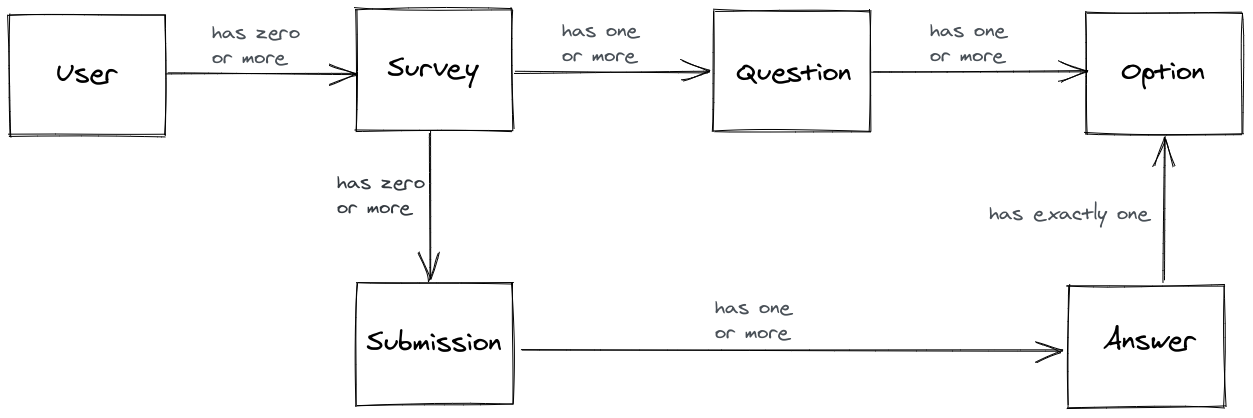
I explain how I came up with this particular data model in this appendix page .
You don't need to get too formal or technical with these diagrams. They're just a starting point, not a perfect, final description of how your app will work. Also, the data model which I made isn't the only possible one for this app. Feel free to make your own and do it differently.
Webpage wireframes
Now we have an idea of how our users will interact with the app and we know how we will structure our data. Next, we design our user interfaces. I suggest you create a rough wireframe that describes the user interface for each webpage. Creating wireframes for webpages is a good idea for two reasons:
- Wireframing allows you to quickly explore different page designs and it forces you to think about how your app needs to work
- It's much easier to write HTML and CSS for pages where you already have a simple design to work from
You can use a free wireframing tool like Exalidraw or Wireflow for these diagrams. Keep in mind that this project doesn't use JavaScript, so you can't get too fancy with custom interactions. You will need to use HTML forms to POST data to the backend.
You can create your own wireframes or you can use the ones that I've already created, which are all listed in this appendix page with some additional notes for each page:
- Starting the survey
- Answering the survey
- Survey submitted
- Landing page
- Signing up
- Logging in
- Survey list
- Create a survey
- Edit a survey
- Add questions to a survey
- Add options to a survey question
- Survey details
General advice
Now with some user journeys, a data model and a set of wireframes, you should be ready to start building your Django app. This project blueprint will help you get started, but there is still a lot of work for you to do if you want to build this app. You still need to:
- decide on a URL schema
- create models to represent the data
- create forms to validate the user-submitted data
- write HTML templates to build each page
- add views to bind everything together
There's about 12 views, 12 templates, 5 forms and 5 models to write. Given all this work, it's really important that you focus and keep the scope of this project narrow. Keep everything simple . Don't use any JavaScript and write as little CSS as possible. Use a CSS framework like Boostrap or Semantic UI if you want it to look nice. Get something simple working first , and then you can make it fancy later. If you don't focus, you could spend weeks or months on this project before it's done.
As a specific example, consider the user authentication feature. In this app, your users can log in or sign up. To really make the auth system "complete", you could also add a log out button, a password reset page, and an email validation feature. I think you should skip these features for now though, and get the core functionality working first.
Software projects are never finished, and you can improve this app again and again even after you are "done". Don't try to make it perfect, just finish it.
Next steps
I hope you find this blueprint project and design guide helpful. If you actually end up building this, send me an email! I'd love to see it. If you like this post and you want to read some more stuff I've written about Django, check out:
- A beginner's guide to Django deployment
- How to read the Django documentation
- How to make your Django project easy to move and share
- How to polish your GitHub projects when you're looking for a job
- Tips for debugging with Django
You can also subscribe to my mailing list below for emails when I post new articles.
Django project blueprint: data model
Published: 2020-10-03T12:00:00+10:00
Updated: 2020-10-03T12:00:00+10:00
UTC: 2020-10-03 02:00:00+00:00
URL: https://mattsegal.dev/django-survey-project-data-model.htmlThis post is an appendix to my post on designing a Django project. In this page I explain why I chose to use this data model: I created this data model by looking at the user journeys and thinking about what data I would need to make them work. Here's …Content Preview
This post is an appendix to my post on designing a Django project . In this page I explain why I chose to use this data model:
I created this data model by looking at the user journeys and thinking about what data I would need to make them work. Here's the thought process I used. First I thought about the data that I need to define everything about a "survey" in the app. I decided that I would need:
- a Survey model to represent each survey; and then
- a link between each Survey and a User , since we need to restrict survey access to only the user who owns it
- a Question model for each question on the survey. Each survey needs to have one or more questions, so we can't hardcode questions as fields on the Survey model, so we must create a new Question model which knows which survey owns it
- each Question has one re more multi-choice answer options, so we must create an Option model
Next, I thought about how we would record a survey taker answering the questions. We would need:
- a Submission model to represent each survey taker's submission
- a link between Submission and Survey , so each submission can know which survey it belongs to
- the Answers to each question, where the answer is for a particular Option
Django project blueprint: wireframes
Published: 2020-10-03T12:00:00+10:00
Updated: 2020-10-03T12:00:00+10:00
UTC: 2020-10-03 02:00:00+00:00
URL: https://mattsegal.dev/django-survey-project-wireframes.htmlThis post is an appendix to my post on designing a Django project. This page shows all the wireframes for the app, with some additional notes for each page. Page designs for the user who answers the survey This section covers the pages required for the "survey taker" user journey …Content Preview
This post is an appendix to my post on designing a Django project . This page shows all the wireframes for the app, with some additional notes for each page.
Page designs for the user who answers the survey
This section covers the pages required for the "survey taker" user journey:
Taken literally, this journey suggests that we should build ~3 pages.
Starting the survey
The person taking the survey should start on a "landing" page, where we explain what's going on and invite them to take the survey.

The "start survey" button can just be a link to the next page.
Answering the survey
Next, we need a page for the survey taker to actually answer the questions.

You will need to render all of the questions on the survey inside an HTML form. The "submit" button should trigger a POST request to the backend.
If you want to answer multiple questions on one page, then you will need to use a more advanced feature of Django: a formset. I found this blog post and this other one useful for creating my formsets, along with the official Django docs on formsets .
Alternatively, you could have one page per question, which would mean splitting up this single page across multiple pages, but it would make your Django forms simpler.
Survey submitted
Once the user submits their answers for the survey, they should then receive confirmation that everything worked so that they don't try to submit the survey again or get frustrated. When they click "submit", let's take them to a "thank you" page.

That's it for the survey taker. Next let's look at the survey creator pages.
Page designs for the user who creates the survey
Here's the "survey creator" user journey again.
The correspondence between this journey and the pages won't be exact, but it'll be pretty close.
Landing page
We should start the user's experience with a landing page, where we will explain the app to the user and invite them to log in with a call to action button.

The button can just be a link to the login or signup page. If you're not sure what to write for the landing page, check out this article .
Signing up
We need a signup page for new users to create accounts.
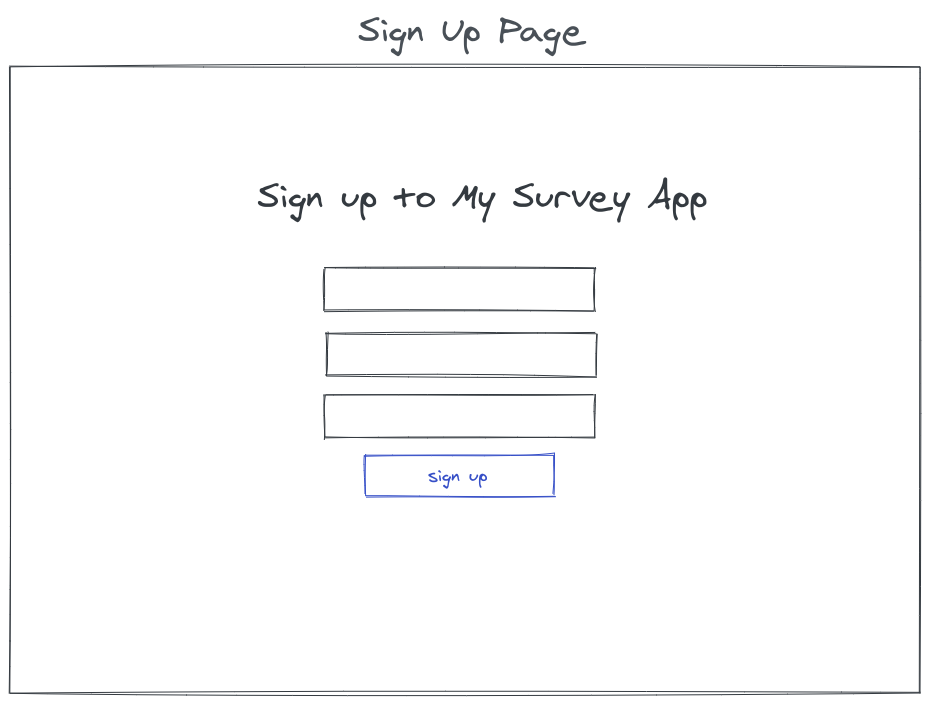
There should also be a link to the log in page from the signup page, just in case a user who alread has an account gets lost. This blog post is a good guide for how to create a sign up view in Django.
Logging in
We also need a login page for returning users.

Use a LoginView for the log in view. More details on this view class at CCBV . There should be a link to the signup page from the login page.
Survey list
Where do users go after they log in? There are two viable options. You could send them straight to a "create survey" page, or you could send them to a "list" page, where they can see all their surveys. I chose the list page option, becuase I think it's less disorienting for the user and less complicated to implement.

For this page to work you'll need to grab all of the Survey objects that the user has created and list them in the HTML template.
In this wireframe, a survey can be either in an "active" or "editing" state, where if the survey is "active" then the user can view the results and if it is "editing" then they can add more questions.
This is the first page we've seen that is specific to one user. You need to implement authorization so that one user cannot spy on another user's surveys.
Create survey
On this page a user types in the name of a new survey, and presses "create survey" to create a new survey with that name.

This can be implented with a HTML form which sends a POST request to a Django view. You will need a Django Form to validate the data.
I have broken the "survey creation" pages (this page an the ones after it) up into many stages to try and make the Django views simple. This is not the only way to design pages for the "survey creation" feature, and you can do this differently, with fewer pages, if you like.
You will need to think about authorization for this view, and all the other views where the user can change data. We don't want users to be able to change the data of other users. You will need to write some code in your views to check that the user who is changing some data is also the user who owns it.
Edit survey
On this page a user can add questions to the survey they just created.

Clicking "add another question" takes the user to a seperate "add question" page. The user can add as many questions as they like until they are ready to make the survey "active".
When they click "start survey", the button should use an HTML form to send a POST request to a Django view which moves the survey from "edit mode" to "active mode".
Add a question to survey
On this page the user can create a new question for the survey. They type in the prompt for the question, like "what is your favourite colour?" and then click "add question" to create the new question.

Add options to a new question
On this page the user can add multiple options to a question that they just created.

Survey details
This is the final page that a user who is running a survey wants to look at. They will view this dashboard to check the answers of a survey that they've created and sent out.
This page tells the user how many people have answered their survey and what percentage of people chose each answer.

You will need to do a bit of maths in the view for this page. You can calculate the percentages using some fancy database queries using aggregation . Otherwise you can query the Survey model, its Questions and all of its Submissions and their Answers. Once you have pulled all the data you need into memory, then you can write a for loop or something to do the percentage calculations. I recommend using
filterandcountin your queries.When thinking about database queries for this view, you should imagine that you have thousands of surveys and each survey has dozens of questions and hundreds of answers.
You will need to implement authorization on in this page's view so that only the user who created the survey can view the results.
How to use both camelCase and snake_case in your frontend and backend
Published: 2020-09-24T12:00:00+10:00
Updated: 2020-09-24T12:00:00+10:00
UTC: 2020-09-24 02:00:00+00:00
URL: https://mattsegal.dev/camel-and-snake-case.htmlPython uses snake_case variable naming while JavaScript favours camelCase. When you're buiding an web API with Django then you'll be using both langauges together. How do you keep your styles consistent? You could just use one style for both your frontend and backend, but it looks ugly. Perhaps this is …Content Preview
Python uses
snake_casevariable naming while JavaScript favourscamelCase. When you're buiding an web API with Django then you'll be using both langauges together. How do you keep your styles consistent? You could just use one style for both your frontend and backend, but it looks ugly. Perhaps this is not the biggest problem in your life right now, but it's a nice one to solve and it's easy to fix.In this post I'll show you can use snake case on the backend and camel case on the frontend, with the help of the the
camelizeandsnakeizeJS libraries.The problem: out of place naming styles
Let's say you've got some Django code that presents an API for a
Personmodel:# Inside your Django app. # The data model class Person(models.Model): full_name = models.CharField(max_length=64) biggest_problem = models.CharField(max_length=128) # The serializer class PersonSerializer(serializers.ModelSerializer): class Meta: model = Person fields = ["full_name", "biggest_problem"] # The API view class PersonViewSet(viewsets.ModelViewSet): serializer_class = PersonSerializer queryset = Person.objects.all()And you've also got some JavaScript code that talks to this view:
// Inside your frontend JavaScript codebase.
const createPerson = (personData) => {
    requestData = {
      method: 'POST',
      body: JSON.stringify(personData),
      // etc.
    }
    const response = await fetch('/api/person/', requestData)
    return await resp.json()
}
The problem occurs when you try to use the data fetched from the backend and it is using the wrong variable naming style:
// Inside your frontend JavaScript codebase.
const personData = {
    full_name: 'Matt Segal',
    biggest_problem: 'My pants are too red',
}
const person = createPerson(personData).then(console.log)
// {
//   full_name: 'Matt Segal',
//   biggest_problem: 'My pants are too red',
// }
This usage of snake case in JavaScript is a little yucky and it's a quick fix.
The solution: install more JavaScript libraries
Hint: the solution is always to add more dependencies.
To fix this we'll install snakeize and camelize using npm or yarn:
yarn add snakeize camelizeThen you just need to include it in your frontend's API functions:
// Inside your frontend JavaScript codebase.
import camelize from 'camelize'
import snakeize from 'snakeize'

const createPerson = (personData) => {
    requestData = {
      method: 'POST',
      body: JSON.stringify(snakeize(personData)),
      // etc.
    }
    const response = await fetch('/api/person/', requestData)
    const responseData = await resp.json()
    return camelize(responseData)
}
Now we can use
camelCasein the frontend and it will automatically be transformed tosnake_casebefore it gets sent to the backend:// Inside your frontend JavaScript codebase. const personData = { fullName: 'Matt Segal', biggestProblem: 'I ate too much fish', } const person = createPerson(personData).then(console.log) // { // fullName: 'Matt Segal', // biggestProblem: 'I ate too much fish', // }That's it! Hope this helps your eyes a little.
A breakdown of how NGINX is configured with Django
Published: 2020-07-31T12:00:00+10:00
Updated: 2020-07-31T12:00:00+10:00
UTC: 2020-07-31 02:00:00+00:00
URL: https://mattsegal.dev/nginx-django-reverse-proxy-config.htmlYou are trying to deploy your Django web app to the internet. You have never done this before, so you follow a guide like this one. The guide gives you many instructions, which includes installing and configuring an "NGINX reverse proxy". At some point you mutter to yourself: What-the-hell is …Content Preview
You are trying to deploy your Django web app to the internet. You have never done this before, so you follow a guide like this one . The guide gives you many instructions, which includes installing and configuring an "NGINX reverse proxy". At some point you mutter to yourself:
What-the-hell is an NGINX? Eh, whatever, let's keep reading.
You will have to copy-paste some weird gobbledygook into a file, which looks like this:
# NGINX site config file at /etc/nginx/sites-available/myproject
server {
    listen 80;
    server_name foo.com;
    location / {
        proxy_pass http://127.0.0.1:8000;
        proxy_set_header Host $host;
        proxy_set_header X-Forwarded-For $proxy_add_x_forwarded_for;
        proxy_set_header X-Forwarded-Proto $scheme;
        proxy_redirect http://127.0.0.1:8000 http://foo.com;
    }
    location /static/ {
        root /home/myuser/myproject;
    }
}
What is all this stuff? What is it supposed to do?
Most people do their first Django deployment as a learning exercise. You want to understand what you are doing, so that you can fix problems if you get stuck and so you don't need to rely on guides in the future. In this post I'll break down the elements of this NGINX config and how it ties in with Django, so that you can confidently debug, update and extend it in the future.
What is this file supposed to achieve?
This scary-looking config file sets up NGINX so that it acts as the entrypoint to your Django application. Explaining why you might choose to use NGINX is a topic too expansive for this post, so I'm just going to stick to explaining how it works.
NGINX is completely separate program to your Django app. It is running inside its own process, while Django is running inside a WSGI server process, such as Gunicorn. In this post I will sometimes refer to Gunicorn and Django interchangeably.

All HTTP requests that hit your Django app have to go through NGINX first.

NGINX listens for incoming HTTP requests on port 80 and HTTPS requests on port 443. When a new request comes in:
- NGINX looks at the request, checks some rules, and sends it on to your WSGI server, which is usually listening on localhost, port 8000
- Your Django app will process the request and eventually produce a response
- Your WSGI server will send the response back to NGINX; and then
- NGINX will send the response back out to the original requesting client
You can also configure NGINX to serve static files, like images, directly from the filesystem, so that requests for these assets don't need to go through Django

You can adjust the rules in NGINX so that it selectively routes requests to multiple app servers. You could, for example, run a Wordpress site and a Django app from the same server:

Now that you have a general idea of what NGINX is supposed to do, let's go over the config file that makes this happen.
Server block
The top level block in the NGINX config file is the virtual server . The main utility of virtual servers is that they allow you to sort incoming requests based on the port and hostname. Let's start by looking at a basic server block:
server {
    # Listen on port 80 for incoming requests.
    listen 80;
    # Return status code 200 with text "Hello World".
    return 200 'Hello World';
}
Let me show you some example requests. Say we're on the same server as NGINX and we send a GET request using the command line tool
curl.curl localhost # Hello WorldThis
curlcommand sends the following HTTP request to localhost, port 80:GET / HTTP/1.1 Host: localhost User-Agent: curl/7.58.0We will get the following HTTP response back from NGINX, with a 200 OK status code and "Hello World" in the body:
HTTP/1.1 200 OK Content-Type: application/octet-stream Content-Length: 11 Hello WorldWe can also request some random path and we get the same result:
curl localhost/some/path/on/website # Hello WorldWith
curlsending this HTTP request:GET /some/path/on/website HTTP/1.1 Host: localhost User-Agent: curl/7.58.0and we get back the same response as before:
HTTP/1.1 200 OK Content-Type: application/octet-stream Content-Length: 11 Hello WorldSimple so far, but not very interesting, let's start to mix it up with multiple server blocks.
Multiple virtual servers
You can add more than one virtual server in NGINX:
# All requests to foo.com return a 200 OK status code server { listen 80; server_name foo.com; return 200 'Welcome to foo.com!'; } # Any other requests get a 404 Not Found page server { listen 80 default_server; return 404; }NGINX uses the
server_namedirective to check theHostheader of incoming requests and match the request to a virtual server. Your web browser will usually set this header automatically for you. You can set up a particular virtual server to be the default choice (default_server) if no other ones match the incoming request. You can use this feature to host multiple Django apps on a single server. All you need to do is set up your DNS to get multiple domain names to point to a single server, and then add a virtual server for each Django app.Let's test out the config above. If send a request to
localhost, we'll get a 404 status code from the default server:curl localhost # <html> # <head><title>404 Not Found</title></head> # ... # </html>This is the request that gets sent:
GET / HTTP/1.1 Host: localhost User-Agent: curl/7.58.0Our request was matched to the default server because the
Hostheader we sent didn't matchfoo.com. Let's try setting theHostheader tofoo.com:curl localhost --header "Host: foo.com" # Welcome to foo.com!This is the request that gets sent:
GET / HTTP/1.1
Host: foo.com
User-Agent: curl/7.58.0
Now are directed to the
foo.comvirtual server because we sent the correctHostheader in our request. Finally, we can see that setting a randomHostheader sends us to the default server:curl localhost --header "Host: fasfsadfs.com" # <html> # <head><title>404 Not Found</title></head> # ... # </html>There's more that you can do with virtual servers in NGINX, but what we've covered so far should be enough for you to understand their typical usage with Django.
Location blocks
Within a virtual server you can route the request based on the path.
server {
    listen 80;
    # Requests to the root path get a 200 OK response
    location / {
        return 200 'Cool!';
    }
    # Requests to /forbidden get 403 Forbidden response
    location /forbidden {
        return 403;
    }
}
Under this configuration, any requested path that matches
/forbiddenwill return a 403 Forbidden status code, and everything else will return Cool! Let's try it out:curl localhost # Cool! curl localhost/blah/blah/blah # Cool! curl localhost/forbidden # <html> # <head><title>403 Forbidden</title></head> # ... # </html> curl localhost/forbidden/blah/blah/blah # <html> # <head><title>403 Forbidden</title></head> # ... # </html>Now that we've covered
serverandlocationblocks it should be easier to make sense of some of the config that I showed you at the start of this post:server { listen 80; server_name foo.com; location / { # Do something... } location /static/ { # Do something... } }Next we'll dig into the connection between NGINX and our WSGI server.
Reverse proxy location
As mentioned earlier, NGINX acts as a reverse proxy for Django:
This reverse proxy setup is configured within this location block:
location / {
    proxy_pass http://127.0.0.1:8000;
    proxy_set_header Host $host;
    proxy_set_header X-Forwarded-For $proxy_add_x_forwarded_for;
    proxy_set_header X-Forwarded-Proto $scheme;
    proxy_redirect http://127.0.0.1:8000 http://foo.com;
}
In the next few sections I will break down the directives in this block so that you understand what is going on. You might also find the NGINX documentation on reverse proxies helpful for understanding this config.
Proxy pass
The
proxy_passdirective tells NGINX to send all requests for that location to the specified address. For example, if your WSGI server was running on localhost (which has IP 127.0.0.1), port 8000, then you would use this config:server { listen 80; location / { proxy_pass http://127.0.0.1:8000; } }You can also point
proxy_passat a Unix domain socket , with Gunicorn listening on that socket, which is very similar to using localhost except it doesn't use up a port number and it's a bit faster:server { listen 80; location / { proxy_pass http://unix:/home/user/my-socket-file.sock; } }Seems simple enough - you just point NGINX at your WSGI server, so... what was all that other crap? Why do you set
proxy_set_headerandproxy_redirect? That's what we'll discuss next.NGINX is lying to you
As a reverse proxy, NGINX will receive HTTP requests from clients and then send those requests to our Gunicorn WSGI server. The problem is that NGINX hides information from our WSGI server. The HTTP request that Gunicorn receives is not the same as the one that NGINX received from the client.

Let me give you an example, which is illustrated above. You, the client, have an IP of
12.34.56.78and you go tohttps://foo.comin your web browser and try to load the page. The request hits the server on port 443 and is read by NGINX. At this stage, NGINX knows that:
- the protocol is HTTPS
- the client has an IP address of
12.34.56.78- the request is for the host
foo.comNGINX then sends the request onwards to Gunicorn. When Gunicorn receives this request, it thinks:
- the protocol is HTTP, not HTTPS, because the connection between NGINX and Gunicorn is not encrypted
- the client has the IP address
127.0.0.1, because that's the address NGINX is using- the host is
127.0.0.1:8000because NGINX said soSome of this lost information is useful, and we want to force NGINX to send it to our WSGI server. That's what these lines are for:
proxy_set_header Host $host;
proxy_set_header X-Forwarded-For $proxy_add_x_forwarded_for;
proxy_set_header X-Forwarded-Proto $scheme;
Next, I will explain each line in more detail.
Setting the Host header
Django would like to know the value of the
Hostheader so that various bits of the framework, like ALLOWED_HOSTS or HttpRequest.get_host can work. The problem is that NGINX does not pass theHostheader to proxied servers by default.For example, when I'm using
proxy_passlike I did in the previous section, and I send a request with theHostheader to NGINX like this:curl localhost --header "Host: foo.com"Then NGINX receives the HTTP request, which looks like this:
GET / HTTP/1.1
Host: foo.com
User-Agent: curl/7.58.0
and then NGINX sends a HTTP request to your WSGI server, like this:
GET / HTTP/1.0
Host: 127.0.0.1:8000
User-Agent: curl/7.58.0
Notice something? That rat-fuck-excuse-for-a-webserver sent different headers to our WSGI server! I'm sure there is a good reason for this behaviour, but it's not what we want because it breaks some Django functionality. We can fix this by using the
proxy_set_headeras follows:server { listen 80; location / { proxy_pass http://127.0.0.1:8000; # Ensure original Host header is forwarded to our Django app. proxy_set_header Host $host; } }Now NGINX will send the desired headers to Django:
GET / HTTP/1.0
Host: foo.com
User-Agent: curl/7.58.0
Gunicorn will read this
Hostheader and provide it to you in your Django views via therequest.METAobject:# views.py def my_view(request): host = request.META['HTTP_HOST'] print(host) # Eg. "foo.com" return HttpResponse(f"Got host {host}")Setting the X-Forwarded-Whatever headers
The
Hostheader isn't the only useful information that NGINX does not pass to Gunicorn. We would also like the protocol and source IP address of the client request to be passed to our WSGI server. We achieve this with these two lines:proxy_set_header X-Forwarded-For $proxy_add_x_forwarded_for; proxy_set_header X-Forwarded-Proto $scheme;I just want to point out that these header names are completely arbitrary. You can send any header you want with the format
X-Insert-Words-Hereto Gunicorn and it will parse it and send it onwards to Django. For example, you could set the header to beX-Matt-Is-Coolas follows:proxy_set_header X-Matt-Is-Cool 'it is true';Now NGINX will include this header with every request it sends to Gunicorn. When Gunicorn parses the HTTP request it reads any header with the format
X-Insert-Words-Hereinto a Python dictionary, which ends up in theHttpRequestobject that Django passes to your view. So in this case,X-Matt-Is-Coolgets turned into the keyHTTP_X_MATT_IS_COOLin your request object. For example:# views.py def my_view(request): # Prints value of X-Matt-Is-Cool header included by NGINX print(request.META["HTTP_X_MATT_IS_COOL"]) # it is true return HttpResponse("Hello World")This means you can add in whatever custom headers you like to your NGINX config, but for now let's focus on getting the protocol and client IP address to your Django app.
Setting the X-Forwarded-Proto header
Django sometimes needs to know whether the incoming request is secure (HTTPS) or not (HTTP). For example, some features of the SecurityMiddleware class checks for HTTPS. The problem is, of course, that NGINX is always telling Django that the client's request to the sever is not secure, even when it is. This problem always crops up for me when I'm implementing pagination, and the "next" URL has
http://instead ofhttps://like it should.Our fix for this is to put the client request protocol into a header called
X-Forwarded-Proto:proxy_set_header X-Forwarded-Proto $scheme;Then you need to set up the SECURE_PROXY_SSL_HEADER setting to read this header in your
settings.pyfile:SECURE_PROXY_SSL_HEADER = ('HTTP_X_FORWARDED_PROTO', 'https')Now Django can tell the difference between incoming HTTP requests and HTTPS requests.
Setting the X-Forwarded-For header
Now let's talk about determining the client's IP address. As mentioned before, NGINX will always lie to you and say that the client IP address is
127.0.0.1. If you don't care about client IP addresses, then you don't care about this header. You don't need to set it if you don't want to. Knowing the client IP might be useful sometimes. For example, if you want to guess at where they are located, or if you are building one of those What's My IP? websites:

You can set the X-Forwarded-For header to tell Gunicorn the original IP address of the client:
proxy_set_header X-Forwarded-For $proxy_add_x_forwarded_for;As described earlier, the header
X-Forwarded-Forgets turned into the keyHTTP_X_FORWARDED_FORin your request object. For example:# views.py def my_view(request): # Prints client IP address: "12.34.56.78" print(request.META["HTTP_X_FORWARDED_FOR"]) # Prints NGINX IP address: "127.0.0.1", ie. localhost print(request.META["REMOTE_ADDR"]) return HttpResponse("Hello World")Does this seem kind of underwhelming? Maybe a little pointless? As I said before, if you don't care about client IP addresses, then this header isn't for you.
Proxy redirect
Let's cover the final line of the Django reverse proxy config:
proxy_redirect. The NGINX docs for this directive are here .proxy_redirect http://127.0.0.1:8000 http://foo.com;This directive is used when handling redirects that are issued by Django. For example, you might have a webpage that used to live at path
old/page/, but you moved it tonew/page/. You want to send any user that asked forold/page/tonew/page/. To achieve this you could write a Django view like this:# view.py def redirect_view(request): return HttpResponseRedirect("new/page/")When a user asks for
old/page/, this view will send them a HTTP response with a 302 redirect status code:HTTP/1.1 302 Found Location: new/page/Your web browser will follow the
Locationresponse header to the new page. A problem occurs when your Django app includes the WSGI server's address and port in theLocationheader:HTTP/1.1 302 Found Location: http://127.0.0.1:8000/new/page/This is a problem because the client's browser will try to go to that address, and it will fail because the WSGI server is not on the same server as the client.
Here's the thing: I have never actually seen this happen, and I'm having trouble thinking of a common scenario where this would happen. Send me an email if you know where this issue crops up. Anyway, using
proxy_redirecthelps in the hypothetical case where Django does include the WSGI address in a redirect'sLocationheader.The directive rewrites the header using the syntax:
proxy_redirect redirect replacementSo, for example, if there was a redirect response like this:
HTTP/1.1 302 Found Location: http://127.0.0.1:8000/new/page/and you set up your
proxy_redirectlike thisproxy_redirect http://127.0.0.1:8000 https://foo.com/blog/;then the outgoing response would be re-written to this:
HTTP/1.1 302 Found
Location: https://foo.com/blog/new/page/
I guess this directive might be useful in some situations? I'm not really sure.
Static block
Earlier I mentioned that NGINX can serve static files directly from the filesystem.
This is a good idea because NGINX is much more efficient at doing this than your WSGI server will be. It means that your server will be able to respond faster to static file request and handle more traffic. You can use this technique to put all of your Django app's static files into a folder like this:
/home/myuser/myproject
└─ static               Your static files
    ├─ styles.css       CSS file
    ├─ main.js          JavaScript file
    └─ cat.png          A picture of a cat
Then you can set the
/static/location to serve files directly from this folder:location /static/ { root /home/myuser/myproject; }Now a request to
http://localhost/static/cat.pngwill cause NGINX to read from/home/myuser/myproject/static/cat.png, without sending a request to the WSGI server.Next steps
Now you know what every line of your Django app's NGINX config is doing. Hopefully you will be able to use this knowledge to debug issues faster and customise your existing setup. If you have specific questions that weren't covered by this post, I recommend looking at the official NGINX documentation here .
If you liked this post then you might also like reading some other stuff I've written:
- A simple guide to deploying a Django app
- An overview of Django server setups
- How to manage logs with Django, Gunicorn and NGINX
- A mini rant on Django performance: Is Django too slow?
- A little series on Postgres database backups 1 , 2 , 3
If you found some of the stuff about HTTP in this post confusing, I heartily recommend checking out Brian Will's "The Internet" videos to learn more about what HTTP, TCP, and ports are: part 1 , part 2 , part 3 , part 4 .
And, of course, if you want to get updates on any new posts I write, you can subscribe to my blog's mailing list below.
How to manage logs with Django, Gunicorn and NGINX
Published: 2020-07-26T12:00:00+10:00
Updated: 2020-07-26T12:00:00+10:00
UTC: 2020-07-26 02:00:00+00:00
URL: https://mattsegal.dev/django-gunicorn-nginx-logging.htmlSo you want to run a Django app using NGINX and Gunicorn. Did you notice that all three of these tools have logging options? You can configure Django logging, Gunicorn logging, and NGINX logging. You just want to see what's happening in your Django app so that you can fix …Content Preview
So you want to run a Django app using NGINX and Gunicorn. Did you notice that all three of these tools have logging options? You can configure Django logging , Gunicorn logging , and NGINX logging .
You just want to see what's happening in your Django app so that you can fix bugs. How are you supposed to set these logs up? What are they all for? In this post I'll give you a brief overview of your logging options with Django, Gunicorn and NGINX, so that you don't feel so confused and overwhelmed.
I've previously written a short guide on setting up file logging with Django if you just want quick instructions on what to do.
NGINX logging
NGINX allows you to set up two log files , access_log and error_log. I usually configure them like this in my
/etc/nginx/nginx.conffile:access_log /var/log/nginx/access.log; error_log /var/log/nginx/error.log;NGINX access logs
The NGINX access_log is a file which records of all the requests that are coming in to your server via NGINX. It looks like this:
123.45.67.89 - - [26/Jul/2020:04:55:28 +0000] "GET / HTTP/1.1" 200 906 "-" "Mozilla/5.0 ... Chrome/98 Safari/537.4"
123.45.67.89 - - [26/Jul/2020:05:06:29 +0000] "GET / HTTP/1.1" 200 904 "-" "Mozilla/5.0 ... Chrome/98 Safari/537.4"
123.45.67.89 - - [26/Jul/2020:05:10:33 +0000] "GET / HTTP/1.1" 200 904 "-" "Mozilla/5.0 ... Chrome/98 Safari/537.4"
123.45.67.89 - - [26/Jul/2020:05:21:33 +0000] "GET / HTTP/1.1" 200 910 "-" "Mozilla/5.0 ... Chrome/98 Safari/537.4"
123.45.67.89 - - [26/Jul/2020:05:25:37 +0000] "GET / HTTP/1.1" 200 907 "-" "Mozilla/5.0 ... Chrome/98 Safari/537.4"
There's a new line for each request that comes in. Breaking a single like down:
123.45.67.89 - - [26/Jul/2020:04:55:28 +0000] "GET / HTTP/1.1" 200 906 "-" "Mozilla/5.0 ... Chrome/98 Safari/537.4"From this line can see:
- the IP is 123.45.67.89
- the request arrived at 26/Jul/2020:04:55:28 +0000
- the HTTP request method was GET
- the path requested was /
- the version of HTTP used was HTTP/1.1
- the status code returned by the server was "200" (ie. OK )
- the requester's user agent was "Mozilla/5.0 ... Chrome/98 Safari/537.4"
This is very useful information to have when debugging issues in production, and I recommend you enable these access logs in NGINX. You can quickly view these logs using
tail:# View last 5 log lines tail -n 5 /var/log/nginx/access.log # View last 5 log lines and watch for new ones tail -n 5 -f /var/log/nginx/access.logIn addition to legitimate requests to your web application, NGINX will also log all of the spam, crawlers, and hacking attempts that hit your webserver. If you have your server accessible via the internet, then you will get garbage requests like this in your access log:
195.54.160.21 - - [26/Jul/2020:03:58:25 +0000] "POST /vendor/phpunit/phpunit/src/Util/PHP/eval-stdin.php HTTP/1.1" 404 564 "-" "Mozilla/5.0 (Windows NT 10.0; Win64; x64) AppleWebKit/537.36 (KHTML, like Gecko) Chrome/78.0.3904.108 Safari/537.36"I assume this is a bot trying to hack an old version of PHP (which I do not run on this server).
NGINX error logs
NGINX also logs errors to error_log, which can occur when you've messed up your configuration somehow, or if your Gunicorn server is unresponsive. This file is also useful for debugging so I recommend you include it as well in your NGINX config. You get error messages like this:
2020/07/25 08:14:57 [error] 32115#32115: *44242 connect() failed (111: Connection refused) while connecting to upstream, client: 11.22.33.44, server: www.example.com, request: "GET /admin/ HTTP/1.1", upstream: "http://127.0.0.1:8000/admin/", host: "clerk.anikalegal.com", referrer: "https://www.example.com/admin/"Gunicorn logging
Gunicorn has two main logfiles that it writes, the error log and the access log. You can configure the log settings through the command line or a config file . I recommend using the config file because it's easier to read.
Gunicorn access logs
The Gunicorn access log is very similar to the NGINX access log, it records all the requests coming in to the Gunicorn server:
10.255.0.2 - - [26/Jul/2020:05:10:33 +0000] "GET /foo/ HTTP/1.0" 200 1938 "-" "Mozilla/5.0 ... (StatusCake)"
10.255.0.2 - - [26/Jul/2020:05:25:37 +0000] "GET /foo/ HTTP/1.0" 200 1938 "-" "Mozilla/5.0 ... (StatusCake)"
10.255.0.2 - - [26/Jul/2020:05:40:42 +0000] "GET /foo/ HTTP/1.0" 200 1938 "-" "Mozilla/5.0 ... (StatusCake)"
I think you may as well enable this so that you can debug issues where you're not sure if NGINX is sending requests to Gunicorn properly.
Gunicorn error logs
The Gunicorn error log is a little bit more complicated. By default it contains information about what the Gunicorn server is doing, like starting up and shutting down:
[2020-04-06 06:17:23 +0000] [53] [INFO] Starting gunicorn 20.0.4
[2020-04-06 06:17:23 +0000] [53] [INFO] Listening at: http://0.0.0.0:8000 (53)
[2020-04-06 06:17:23 +0000] [53] [INFO] Using worker: sync
[2020-04-06 06:17:23 +0000] [56] [INFO] Booting worker with pid: 56
[2020-04-06 06:17:23 +0000] [58] [INFO] Booting worker with pid: 58
You can change how verbose these messages are using the " loglevel " setting, which can be set to log more info using the "debug" level, or only errors, using the "error" level, etc.
Finally, and importantly there is the " capture_output " logging setting, which is a boolean flag. This setting will take any stdout/stderr, which is to say print statements, log messages, warnings and errors from your Django app, and log then to the Gunicorn error file. I like to keep this setting enabled so that I can catch any random output that is falling through from Django to Gunicorn. Here is an example Gunicorn config file with logging set up:
# gunicorn.conf.py
# Non logging stuff
bind = "0.0.0.0:80"
workers = 3
# Access log - records incoming HTTP requests
accesslog = "/var/log/gunicorn.access.log"
# Error log - records Gunicorn server goings-on
errorlog = "/var/log/gunicorn.error.log"
# Whether to send Django output to the error log
capture_output = True
# How verbose the Gunicorn error logs should be
loglevel = "info"
You can run Gunicorn using config like this as follows:
gunicorn myapp.wsgi:application -c /some/folder/gunicorn.conf.pyDjango logging
Django logging refers to the output of your Django application. The kind of messages you see printed by
runserverin development. Stuff like this:Sending Thing<b5d1854b-7efc-4c67-9e9b-a956c10e5b86]> to Google API Google API called failed: {'error_description': 'You failed hahaha'} Traceback (most recent call last): File "/app/google/api/base.py", line 102, in _handle_json_response resp.raise_for_status() File "/usr/local/lib/python3.6/dist-packages/requests/models.py" raise HTTPError(http_error_msg, response=self) requests.exceptions.HTTPError: 403 Client Error Setting expired tokens to inactive: []I discuss Django logging in more detail in this guide , but I will give you a brief summary here. Django uses the same conventions as Python's standard library logging module, which is kind of a pain to learn, but valuable to know. The Django docs provide a nice overview of logging config here .
I think you have two viable options for your Django logging:
- Set up Django to log everything to stdout/stderr using the
StreamHandlerand capture the output using Gunicorn via the capture_output option, so that your Django logs end up in the Gunicorn error logfile- Set up Django to log to a file using
FileHandlerso you can keep your Django and Gunicorn logs separateI personally prefer option #2, but you whatever makes you happy.
Next steps
I encourage you to set up the logging described in this post, so that you don't waste hours trying to figure out what is causing bugs in production. I also recommend that you configure error alerting with Django, with Sentry being a strong choice.
Finally, if you're having other difficulties getting your Django app onto the internet, then check out my guide on Django deployment
How to make your Django project easy to move and share
Published: 2020-07-24T12:00:00+10:00
Updated: 2020-07-24T12:00:00+10:00
UTC: 2020-07-24 02:00:00+00:00
URL: https://mattsegal.dev/django-portable-setup.htmlYou need your Django project to be portable. It should be quick and easy to start it up on a new laptop. If it isn't portable, then your project is trapped on your machine. If it gets deleted or corrupted, then you've lost all your work! This issue comes up …Content Preview
You need your Django project to be portable. It should be quick and easy to start it up on a new laptop. If it isn't portable, then your project is trapped on your machine. If it gets deleted or corrupted, then you've lost all your work! This issue comes up in quite a few scenarios:
- you want to work on your code on multiple machines, like a laptop and a PC
- you want to get help from other people, and they want to try running your code
- you somehow screwed up your files very badly and you want to start from scratch
In the worst case, moving your Django project from one machine to another is a frustrating and tedious experience that involves dead ends, mystery bugs and cryptic error messages. It's the kind of thing that makes you want to scream at your computer.

In the best case, this process can take minutes. To achieve this best case, there are some steps that you'll need to take to make your development environment reproducable.
If you don't believe that this is achievable, then here's a quick example of me cloning and setting up an example project from scratch in under a minute:
In the rest of this post, I'll describe some practices that will help ensure that anyone with Python installed can quickly start working on your Django app.
Hosting your code
The best way to make your code portable between multiple computers is to put it online in a place that is publicly accessible, like GitHub . For example, this blog is hosted on GitHub so that I can access the latest copy of my writing from both my laptop and PC. Git, the version control tool, is widely used by software developers and allows you to efficently and reliably sync your code between multiple machines.
If you don't know Git and you plan to work with software in any capacity, then I strongly recommend that you start learning how to use it as soon as possible. There are plenty of books , online courses , lectures and more to help you learn. It's a pain in the ass to start with, no doubt about that, but it is definitely worth your time.
Tracking Python dependencies
Your project needs a bunch of 3rd party libraries to run. Obviously Django is required, plus maybe, Django Rest Framework, Boto3... Pillow, perhaps? It's hard to remember all the thing that you've
pip install'd, which is why it's really important to track all the libraries that your app needs, plus the versions, if those are important to you.There is a Python convention of tracking all your libraries in a requirements.txt file. Experienced Python devs immediately know what to do if they see a project with one of these files, so it's good if you stick with this practice. Installing all your requirements is as easy as:
pip install -r requirements.txtYou can also use
pip freezeto get an exact snapshot of your current Python packages and write them to a file:pip freeze > requirements.txtPython's
pippackage manager tries to install all of your dependencies in your global system Python folder by default, which is a really dumb idea, and it can cause issues where multiple Python projects are all installing libraries in the same place. When this happens you can get the wrong version installed, and you can no longer keep track of what dependencies you need to run your code, because they're are muddled together with the ones from all your other projects.The simplest way to fix this issue is to always use
virtualenvto isolate your Python dependencies. You can read a guide on that here . Usingvirtualenv, incidentally, also fixes the problem where you sometimes have to usesudoto pip install things on Linux. There are also other tools like pipenv or poetry that solve this problem as well. Use whatever you want, but it's a good idea to pick something , or you will shed many tears over Python dependency errors in the future.Repeatable setup instructions
Most simple Django projects have the exact same setup sequence. It's almost always roughly this:
# Create and activate virtual environment
virtualenv -p python3 env
. ./env/bin/activate

# Install Python dependencies
pip install -r requirements.txt

# Create SQLite databse, run migrations
cd myapp
./manage.py migrate

# Run Django dev server
./manage.py runserver
But for anything but the simplest projects there's usually a few extra steps that you'll need to get up and running. You need to write this shit down , preferably in your project's README, or you will forget . Even if you remember all these steps, your friends or colleagues will get stuck if they're not available.
You want to document all the instructions that someone needs to do to start running your project, with as much of it being explicit line of shell code as possible. Someone, who already has Python setup, should be able to clone your project onto their laptop with Git, follow your instructions, and then be able to run your Django app. The kind of extra things that you should document are:
- any extra scripts or management commands that the user must run
- any environment variables or files that the user needs to configure
- setup of required data in the Django admin or shell
- installing and running any 3rd party dependencies (eg. Docker, Postgres, Redis)
- building required front end web assets (eg. with Webpack)
- downloading essential data from the internet
Documenting the project setup isn't so important for small and simple projects, but it's also really easy to do (see script above). As your project becomes more complicated, the need to have replicable, explicit setup instructions becomes vital. If you do not maintain these instructions, then it will cost your hours of work when you forget to perform a vital step and your app doesn't work.
I've written before on how to write a nice README , which you might find useful. It's a little over the top for the purposes of just making your project portable and reproducible, but it should give you a general idea of what to cover.
Exclude unnecessary files
Your project should only contain source code, plus the minimum files required to run it. It should not not contain:
- Editor config files (.idea, .vscode)
- Database files (eg. SQLite)
- Random documents (.pdf, .xls)
- Non-essential media files (images, videos, audio)
- Bytecode (eg. *.pyc files)
- Build artifacts (eg. JavaScript and CSS from Webpack)
- Virtual environments (eg env/venv folders)
- JavaScript packages (node_modules)
- Log files (eg. *.log)
Some of these files are just clutter, but the SQLite databases and bytecode are particularly important to exclude.
SQLite files are a binary format, which Git does not store easily. Every change to the database causes Git to store a whole new copy. In addition, there's no way to "merge" databases with Git, meaning the data will get regularly overwritten by multiple users.
Python bytecode files, with the
.pycextension, can cause issues when shared between different machines, and are also just yucky to look at.You can exlude all of the files (and folders) I described above using a
.gitignorefile, in the root of your repository, with contents something like this:# General *.log *.pdf *.png # IDE .idea/ # PyCharm settings .vscode/ # VSCode settings # Python *.pyc env/ venv/ # Databases *.sqlite3 # JavaScript node_modules/ build/ # Webpack build outputIf you've already added these kinds of files to your project's Git history, then you'll need to delete them before ignoring them.
In addition, a common mistake by beginners is to exclude migration files from theit Git history. Django migration files belong in source control, so that you can ensure that everybody is running the same migrations on their data.
Automate common tasks
Although it's not strictly necessary, it's really nice to automate your project setup, so that you can get started by just running a few scripts. You can use bash scripts if you're a Linux or Mac user, PowerShell if you're using Windows, or even custom Django management commands. I also recommend checking out Invoke , which is a nice, cross-platform Python tool for running tasks ( example Invoke script ).
For example, in this demo repo , I added a script which fills the website with test data , which a user can quickly run via a management command:
./manage.py setup_test_dataIn other projects of mine, I also like to include a script that allows me to pull production data into my local database , which is also just one quick copy-paste to run.
./scripts/restore-prod.shNext steps
If you're working on a Django project right now, I recommend that you make sure that it's portable. It doesn't take long to do and you will save yourself hours and hours of this:

If multiple people are working on your Django project and you want to become even more productive as a team, then I also recommend that you begin writing tests and run them automatically with GitHub Actions .
If you've found moving your Django project around to be a frustrating experience, then you've probably also had trouble deploying it to the web as well. If that's the case, you might enjoy my guide on Django deployment , where I show you how to deploy Django to a DigitalOcean virtual machine.
Is Django too slow?
Published: 2020-07-24T12:00:00+10:00
Updated: 2020-07-24T12:00:00+10:00
UTC: 2020-07-24 02:00:00+00:00
URL: https://mattsegal.dev/is-django-too-slow.htmlDoes Django have "bad performance"? The framework is now 15 years old. Is it out of date? Mostly, no. I think that Django's performance is perfectly fine for most use-cases. In this post I'll review different aspects of Django's "performance" as a web framework and discuss how you can decide …Content Preview
Does Django have "bad performance"? The framework is now 15 years old. Is it out of date? Mostly, no. I think that Django's performance is perfectly fine for most use-cases. In this post I'll review different aspects of Django's "performance" as a web framework and discuss how you can decide whether it's a good fit for your web app.
Benchmarks
Let's start by digging into the ad-hoc web app performance benchmarks that you'll see pop up on Medium from time to time. To produce a graph like the one below, the author of this article sets up a server for each of the frameworks tested and sends them a bunch of HTTP requests. The benchmarking tool counts number of requests served per second by each framework.

I think these kind of measurements are irrelevant to practical web development. There are a few factors to consider:
- Is the metric being measured actually of interest? What's a good baseline? Is 100 requests per seconds good, or pathetic? Is 3000 requests/s practically better than 600 requests/s?
- Is the test representative of an actual web app workload? In this case, how often do we just send a static "hello world" JSON to users?
- Are we comparing apples to apples? For example, ExpressJS has 3 layers of relatively simple middleware enabled by default, wheras Django provides a larger stack of middleware features, "out of the box"
- Has each technology been set up correctly? Was Gunicorn, for example, run with an optimal number of workers?
This kind of naive comparsison is a little misleading and it's hard to use it to make practical decisions. So, what kind of performance metrics should you pay attention to when working on your Django app?
What do you mean by "performance"?
When you ask whether a framework or language is "slow", you should also ask "slow at what?" and "why do you care?". Fundamentally I think there are really only two performance goals: a good user experience and low hosting cost. How much money does running this website cost me, and do people enjoy using my website? For user experience I'm going to talk about two factors:
- Response time: how long people need to wait before their requests are fulfilled
- Concurrency: how many people can use your website at the same time
Cost, on the other hand, is typically proportional to compute resources: how many CPU cores and GB of RAM you will need to run your web app.
Response time in Django
Users don't like waiting for their page to load, so the less time they have to wait, the better. There are a few different metrics that you could use to measure page load speed, such as time to first byte or first contentful paint , both of which you can check with PageSpeed Insights . Faster responses don't benefit your user linearly though, not every 5x improvement in response is equally beneficial. A user getting a response in:
- 5s compared to 25s transforms the app from "broken" to "barely useable"
- 1s compared to 5s is a huge improvement
- 200ms instead of 1s is good
- 50ms instead of 200ms is nice, I guess, but many people wouldn't notice
- 10ms instead of 50ms is imperceptible, no one can tell the difference
So if someone says "this framework is 5x faster than that framework blah blah blah" it really doesn't mean anything without more context. The important question is: will your users notice? Will they care?
So, what makes a page load slowly in Django? The most common beginner mistakes are using too many database queries or making slow API calls to external services. I've written previously on how to find and fix slow database queries with Django Debug Toolbar and how to push slow API calls into offline tasks . There are many other ways to make your Django web pages or API endpoints load slowly, but if you avoid these two major pitfalls then you should be able to serve users with a time to first byte (TTFB) of 1000ms or less and provide a reasonable user experience.
When is Django's response time not fast enough?
Django isn't perfect for every use case, and sometimes it can't respond to queries fast enough. There are some aspects of Django that are hard to optimise without giving up much of the convenience that makes the framework attractive in the first place. You will always have to wait for Django when it is:
- running requests through middleware (on the way in and out)
- serializing and deserializing JSON strings
- building HTML strings from templates
- converting database queries into Python objects
- running garbage collection
All this stuff run really fast on modern computers, but it is still overhead. Most humans don't mind waiting roughly a second for their web page to load, but machines can be more impatient. If you are using Django to serve an API, where it is primarily computer programs talking to other computer programs, then it may not be fast enough for very high performance workloads. Some applications where you would consider ditching Django to shave off some latency are:
- a stock trading marketplace
- an global online advertisement serving network
- a low level infrastructure control API
If you find yourself sweating about an extra 100ms here or there, then maybe it's time to look at alternative web frameworks or languages. If the difference between a 600ms and 500ms TTFB doesn't mean much to you, then Django is totally fine.
Concurrency in Django
As we saw in the benchmark above, Django web apps can handle multiple requests at the same time. This is important if your application has multiple users. If too many people try to use your site at the same time, then it will eventually become overwhelmed, and they will be served errors or timeouts. In Australia, our government's household census website was famously overwhelmed when the entire country tried to access an online form in 2016. This effect is often called the " hug of death " and associated with small sites becoming popular on Reddit or Hacker News.
A Django app's WSGI server is the thing that handles multiple concurrent requests. I'm going to use Gunicorn , the WGSI server I know best, as a reference. Gunicorn can provide two kinds of concurrency: multiple child worker processes and multiple green threads per worker. If you don't know what a "process" or a "green thread" is then, whatever, suffice to say that you can set Gunicorn up to handle multiple requests at the same time.
What happens if a new request comes in and all the workers/threads are busy? I'm a little fuzzy on this, but I believe these extra requests get put in a queue, which is managed by Gunicorn. It appears that the default length of this queue is 2048 requests. So if the workers get overwhelmed, then the extra requests get put on the queue so that the workers can (hopefully) process them later. Typically NGINX will timeout any connections that have not received a response in 60s or less, so if a request gets put in the queue and doesn't get responded to in 60s, then the user will get a HTTP 504 "Gateway Timeout" error. If the queue gets full, then Gunicorn will start sending back errors for any overflowing requests.
It's interesting to note the relationship between request throughput and response time. If your WSGI server has 10 workers and each request takes 1000ms to complete, then you can only serve ~10 requests per second. If you optimise your Django code so that each request only takes 100ms to complete, then you can serve ~100 requests per second. Given this relationship, it's sometimes good to improve your app's response time even if users won't notice, because it will also improve the number of requests/second that you can serve.
There are some limitations to adding more Gunicorn workers, of course:
- Each additional worker eats up some RAM (which can be reduced if you use preload )
- Each additional worker/thread will eat some CPU when processing requests
- Each additional worker/thread will eat some extra CPU when listening to new requests, ie. the " thundering herd problem ", which is described in great detail here
So, really, the question of "how much concurrency can Django handle" is actually a question of "how much cloud compute can you afford":
- if you need to handle more requests, add more workers
- if you need more RAM, rent a virtual machine with more RAM
- if you have too many workers one server and are seeing "thundering herd" problems, then scale out your web servers ( more here )
This situation is, admittedly, not ideal, and it would be better if Gunicorn were more resource efficient. To be fair, though, this problem of scaling Django's concurrency doesn't really come up for most developers. If you're working at Instagram or Eventbrite , then sure, this is costing your company some serious money, but most developers don't run apps that operate at a scale where this is an issue.
How do you know if you can support enough concurrency with your current infrastructure? I recommend using Locust to load test your app with dozens, hundreds, or thousands of simultaneous users - whatever you think a realistic "bad case" scenario would look like. Ideally you would do this on a staging server that has a similar architecture and compute resources to your production enviroment. If your server becomes overwhelmed with requests and starts returning errors or timeouts, then you know you have concurrency issues. If all requests are gracefully served, then you're OK!
What if the traffic to your site is very "bursty" though, with large transient peaks, or you're afraid that you'll get the dreaded "hug of death"? In that case I recommend looking into " autoscaling " your servers, based on a metric like CPU usage.
If you're interested, you can read more on Gunicorn worker selection and how to configure Gunicorn to use more workers/threads . There's also this interesting case study on optimising Gunicorn for arxiv-vanity.com .
When is Django's concurrency not enough?
You will have hit the wall when you run out of money, or you can't move your app to a bigger server, or distribute it across more servers. If you've twiddled all the available settings and still can't get your app to handle all the incoming requests without sending back errors or burning through giant piles of cash, then maybe Django isn't the right backend framework for your application.
The other kind of "performance"
There's one more aspect of performance to consider: your performance as a developer. Call it your takt time , if you like metrics. Your ability to quickly and easily fix bugs and ship new features is valuable to both you and your users. Improvements to the speed or throughput of your web app that also makes your code harder to work with may not be worth it. Cost savings on infrastructure might be a waste if the change makes you less productive and costs you your time.
Choosing languages, frameworks and optimisations is an engineering decision, and in all engineering decisions there are competing tradeoffs to be considered, at least at the Pareto frontier .
If raw performance was all we cared about, then we'd just write all our web apps in assembly.

Next steps
If you liked reading about running Django in production, then you might also enjoy another post I wrote, which gives you a tour of some common Django production architectures . If you've written a Django app and you're looking to deploy it to production, then you might enjoy my guide on Django deployment .
There's no one right way to test your code
Published: 2020-07-11T12:00:00+10:00
Updated: 2020-07-11T12:00:00+10:00
UTC: 2020-07-11 02:00:00+00:00
URL: https://mattsegal.dev/alternate-test-styles.htmlToday I read a Reddit thread where a beginner was stumbling over themself, apologizing for writing tests the "wrong way": I'm now writing some unit tests ... I know that the correct way would be to write tests first and then the code, but unfortunately it had to be done this …Content Preview
Today I read a Reddit thread where a beginner was stumbling over themself, apologizing for writing tests the "wrong way":
I'm now writing some unit tests ... I know that the correct way would be to write tests first and then the code, but unfortunately it had to be done this way.
This is depressing... what causes newbies to feel the need to ask for forgiveness when writing tests? You can tell the poster has either previously copped some snark or has seen someone else lectured online for not doing things the "correct way".
I feel that people can be very prescriptive about how you should test your code, which is puzzling to me. There are so many different use-cases for automated tests that there cannot be one right way to do it. When you're reading blogs and forums you get the impression that you must write "unit tests" (the right way!) and that you need to do test driven development , or else you're some kind of idiot slacker.
In this post I am going to focus on the quiet dominance of "unit tests" as the default way to test your code, and suggest some other testing styles that you can use.
You should write "unit tests"
People often say that you should write unit tests for your code. In brief, these tests check that some chunk of code returns a an specific output for a given input. For example:
# The function to be tested
def add(a: int, b: int):
    """Returns a added with b"""
    return a + b


# Some tests for `add`
def test_add__with_positive_numbers():
    assert add(1, 2) == 3


def test_add__with_zero():
    assert add(1, 0) == 1

# etc. etc. etc
This style of testing is great under the right circumstances, but these are not the only kind of test that you can, or should, write. Unfortunately the name "unit test" is used informally to refer to all automated testing of code. This misnomer leads beginners to believe that unit tests are the best, and maybe only, way to test.
Let's start with what unit tests are good for. They favour a "bottom-up" style of coding. They're the most effective when you have a lots of little chunks of code that you want to write, test independently, and then assemble into a bigger program.
This is a perfect fit when you're writing code to deterministically transform data from one form into another, like parts of an ETL pipeline or a compiler. These tests work best when you're writing pure functions , or code with limited side effects .
When unit tests don't make sense
The main problem with unit tests is that you can't always break your code up into pretty little pure functions.
When you start working on an existing legacy codebase there's no guarantee that the code is well-structured enough to allow for unit tests. Most commercial code that you'll encounter is legacy code, and a lot of legacy code is untested. I've encountered a fair few 2000+ line classes where reasoning about the effect of any one function is basically impossible because of all the shared state. You can't test a function if you don't know what it's supposed to do. These codebases cannot be rigourly unit tested straight away and need to be gently massaged into a better shape over time , which is a whole other can of worms.
Another, very common, case where unit tests don't make much sense is when a lot of the heavy lifting is being done by a framework. This happens to me all the time when I'm writing web apps with the Django framework. In Django's REST Framework, we use a "serializer" class to validate Python objects and translate them into a JSON string. For example:
from django.db import models
from rest_framework import serializers
from rest_framework.renderers import JSONRenderer

# Create a data model that represents a person
class Person(models.Model):
    name = models.CharField(max_length=64)
    email = models.EmailField()

# Create a serializer that can map a Person to a JSON string
class PersonSerializer(serializers.ModelSerializer):
    class Meta:
        model = Person
        fields = ["name", "email"]

# Example usage.
p = Person(name="Matt", email="mattdsegal@gmail.com")
ps = PersonSerializer(p)
ps.is_valid() # True
JSONRenderer().render(ps.data)
# '{"name":"Matt","email":"mattdsegal@gmail.com"}'
In this case, there's barely anything for you to actually test. Don't get me wrong, you could write unit tests for this code, but anything you write is just a re-hash of the definitions of the
PersonandPersonSerializer. All the interesting stuff is handled by the framework. Any "unit test" of this code is really just a test of the 3rd party code, which already has heaps of tests . In this case, writing unit tests is just adding extra boilerplate to your codebase, when the whole point of using a framework was to save you time.So if "unit tests" don't always make sense, what else can you do? There are other styles of testing that you can use. I'll highlight my two favourites: smoke tests and integration tests .
Quick 'n dirty smoke tests
Some of the value of an automated test is checking that the code runs at all. A smoke test runs some code and checks that it doesn't crash. Smoke tests are really, really easy to write and maintain and they catch 50% of bugs (made up number). These kinds of tests are great for when:
- your app has many potential code-paths
- you are using interpreted languages like JavaScript or Python which often crash at runtime
- you don't know or can't predict what the output of your code will be
Here's a smoke test for a neural network. All it does is construct the network and feed it some random garbage data, making sure that it doesn't crash and that the outputs are the correct shape:
def test_processes_noise():
    input_shape = (1, 1, 80, 256)
    inputs = get_random_input(input_shape)
    outputs = MyNeuralNet(inputs)
    assert outputs.shape == (1, 1, 80, 256)
This is valuable because runtime errors due to stupid mistakes are very common when building a neural net. A mismatch in array dimensions somewhere in the network is common stumbling block. Typically it might take minutes of runtime before your code crashes due to all the data loading and processing that needs to happen before the broken code is executed. With smoke tests like this, you can check for stupid errors in seconds instead of minutes.
In a more web-development focused example, here's a Django smoke test that loops over a bunch of urls and checks that they all respond to GET requests with happy "200" HTTP status codes, without validating any of the data that is returned:
@pytest.mark.django_db
def test_urls_work(client):
    """Ensure all urls return 200"""
    for url in SMOKE_TEST_URLS:
        response = client.get(url)
        assert response.status_code == 200
Maybe you don't have time to write detailed tests for all your web app's endpoints, but a quick smoke test like this will at least exercise your code and check for stupid errors.
This crude style of testing is both fine and good. Don't let people shame you for writing smoke tests. If you do nothing but write smoke tests for your app, you'll still be getting a sizeable benefit from your test suite.
High level integration tests
To me, integration tests are when you test a whole feature, end-to-end. You are testing a system of components (functions, classes, modules, libraries) and the integrations between them. I think this style of testing can provide more bang-for-buck than a set of unit tests, because the integration tests cover a lot of different components with less code, and they check for behaviours that you actually care about. This is more "top down" approach to testing, compared to the "bottom up" style of unit tests.
Calling back to my earlier Django example, an integration test wouldn't test any independent behaviour of the the
PersonorPersonSerializerclasses. Instead, we would test them by exercising a code path where they are used in combination. For example, we would want to make sure that a GET request asking for a specific Person by their id returns the correct data. Here's the API code to be tested:# Data model class Person(models.Model): name = models.CharField(max_length=64) email = models.EmailField() # Maps data model to JSON string class PersonSerializer(serializers.ModelSerializer): class Meta: model = Person fields = ["name", "email"] # API endpoint for Person class PersonViewSet(viewsets.RetrieveAPIView): serializer_class = PersonSerializer queryset = Person.objects.all() # Attach API endpoint to a URL path router = routers.SimpleRouter() router.register("person", PersonViewSet) urlpatterns = [path("api", include(router.urls))]And here's a short integration test for the code above. It used Django's test client to simulate a HTTP GET request to our view and validate the data that is returned:
@pytest.mark.django_db
def test_person_get(client):
    """Ensure a user can retrieve a person's data by id"""
    p = Person.objects.create(name="Matt", email="mattdsegal@gmail.com")
    url = reverse("person-detail", args=[p.id])
    response = client.get(url)
    assert response.status_code == 200
    assert response.data == {
        "name": "Matt",
        "email": "mattdsegal@gmail.com",
    }
This integration test is exercising the code of the
Persondata model, thePersonSerializerdata mapping and thePersonViewSetAPI endpoint all in one go.A valid criticism of this style of testing is that if the integration test fails, it's not always clear why it failed. This is typically a non-issue, since you can get to the bottom of a failure by reading the error message and spending a few minutes poking the code with a debugger.
Next steps
Testing code is an art that requires you to apply judgement to your specific situation. There's a bunch of styles and methodologies for testing your code and your choice depends on your codebase, your app's risk profile and your time constraints. I think you can cultivate this judgement by trying out different techniques. If you haven't already, try a new style of testing on your codebase and see if you like it.
I've enjoyed poking around the Undertand Legacy Code blog, which suggests quite a few novel testing methods that I've never heard of. I've got my eye on the " approval test " for a codebase I'm currently working on.
If you're interested in reading more about automated testing with Python, then you might enjoy this post I wrote on how to automatically run your tests on every commit with GitHub Actions .
How to find what you want in the Django documentation
Published: 2020-06-26T12:00:00+10:00
Updated: 2020-06-26T12:00:00+10:00
UTC: 2020-06-26 02:00:00+00:00
URL: https://mattsegal.dev/how-to-read-django-docs.htmlMany beginner programmers find the Django documentation overwhelming. Let's say you want to learn how to perform a login for a user. Seems like it would be pretty simple: logins are a core feature of Django. If you google for "django login" or search the docs you see a few …Content Preview
Many beginner programmers find the Django documentation overwhelming.
Let's say you want to learn how to perform a login for a user. Seems like it would be pretty simple: logins are a core feature of Django. If you google for "django login" or search the docs you see a few options, with "Using the Django authentication system" as the most promising result. You click the link, happily anticipating that your login problems will soon be over, and you get smacked in the face with thirty nine full browser pages of text . This is way too much information!
Alternatively, you find your way to the reference page on django.contrib.auth , because that's where all the auth stuff is, right? If you browse this page you will see an endless enumeration of all the different authentication models and fields and functions, but no explanation of how they're supposed to fit together.
At this stage you may want to close your browser tab in despair and reconsider your decision to learn Django. It turns out the info that you wanted was somewhere in that really long page here and here . Why was it so hard to find? Why is this documentation so fragmented?
God forbid that you should complain to anyone about this struggle. Experienced devs will say things like "you are looking in the wrong place" and "you need more experience before you try Django". This response begs the question though: how does anyone know where the "right place" is? The table of contents in the Django documentation is unreadably long . Meanwhile, you read other people raving about how great Django docs are: what are they talking about? You may wonder: am I missing something?
Wouldn't it be great if you could go from having a question to finding the answer in a few minutes or less? A quick Google and a scan, and boom: you know how to solve your Django problem. This is possible. As a professional Django dev I do this daily. I rarely remember how to do anything from heart and I am constantly scanning the docs to figure out how to solve problems, and you can too.
In this post I will outline how to find what you want in the Django documentation, so that you spend less time frustrated and stuck, and more time writing your web app. I also include a list of key references that I find useful.
Experienced devs can be dismissive when you complain about documentation, but they're right about one thing: knowing how to read docs is a really important skill for a programmer, and being good at this will save you lots of time.
Find the right section
Library documentation is almost always written with distinct sections. If you do not understand what these sections are for, then you will be totally lost. If you have time, watch Daniele Procida's excellent talk how documentation should be structured. In the talk he describes four different sections of documentation:
- Tutorials : lessons that show you how to complete a small project ( example )
- How-to guides : guide with steps on how to solve a common problem ( example )
- API References : detailed technical descriptions of all the bits of code ( example )
- Explanations : high level discussion of design decisions ( example )
In addition to these, there's also commonly a Quickstart ( example ), which is the absolute minimum steps you need to to do get started with the library.
The Django Rest Framework docs use a structure similar to this

The ReactJS docs use a structure similar to this

The Django docs use a structure similar to this

Hopefully you see the pattern here: all these docs have been split up into distinct sections. Learn this structure once and you can quickly navigate most documentation. Now that you understand that library documentation is usually structured in a particular way, I will explain how to navigate that structure.
Do the tutorial first
This might seem obvious, but I have to say it. If there is a tutorial in the docs and you are feeling lost, then do the tutorial. It is a place where the authors may have decided to introduce concepts that are key to understanding everything else. If you're feeling like a badass, then don't "do" the tutorial, but at the very least skim read it.
Find an example, guide or overview
Avoid the API reference section, unless you already know exactly what you're looking for. You will recognise that you are in an API reference section because the title will have "reference" in it, and the content will be very detailed with few high-level explanations. For example, django.contrib.auth is a reference section - it is not a good place to learn how "Django login" works.
You need to understand how the bits of code fit together before looking at an API reference. This can be hard since most documentation, even the really good stuff, is incomplete. Still, the best thing to try is to look for overviews and explanations of framework features.
Find and scan the list of how-to guides , to see if they solve your exact problem. This will save you a lot of time if the guide directly solves your problem. Using our login example, there is no "how to log a user in" guide, which is bad luck.
If there is no guide, then quickly scan the topic list and try and find the topic that you need. If you do not already understand the topic well, then read the overview. Google terms that you do not understand , like "authentication" and "authorization" (they're different, specific things). In our login case, " User authentication in Django " is the topic that we want from the list.
Once you think you sort-of understand how everything should fit together, then you can move to the detailed API reference, so that you can ensure that you're using the code correctly.
Find and remember key references
Once you understand what you want to do, you will need to use the API reference pages to figure out exactly what code you should write. It's good to remember key pages that contain the most useful references. Here's my personal favourites that I use all the time:
- Settings reference : A list of all the settings and what they do
- Built-in template tags : All the template tags with examples
- Queryset API reference : All the different tools for using the ORM to access the database
- Model field reference : All the different model fields
- Classy Class Based Views : Detailed descriptions for each of Django's class-based views
I don't have any of these pages bookmarked, I just google for them and then search using
ctrl-fto find what I need in seconds.When using Django REST Framework I often find myself referring to:
- Classy DRF : Like Classy Class Based Views but for DRF
- Serializer reference : To make serializers work
- Serializer field reference : All the different serializer fields
- Nested relationships : How to put serializers inside of other serializers
Search insead of reading
Most documentation is not meant to be read linearly, from start to end, like a novel: most pages are too long to read. Instead, you should strategically search for what you want. Most documentation involves big lists of things, because they're so much stuff that the authors need to explain in a lot of detail. You cannot rely on brute-force reading all the content to find the info you need.
You can use your browser's build in text search feature (
ctrl-f) to quickly find the text that you need. This will save you a lot of scrolling and squinting at your screen. I use this technique all the time when browsing the Django docs. Here's a video of me finding out how to log in with Django usingctrl-f:Here's me struggling to get past the first list by trying to read all the words with my pathetic human eyes. I genuinely did miss the "auth" section several times when trying to read that list manually while writing this post:
Using search is how you navigate the enormous table of contents or the 39 browser pages of authentication overview . You're not supposed to read all that stuff, you're supposed to strategically search it. In our login example, good search terms would be "auth", "login", "log in" and "user".
In addition, most really long pages will have a sidebar summarising all the content. If you're going to read something, read that.

Read the source code
This is kind of the documentation equivalent of "go fuck yourself", but when you need an answer and the documentation doesn't have it, then the code is the authoratative source on how the library works. There are many library details that would be too laborious to document in full, and at some point the expectation is that if you really need to know how something works, then you should try reading the code. The Django source code is pretty well written, and the more time you spend immersed in it, the easier it will be to navigate. This isn't really advice for beginners, but if you're feeling brave, then give it a try.
Summary
The Django docs, in my opionion, really are quite good, but like most code docs, they're hard for beginners to navigate. I hope that these tips will make learning Django a more enjoyable experience for you. To summarise my tips:
- Identify the different sections of the documentation
- Do the tutorial first if you're not feeling confident, or at least skim read it
- Avoid the API reference early on
- Try find a how to guide for your problem
- Try find a topic overview and explanation for your topic
- Remember key references for quick lookup later
- Search the docs, don't read them like a book
- Read the source code if you're desperate
As good as it is, the Django docs do not, and should not, tell you everything there is to know about how to use Django. At some point, you will need to turn to Django community blogs like Simple is Better than Complex , YouTube videos, courses and books. When you need to deploy your Django app, you might enjoy my guide on Django deployment and my overview of Django server setups .

How to pull production data into your local Postgres database
Published: 2020-06-21T12:00:00+10:00
Updated: 2020-06-21T12:00:00+10:00
UTC: 2020-06-21 02:00:00+00:00
URL: https://mattsegal.dev/restore-django-local-database.htmlSometimes you want to write a feature for your Django app that requires a lot of structured data that already exists in production. This happened to me recently: I needed to create a reporting tool for internal business users. The problem was that I didn't have much data in my …Content Preview
Sometimes you want to write a feature for your Django app that requires a lot of structured data that already exists in production. This happened to me recently: I needed to create a reporting tool for internal business users. The problem was that I didn't have much data in my local database. How can I see what my reports will look like if I don't have any data?
It's possible to generate a bunch of fake data using a management command. I've written earlier about how to do this with FactoryBoy . This approach is great for filling web pages with dummy content, but it's tedious to do if your data is highly structured and follows a bunch of implcit rules. In the case of my reporting tool, the data I wanted involved hundreds of form submissions, and each submission has dozens of answers with many different data types. Writing a script to generate data like this would haven take ages! I've also seen situations like this when working with billing systems and online stores with many product categories.
Wouldn't it be nice if we could just get a copy of our production data and use that for local development? You could just pull the latest data from prod and work on your feature with the confidence that you have plenty of data that is structured correctly.
In this post I'll show you a script which you can use to fetch a Postgres database backup from cloud storage and use it to populate your local Postgres database with prod data. This post builds on three previous posts of mine, which you might want to read if you can't follow the scripting in this post:
- How to automatically reset your local Django database
- How to backup and restore a Postgres database
- How to automate your Postgres database backups
I'm going to do all of my scripting in bash, but it's also possible to write similar scripts in PowerShell, with only a few tweaks to the syntax.
Starting script
Let's start with the "database reset" bash script from my previous post . This script resets your local database, runs migrations and creates a local superuser for you to use. We're going to extend this script with an additional step to download and restore from our latest database backup.
#!/bin/bash
# Resets the local Django database, adding an admin login and migrations
set -e
echo -e "\n>>> Resetting the database"
./manage.py reset_db --close-sessions --noinput

# =========================================
# DOWNLOAD AND RESTORE DATABASE BACKUP HERE
# =========================================

echo -e "\n>>> Running migrations"
./manage.py migrate

echo -e "\n>>> Creating new superuser 'admin'"
./manage.py createsuperuser \
   --username admin \
   --email admin@example.com \
   --noinput

echo -e "\n>>> Setting superuser 'admin' password to 12345"
./manage.py shell_plus --quiet-load -c "
u=User.objects.get(username='admin')
u.set_password('12345')
u.save()
"

echo -e "\n>>> Database restore finished."
Fetching the latest database backup
Now that we have a base script to work with, we need to fetch the latest database backup. I'm going to assume that you've followed my guide on automating your Postgres database backups .
Let's say your database is saved in an AWS S3 bucket called
mydatabase-backups, and you've saved your backups with a timestamp in the filename, likepostgres_mydatabase_1592731247.pgdump. Using these two facts we can use a little bit of bash scripting to find the name of the latest backup from our S3 bucket:# Find the latest backup file S3_BUCKET=s3://mydatabase-backups LATEST_FILE=$(aws s3 ls $S3_BUCKET | awk '{print $4}' | sort | tail -n 1) echo -e "\nFound file $LATEST_FILE in bucket $S3_BUCKET"Once you know the name of the latest backup file, you can download it to the current directory with the
awsCLI tool:# Download the latest backup file aws s3 cp ${S3_BUCKET}/${LATEST_FILE} .The
.in this case refers to the current directory.Restoring from the latest backup
Now that you've downloaded the backup file, you can apply it to your local database with
pg_restore. You may need to install a Postgres client on your local machine to get access to this tool. Assuming your local Postgres credentials aren't a secret, you can just hardcode them into the script:pg_restore \ --clean \ --dbname postgres \ --host localhost \ --port 5432 \ --username postgres \ --no-owner \ $LATEST_FILEIn this case we use
--cleanto remove any existing data and we use--no-ownerto ignore any commands that set ownership of objects in the database.Look ma, no files!
You don't have to save your backup file to disk before you use it to restore your local database: you can stream the data directly from
aws s3 cptopg_restoreusing pipes.aws s3 cp ${S3_BUCKET}/${LATEST_FILE} - | \ pg_restore \ --clean \ --dbname postgres \ --host localhost \ --port 5432 \ --username postgres \ --no-ownerThe
-in this case means "stream to stdout", which we use so that we can pipe the data.Final script
Here's the whole thing:
#!/bin/bash
# Resets the local Django database,
# restores from latest prod backup,
# and adds an admin login and migrations
set -e
echo -e "\n>>> Resetting the database"
./manage.py reset_db --close-sessions --noinput

echo -e "\nRestoring database from S3 backups"
S3_BUCKET=s3://mydatabase-backups
LATEST_FILE=$(aws s3 ls $S3_BUCKET | awk '{print $4}' | sort | tail -n 1)
aws s3 cp ${S3_BUCKET}/${LATEST_FILE} - | \
    pg_restore \
        --clean \
        --dbname postgres \
        --host localhost \
        --port 5432 \
        --username postgres \
        --no-owner

echo -e "\n>>> Running migrations"
./manage.py migrate

echo -e "\n>>> Creating new superuser 'admin'"
./manage.py createsuperuser \
   --username admin \
   --email admin@example.com \
   --noinput

echo -e "\n>>> Setting superuser 'admin' password to 12345"
./manage.py shell_plus --quiet-load -c "
u=User.objects.get(username='admin')
u.set_password('12345')
u.save()
"

echo -e "\n>>> Database restore finished."
You should be able to to run this over and over and over to get the latest database backup working on your local machine.
Other considerations
When talking about using production backups locally, there are two points that I think are important.
First, production data can contain sensitive user information including names, addresses, emails and even credit card details. You need to ensure that this data is only be distributed to people who are authorised to access it, or alternatively the backups should be sanitized so the senitive data is overwritten or removed.
Secondly, It's possible to use database backups to debug issues in production. I think it's a great method for squashing hard-to-reproduce bugs, but it shouldn't be your only way to solve production errors. Before you move onto this technique, you should first ensure you have application logging and error monitoring set up for your Django app, so that you don't lean on your backups as a crutch.
Next steps
If you don't already have automated prod backups, I encourage you to set that up if you have any valuable data in your Django app. Once that's done, you'll be able to use this script to pull down prod data into your local dev environment on demand.
How to polish your GitHub projects when you're looking for a job
Published: 2020-06-17T12:00:00+10:00
Updated: 2020-06-17T12:00:00+10:00
UTC: 2020-06-17 02:00:00+00:00
URL: https://mattsegal.dev/github-resume-polish.htmlWhen you're going for your first programming job, you don't have any work experience or references to show that you can write code. You might not even have a relevant degree (I didn't). What you can do is write some code and throw it up on GitHub to demonstrate to …Content Preview
When you're going for your first programming job, you don't have any work experience or references to show that you can write code. You might not even have a relevant degree (I didn't). What you can do is write some code and throw it up on GitHub to demonstrate to employers that you can build a complete app all by yourself.
A lot of junior devs don't know how to show off their projects on GitHub. They spend hours and hours writing code and then forget to do some basic things to make their project seem interesting. In this post I want to share some tips that you can apply in a few hours to make an existing project much more effective at getting you an interview.
Remove all the clutter
Your project should only contain source code, plus the minimum files required to run it. It should not not contain:
- Editor config files (.idea, .vscode)
- Database files (eg. SQLite)
- Random documents (.pdf, .xls)
- Media files (images, videos, audio)
- Build outputs and artifacts (*.dll files, *.exe, etc)
- Bytecode (eg. *.pyc files for Python)
- Log files (eg. *.log)
Having these files in your repo make you look sloppy. Professional developers don't like finding random crap cluttering up their codebase. You can keep these files out of your git repo using a .gitignore file. If you already have these files inside your repo, make sure to delete them. If you're using
bashyou can usefindto delete all files that match a pattern, like Python bytecode files ending in.pyc.find -name *.pyc -deleteYou can achieve a similar result in Windows PowerShell, but it'll be a little more verbose.
Sometimes you do need to keep some media files, documents or even small databases in your source control. This is okay to do as long as it's an essential part of running, testing or documenting the code, as opposed to random clutter that you forgot to remove or gitignore. A good example of non-code files that you should keep in source control is website static files, like favicons and fonts.
Write a README
Your project must have a README file. This is a file in the root of your project's repository called
README.md. It's a text file written in Markdown that gives a quick overview of what your project is and what it does. Not having a README makes your project seem crappy, and many people, including me, may close the browser window without checking any code if there isn't one present.Here's one I prepared earlier , and here's another . They're not perfect, but I hope they give you a general idea of what to do.
One hour of paying attention to your project's README is worth 20 extra hours of coding, when it comes to impressing hiring managers. You know when people mindlessly write that they have "excellent communication skills" on their resume? No one believe that - it's far too easy to just say that. Don't tell them that you have excellent commuication skills, show them when you write an excellent README.
Enough of me waffling about why you should right a README, what do you put in it?
First, you should describe what your project does at a high level: what problem it solves. It is a command line tool that plays music? Is it a website that finds you low prices on Amazon? Is it a Reddit bot that reminds people? A reader should be able to read the first few sentences and decide if it's something they might want to use. You should summarize the main features of your project in this section.
A key point to remember is that the employer or recruiter reading your GitHub is both lazy and time-poor. They might not read past the first few sentences... they might not even read the code! They may well assume that your project works without checking anything. Before you rush to pack your README with features that don't exist, you scallywag, note that they may ask you more about your project in a job interview. So, uh... don't lie about anything.
Beyond a basic overview of your project, it's also good to outline the high-level architecture of your code - how it's structured. For example, in a Django web app, you could explain the different apps that you've implemented and their responsibilities.
If your project is a website, then you can also talk about the production infrastructure that your website runs on. For example:
This website is deployed to a DigitalOcean virtual machine. The Django app runs inside a Gunicorn WSGI app server and depends on a Postgres database. A seperate Celery worker process runs offline tasks. Redis is responsible for both caching and serving as a task broker.
Or for something a little more simple:
This project is a static webpage that is hosted on Netlify
Simply indicating that you know how to deploy your application makes you look good. "Isn't that obvious though?" - you may ask. No, it's not obvious and you need to be explicit.
A little warning on READMEs: they're for other people to read, not you. Do not include personal to-dos or notes to yourself in your README. Put those somewhere else, like Trello or Workflowy.
Add a screenshot
Add a screenshot of your website or tool and embed it in the README, it'll take you 10 minutes and it makes it look way better. Store the screenshot in a "docs" folder and embed it in your README using Markdown. If it's a command line app your can use asciinema to record the tool in action, if your project has a GUI then you can quickly record yourself using the website with Loom . This will make your project seem much more impressive for only a small amount of effort.
Give instructions for other developers
You should include instructions on how other devs can get started using your project. This is important because it demonstrates that you can document project setup instructions, and also because someone may actually try to run your code. These instructions should state what tools are required to run your project. For example:
- You will need Python 3 and pip installed
- You will need yarn and node v11+
- You will need docker and docker-compose
Next your should explain the steps, with explicit command line examples if possible, that are required to get the app built or running. If your project has external libraries that need to be installed, then you should have a file that specifies these dependencies, like a
requirements.txt(Python) orpackage.json(Node) orDockerfile/docker-compose.yaml(Docker).You should also include instructions on how to run your automated tests. You have some tests, right? More on that later.
If you've scripted your project's deployment, you can mention how to do it here, if you like.
Have a nice, readable commit history
If possible, your git commit history should tell a story about what you've been working on. Each commit should represent a distinct unit of work, and the commit message should explain what work was done. For example your commit messages could look like this:
- Added smoke tests for payment API
- Refactored image compression
- Added Windows compatibility
There are differing opions amongst devs on what exactly makes a "good" commit message, but it's very, very clear what bad commit messages look like:
- zzzz
- add code
- more code
- fuck
- remove shitty code
- fuckfuckfuckfuck
- still broken
- fuck Windows
- zzz
- adsafsf
- broken
I for one have written my fair share of "zzz"s. This tip is hard to implement if you've already written all your commits. If you're feeling brave, or if you need to remove a few "fucks", you can re-write your commit history with
git rebase. Be warned though, you can lose your code if you screw this up.Fix your formatting
If I see inconsistent indentation or other poor formatting in someone's code, my opinion of their programming ability drops dramatically. Is this fair? Maybe, maybe not, but that's how it is. Make sure all your code sticks to your language's standard styling conventions. If you don't know what those are, find out, you'll need to learn them eventually. Fixing bad coding style is much easier to do if you use a linter or auto-formatter.
Add linting or formatting
This one is a bonus, but it's reasonably quick to do. Grab your language community's favorite linter and run it over your code. Something like
eslintfor JavaScript orflake8for Python. For those not in the know, a linter is a program that identifies style issues in your code. You run it over your codebase and it yells at you if you do anything wrong. You think your impostor syndrome is bad? Try using a tool that screams at your about all your shitty style choices. These tools are quite common in-industry and using one will help you stand out from other junior devs.Even better than a linter, try using an auto-formatter. I prefer these personally. These tools automatically re-write your code so they conform with a standard style. Examples include gofmt for Go, Black for Python and Prettier for JavaScript. I've written more about getting started with Black here .
Whatever you choose, make sure you document how to run the linter or formatting tool in your README.
Write some tests
Automated code testing is an important part of writing reliable professional-grade software. If you want someone to pay you money to be a professional software developer, then you should demonstrate that you know what a unit test is and how to write one. You don't need to write 100s of tests or get a high test coverage, but write a few at least.
Needless to say, explain how to run your tests in your README.
Add automated tests
If you want to look super fancy then you can run your automated tests in GitHub Actions. This isn't a must-have but it looks nice. It'll take you 30 minutes if you've already written some tests and you can put a cool "tests passing" badge in your README that looks really good. I've written more on how to do this here
Deploy your project
If your project is a website then make sure it's deployed and available online. If you have deployed it, make sure there's a link to the live site in the README. This could be a large undertaking, taking hours or days, especially if you haven't done this before, so I'll leave it to you do decide if it's worthwhile.
If your project is a Django app and you want to get it online, then you might like my guide on simple Django deployments .
Add documentation
This is a high effort endeavour so I don't really recommend it if you're just trying to quickly improve the appeal of your project. That said, building HTML documentation with something like Sphinx and hosting it on GitHub Pages looks pretty pro. This only really makes sense if your app is reasonably complicated and requires documentation.
Next steps
I mention GitHub a lot in this post, but the same tips apply for projects hosted on Bitbucket and GitLab. All these tips also apply to employer-supplied coding tests that are hosted on GitHub, although I'd caution you not to spend too much time jazzing up coding tests: too many beautiful submissions end up in the garbage.
Now you should have a few things you can do to spiff up your projects before you show them to prospective employers. I think it's important to make sure that the code that you've spent hours on isn't overlooked or dismissed because you didn't write a README.
Good luck, and please don't hesitate to mail me money if this post helps you get a job.
How to generate lots of dummy data for your Django app
Published: 2020-06-14T12:00:00+10:00
Updated: 2020-06-14T12:00:00+10:00
UTC: 2020-06-14 02:00:00+00:00
URL: https://mattsegal.dev/django-factoryboy-dummy-data.htmlIt sucks when you're working on a Django app and all your pages are empty. For example, if you're working on a forum webapp, then all your discussion boards will be empty by default: Manually creating enough data for your pages to look realistic is a lot of work. Wouldn't …Content Preview
It sucks when you're working on a Django app and all your pages are empty. For example, if you're working on a forum webapp, then all your discussion boards will be empty by default:

Manually creating enough data for your pages to look realistic is a lot of work. Wouldn't it be nice if there was an automatic way to populate your local database with dummy data that looks real? Eg. your forum app has many threads:

Even better, wouldn't it be cool if there was an easy way to populate each thread with as many comments as you like?
In this post I'll show you how to use Factory Boy and a few other tricks to quickly and repeatably generate an endless amount of dummy data for your Django app. By the end of the post you'll be able to generate all your test data using a management command:
./manage.py setup_test_dataThere is example code for this blog post hosted in this GitHub repo .
Example application
In this post we'll be working with an example app that is an online forum. There are four models that we'll be working with:
# models.py

class User(models.Model):
    """A person who uses the website"""
    name = models.CharField(max_length=128)


class Thread(models.Model):
    """A forum comment thread"""
    title = models.CharField(max_length=128)
    creator = models.ForeignKey(User)


class Comment(models.Model):
    """A comment by a user on a thread"""
    body = models.CharField(max_length=128)
    poster = models.ForeignKey(User)
    thread = models.ForeignKey(Thread)


class Club(models.Model):
    """A group of users interested in the same thing"""
    name = models.CharField(max_length=128)
    member = models.ManyToManyField(User)
Building data with Factory Boy
We'll be using Factory Boy to generate all our dummy data. It's a library that's built for automated testing, but it also works well for this use-case. Factory Boy can easily be configured to generate random but realistic data like names, emails and paragraphs by internally using the Faker library.
When using Factory Boy you create classes called "factories", which each represent a Django model. For example, for a user, you would create a factory class as follows:
# factories.py
import factory
from factory.django import DjangoModelFactory

from .models import User

# Defining a factory
class UserFactory(DjangoModelFactory):
    class Meta:
        model = User

    name = factory.Faker("first_name")

# Using a factory with auto-generated data
u = UserFactory()
u.name # Kimberly
u.id # 51

# You can optionally pass in your own data
u = UserFactory(name="Alice")
u.name # Alice
u.id # 52
You can find the data types that Faker can produce by looking at the " providers " that the library offers. Eg. I found "first_name" by reviewing the options inside the person provider .
Another benefit of Factory boy is that it can be set up to generate related data using SubFactory , saving you a lot of boilerplate and time. For example we can set up the
ThreadFactoryso that it generates aUseras its creator automatically:# factories.py class ThreadFactory(DjangoModelFactory): class Meta: model = Thread creator = factory.SubFactory(UserFactory) title = factory.Faker( "sentence", nb_words=5, variable_nb_words=True ) # Create a new thread t = ThreadFactory() t.title # Room marriage study t.creator # <User: Michelle> t.creator.name # MichelleThe ability to automatically generate related models and fake data makes Factory Boy quite powerful. It's worth taking a quick look at the other suggested patterns if you decide to try it out.
Adding a management command
Once you've defined all the models that you want to generate with Factory Boy, you can write a management command to automatically populate your database. This is a pretty crude script that doesn't take advantage of all of Factory Boy's features, like sub-factories, but I didn't want to spend too much time getting fancy:
# setup_test_data.py
import random

from django.db import transaction
from django.core.management.base import BaseCommand

from forum.models import User, Thread, Club, Comment
from forum.factories import (
    UserFactory,
    ThreadFactory,
    ClubFactory,
    CommentFactory
)

NUM_USERS = 50
NUM_CLUBS = 10
NUM_THREADS = 12
COMMENTS_PER_THREAD = 25
USERS_PER_CLUB = 8

class Command(BaseCommand):
    help = "Generates test data"

    @transaction.atomic
    def handle(self, *args, **kwargs):
        self.stdout.write("Deleting old data...")
        models = [User, Thread, Comment, Club]
        for m in models:
            m.objects.all().delete()

        self.stdout.write("Creating new data...")
        # Create all the users
        people = []
        for _ in range(NUM_USERS):
            person = UserFactory()
            people.append(person)

        # Add some users to clubs
        for _ in range(NUM_CLUBS):
            club = ClubFactory()
            members = random.choices(
                people,
                k=USERS_PER_CLUB
            )
            club.user.add(*members)

        # Create all the threads
        for _ in range(NUM_THREADS):
            creator = random.choice(people)
            thread = ThreadFactory(creator=creator)
            # Create comments for each thread
            for _ in range(COMMENTS_PER_THREAD):
                commentor = random.choice(people)
                CommentFactory(
                    user=commentor,
                    thread=thread
                )
Using the
transaction.atomicdecorator makes a big difference in the runtime of this script, since it bundles up 100s of queries and submits them in one go.Images
If you need dummy images for your website as well then there are a lot of great free tools online to help. I use adorable.io for dummy profile pics and Picsum or Unsplash for larger pictures like this one: https://picsum.photos/700/500 .

Next steps
Hopefully this post helps you spin up a lot of fake data for your Django app very quickly. If you enjoy using Factory Boy to generate your dummy data, then you also might like incorporating it into your unit tests.
How to automatically reset your local Django database
Published: 2020-06-13T12:00:00+10:00
Updated: 2020-06-13T12:00:00+10:00
UTC: 2020-06-13 02:00:00+00:00
URL: https://mattsegal.dev/reset-django-local-database.htmlSometimes when you're working on a Django app you want a fresh start. You want to nuke all of the data in your local database and start again from scratch. Maybe you ran some migrations that you don't want to keep, or perhaps there's some test data that you want …Content Preview
Sometimes when you're working on a Django app you want a fresh start. You want to nuke all of the data in your local database and start again from scratch. Maybe you ran some migrations that you don't want to keep, or perhaps there's some test data that you want to get rid of. This kind of problem doesn't crop up very often, but when it does it's super annoying to do it manually over and over.
In this post I'll show you small script that you can use to reset your local Django database. It completely automates deleting the old data, running migrations and setting up new users. I've written the script in
bashbut most of it will also work inpowershellorcmdwith only minor changes.For those of you who hate reading, the full script is near the bottom.
Resetting the database
We're going to reset our local database with the django-extensions package, which provides a nifty little helper command called
reset_db. This command destroys and recreates your Django app's database../manage.py reset_dbI like to add the
--noinputflag so the script does not ask me for confirmation, and the--close-sessionsflag if I'm using PostgreSQL locally so that the command does not fail if my Django app is connected the database at the same time../manage.py reset_db --noinput --close-sessionsThis is is a good start, but now we have no migrations, users or any other data in our database. We need to add some data back in there before we can start using the app again.
Running migrations
Before you do anything else it's important to run migrations so that all your database tables are set up correctly:
./manage.py migrateCreating an admin user
You want to have a superuser set up so you can log into the Django admin. It's nice when a script guarantees that your superuser always has the same username and password. The first part of creating a superuser is pretty standard:
./manage.py createsuperuser \
   --username admin \
   --email admin@example.com \
   --noinput
Now we want to set the admin user's password to something easy to remember, like "12345". This isn't a security risk because it's just for local development. This step involves a little more scripting trickery. Here we can use
shell_plus, which is an enhanced Django shell provided by django-extensions. Theshell_pluscommand will automatically import all of our models, which means we can write short one liners like this one, which prints the number of Users in the database:./manage.py shell_plus --quiet-load -c "print(User.objects.count())" # 13Using this method we can grab our admin user and set their password:
./manage.py shell_plus --quiet-load -c "
u = User.objects.get(username='admin')
u.set_password('12345')
u.save()
"
Setting up new data
There might be a little bit of data that you want to set up every time you reset your database. For example, in one app I run, I want to ensure that there is always a
SlackMessagemodel that has aSlackChannel. We can set up this data in the same way we set up the admin user's password:./manage.py shell_plus --quiet-load -c " c = SlackChannel.objects.create(name='Test Alerts') SlackMessage.objects.create(channel=c) "If you need to set up a lot of data then there are options like fixtures or tools like Factory Boy (which I heartily recommend). If you only need to do a few lines of scripting to create your data, then you can include them in this script. If your development data setup is very complicated, then I recommend putting all the setup code into a custom management command.
The final script
This is the script that you can use to reset your local Django database:
#!/bin/bash
# Resets the local Django database, adding an admin login and migrations
set -e
echo -e "\n>>> Resetting the database"
./manage.py reset_db --close-sessions --noinput

echo -e "\n>>> Running migrations"
./manage.py migrate

echo -e "\n>>> Creating new superuser 'admin'"
./manage.py createsuperuser \
   --username admin \
   --email admin@example.com \
   --noinput

echo -e "\n>>> Setting superuser 'admin' password to 12345"
./manage.py shell_plus --quiet-load -c "
u=User.objects.get(username='admin')
u.set_password('12345')
u.save()
"

# Any extra data setup goes here.

echo -e "\n>>> Database restore finished."
Other methods
It's good to note that what I'm proposing is the "nuclear option": purge everything and restart from scratch. There are also some more precise methods available for managing your local database:
- If you just want to reverse some particular migrations, then you can use the
migratecommand as documented here .- If you just want to delete all your data and you don't care about re-applying the migrations, then the
flushmanagement command, documented here will take care of that.Docker environments
If you're running your local Django app in a Docker container via
docker-compose, then this process is a little bit more tricky, but it's not too much more complicated. You just need to add two commands to your script.First you want a command to kill all running containers, which I do because I'm superstitious and don't trust that
reset_dbwill actually close all database connections:function stop_docker { echo -e "\nStopping all running Docker containers" # Ensure that no containers automatically restart docker update --restart=no `docker ps -q` # Kill everything docker kill `docker ps -q` }We also want a shorthand way to run commands inside your docker environment. Let's say you are working with a compose file located at
docker/docker-compose.local.ymland your Django app's container is calledweb. Then you can run your commands inside the container as follows:function run_docker { docker-compose -f docker/docker-compose.local.yml run --rm web $@ }Now we can just prefix
run_dockerto all the management commands we run. For example:# Without Docker ./manage.py reset_db --close-sessions --noinput # With Docker run_docker ./manage.py reset_db --close-sessions --noinputI will note that this
run_dockershortcut can act a little weird when you're passing strings toshell_plus. You might need to experiment with different methods of escaping whitespace etc.Conclusion
Hopefully this script will save you some time when you're working on your Django app. If you're interested in more Django-related database stuff then you might enjoy reading about how to back up and restore a Postgres database and then how to fully automate your prod backup process .
How to automate your Postgres database backups
Published: 2020-06-05T12:00:00+10:00
Updated: 2020-06-05T12:00:00+10:00
UTC: 2020-06-05 02:00:00+00:00
URL: https://mattsegal.dev/postgres-backup-automate.htmlIf you've got a web app running in production, then you'll want to take regular database backups, or else you risk losing all your data. Taking these backups manually is fine, but it's easy to forget to do it. It's better to remove the chance of human error and automate …Content Preview
If you've got a web app running in production, then you'll want to take regular database backups , or else you risk losing all your data. Taking these backups manually is fine, but it's easy to forget to do it. It's better to remove the chance of human error and automate the whole process. To automate your backup and restore you will need three things:
- A safe place to store your backup files
- A script that creates the backups and uploads them to the safe place
- A method to automatically run the backup script every day
A safe place for your database backup files
You don't want to store your backup files on the same server as your database. If your database server gets deleted, then you'll lose your backups as well. Instead, you should store your backups somewhere else, like a hard drive, your PC, or in the cloud.
I like using cloud object storage for this kind of use-case. If you haven't heard of "object storage" before: it's just a kind of cloud service where you can store a bunch of files. All major cloud providers offer this service:
- Amazon's AWS has the Simple Storage Service (S3)
- Microsoft's Azure has Storage
- Google Cloud also has Storage
- DigitalOcean has Spaces
These object storage services are very cheap at around 2c/GB/month, you'll never run out of disk space, they're easy to access from command line tools and they have very fast upload/download speeds, especially to/from other services hosted with the same cloud provider. I use these services a lot: this blog is being served from AWS S3.
I like using S3 simply because I'm quite familiar with it, so that's what we're going to use for the rest of this post. If you're not already familiar with using the AWS command-line, then check out this post I wrote about getting started with AWS S3 before you continue.
Creating a database backup script
In my previous post on database backups I showed you a small script to automatically take a backup using PostgreSQL:
#!/bin/bash
# Backs up mydatabase to a file.
TIME=$(date "+%s")
BACKUP_FILE="postgres_${PGDATABASE}_${TIME}.pgdump"
echo "Backing up $PGDATABASE to $BACKUP_FILE"
pg_dump --format=custom > $BACKUP_FILE
echo "Backup completed for $PGDATABASE"
I'm going to assume you have set up your Postgres database environment variables (
PGHOST, etc) either in the script, or elsewhere, as mentioned in the previous post. Next we're going to get our script to upload all backups to AWS S3.Uploading backups to AWS Simple Storage Service (S3)
We will be uploading our backups to S3 with the
awscommand line (CLI) tool. To get this tool to work, we need to set up our AWS credentials on the server by either usingaws configureor by setting the environment variablesAWS_ACCESS_KEY_IDandAWS_SECRET_ACCESS_KEY. Once that's done we can useaws s3 cpto upload our backup files. Let's say we're using a bucket called "mydatabase-backups":#!/bin/bash # Backs up mydatabase to a file and then uploads it to AWS S3. # First, dump database backup to a file TIME=$(date "+%s") BACKUP_FILE="postgres_${PGDATABASE}_${TIME}.pgdump" echo "Backing up $PGDATABASE to $BACKUP_FILE" pg_dump --format=custom > $BACKUP_FILE # Second, copy file to AWS S3 S3_BUCKET=s3://mydatabase-backups S3_TARGET=$S3_BUCKET/$BACKUP_FILE echo "Copying $BACKUP_FILE to $S3_TARGET" aws s3 cp $BACKUP_FILE $S3_TARGET echo "Backup completed for $PGDATABASE"You should be able to run this multiple times and see a new backup appear in your S3 bucket's webpage every time you do it. As a bonus, you can add a little one liner at the end of your script that checks for the last uploaded file to the S3 bucket:
BACKUP_RESULT=$(aws s3 ls $S3_BUCKET | tail -n 1)
echo "Latest S3 backup: $BACKUP_RESULT"
Once you're confident that your backup script works, we can move on to getting it to run every day.
Running cron jobs
Now we need to get our server to run this script every day, even when we're not around. The simplest way to do this is on a Linux server is with cron . Cron can automatically run scripts for us on a schedule. We'll be using the
crontabtool to set up our backup job.You can read more about how to use crontab here . If you find that you're having issues setting up cron, you might also find this StackOverflow post useful.
Before we set up our daily database backup job, I suggest trying out a test script to make sure that your cron setup is working. For example, this script prints the current time when it is run:
#!/bin/bash
echo $(date)
Using
nano, you can create a new file called~/test.sh, save it, then make it executable as follows:nano ~/test.sh # Write out the time printing script in nano, save the file. chmod +x ~/test.shThen you can test it out a little by running it a couple of times to check that it is printing the time:
~/test.sh
# Sat Jun  6 08:05:14 UTC 2020
~/test.sh
# Sat Jun  6 08:05:14 UTC 2020
~/test.sh
# Sat Jun  6 08:05:14 UTC 2020
Once you're confident that your test script works, you can create a cron job to run it every minute. Cron uses a special syntax to specifiy how often a job runs. These "cron expressions" are a pain to write by hand, so I use this tool to generate them. The cron expression for "every minute" is the inscrutable string "
* * * * *". This is the crontab entry that we're going to use:# Test crontab entry SHELL=/bin/bash * * * * * ~/test.sh &>> ~/time.log
- The
SHELLsetting tells crontab to use bash to execute our command- The "
* * * * *" entry tells cron to execute our command every minute- The command
~/test.sh &>> ~/time.logruns our test script~/test.shand then appends all output to a log file called~/time.logEnter the text above into your user's crontab file using the crontab editor:
crontab -eOnce you've saved your entry, you should then be able to view your crontab entry using the list command:
crontab -l
# SHELL=/bin/bash
# * * * * * ~/test.sh &>> ~/time.log
You can check that cron is actually trying to run your script by watching the system log:
tail -f /var/log/syslog | grep CRON
# Jun  6 11:17:01 swarm CRON[6908]: (root) CMD (~/test.sh &>> ~/time.log)
# Jun  6 11:17:01 swarm CRON[6908]: (root) CMD (~/test.sh &>> ~/time.log)
You can also watch your logfile to see that time is being written every minute:
tail -f time.log
# Sat Jun 6 11:34:01 UTC 2020
# Sat Jun 6 11:35:01 UTC 2020
# Sat Jun 6 11:36:01 UTC 2020
# Sat Jun 6 11:37:01 UTC 2020
Once you're happy that you can run a test script every minute with cron, we can move on to running your database backup script daily.
Running our backup script daily
Now we're nearly ready to run our backup script using a cron job. There are a few changes that we'll need to make to our existing setup. First we need to write our database backup script to
~/backup.shand make sure it is executable:chmod +x ~/backup.shThen we need to crontab entry to run every day, which will be "
0 0 * * *", and update our cron command to run our backup script. Our new crontab entry should be:# Database backup crontab entry SHELL=/bin/bash 0 0 * * * ~/backup.sh &>> ~/backup.logUpdate your crontab with
crontab -e. Now we wait! This script should run every night at midnight (server time) to take your database backups and upload them to AWS S3. If this isn't working, then change your cron expression so that it runs the script every minute, and use the steps I showed above to try and debug the problem.Hopefully it all runs OK and you will have plenty of daily database backups to roll back to if anything ever goes wrong.
Automatic restore from the latest backup
When disaster strikes and you need your backups, you could manually view your S3 bucket, download the backup file, upload it to the server and manual run the restore, which I documented in my previous post . This is totally fine, but as a bonus I thought it would be nice to include a script that automatically downloads the latest backup file and uses it to restore your database. This kind of script would be ideal for dumping production data into a test server. First I'll show you the script, then I'll explain how it works:
#!/bin/bash
echo -e "\nRestoring database $PGDATABASE from S3 backups"

# Find the latest backup file
S3_BUCKET=s3://mydatabase-backups
LATEST_FILE=$(aws s3 ls $S3_BUCKET | awk '{print $4}' | sort | tail -n 1)
echo -e "\nFound file $LATEST_FILE in bucket $S3_BUCKET"

# Restore from the latest backup file
echo -e "\nRestoring $PGDATABASE from $LATEST_FILE"
S3_TARGET=$S3_BUCKET/$LATEST_FILE
aws s3 cp $S3_TARGET - | pg_restore --dbname $PGDATABASE --clean --no-owner
echo -e "\nRestore completed"
I've assumed that all the Postgres environment variables (
PGHOST, etc) are already set elsewhere.There are three tasks that are done in this script:
- finding the latest backup file in S3
- downloading the backup file
- restoring from the backup file
So the first part of this script is finding the latest database backup file. The way we know which file is the latest is because of the Unix timestamp which we added to the filename. The first command we use is
aws s3 ls, which shows us all the files in our backup bucket:aws s3 ls $S3_BUCKET # 2019-04-04 10:04:58 112309 postgres_mydatabase_1554372295.pgdump # 2019-04-06 07:48:53 112622 postgres_mydatabase_1554536929.pgdump # 2019-04-14 07:24:02 113484 postgres_mydatabase_1555226638.pgdump # 2019-05-06 11:37:39 115805 postgres_mydatabase_1557142655.pgdumpWe then use
awkto isolate the filename.awkis a text processing tool which I use occasionally, along withcutandsedto mangle streams of text into the shape I want. I hate them all, but they can be useful.aws s3 ls $S3_BUCKET | awk '{print $4}' # postgres_mydatabase_1554372295.pgdump # postgres_mydatabase_1554536929.pgdump # postgres_mydatabase_1555226638.pgdump # postgres_mydatabase_1557142655.pgdumpWe then run
sortover this output to ensure that each line is sorted by the time. The aws CLI tool seems to sort this data by the uploaded time, but we want to use our timestamp, just in case a file was manually uploaded out-of-order:aws s3 ls $S3_BUCKET | awk '{print $4}' | sort # postgres_mydatabase_1554372295.pgdump # postgres_mydatabase_1554536929.pgdump # postgres_mydatabase_1555226638.pgdump # postgres_mydatabase_1557142655.pgdumpWe use
tailto grab the last line of the output:aws s3 ls $S3_BUCKET | awk '{print $4}' | sort | tail -n 1 # postgres_mydatabase_1557142655.pgdumpAnd there's our filename! We use the
$()command-substituation thingy to capture the command output and store it in a variable:LATEST_FILE=$(aws s3 ls $S3_BUCKET | awk '{print $4}' | sort | tail -n 1) echo $LATEST_FILE # postgres_mydatabase_1557142655.pgdumpAnd that's part one of our script done: find the latest backup file. Now we need to download that file and use it to restore our database. We use the
awsCLI to copy backup file from S3 and stream the bytes into stdout. This literally prints out your whole backup file into the terminal:S3_TARGET=$S3_BUCKET/$LATEST_FILE aws s3 cp $S3_TARGET - # ^A^A^A^X^Dx^Ftshirt^F9.5.19^F9.5.19k^A0^AENCODINENCODING^B^^ # SET client_encoding = 'UTF8'; # ^A^A^A^A^A^Afalse^A^A^C^A0^A0 # ... etc ...The
-symbol is commonly used in shell scripting to mean "write to stdout". This isn't very useful on it's own, but we can send that data to thepg_restorecommand via a pipe:S3_TARGET=$S3_BUCKET/$LATEST_FILE aws s3 cp $S3_TARGET - | pg_restore --dbname $PGDATABASE --clean --no-ownerAnd that's the whole script!
Next steps
Now you can set up automated backups for your Postgres database. Hopefully having these daily backups this will take a weight off your mind. Don't forget to do a test restore every now and then, because backups are worthless if you aren't confident that they actually work.
If you want to learn more about the Unix shell tools I used in this post, then I recommend having a go at the Over the Wire Wargames , which teaches you about bash scripting and hacking at the same time.
An introduction to cloud file storage
Published: 2020-06-05T11:00:00+10:00
Updated: 2020-06-05T11:00:00+10:00
UTC: 2020-06-05 01:00:00+00:00
URL: https://mattsegal.dev/aws-s3-intro.htmlSometimes when you're running a web app you will find that you have a lot of files on your server. All these files will start to feel like a burden. You might worry about losing them all if the server fails, or you might be concerned about running out of …Content Preview
Sometimes when you're running a web app you will find that you have a lot of files on your server. All these files will start to feel like a burden. You might worry about losing them all if the server fails, or you might be concerned about running out of disk space. You might even have multiple servers that all need to access these files.
Wouldn't it be nice if solving all these issues were someone else's problem? You would pay a few cents a month so that you never need to think about this again, right? I like using cloud object storage for hosting most of my web app's files and backups. If you haven't heard of "object storage" before: it's just a kind of cloud service where you can store a bunch of files. All major cloud providers offer this service:
- Amazon's AWS has the Simple Storage Service (S3)
- Microsoft's Azure has Storage
- Google Cloud also has Storage
- DigitalOcean has Spaces
These object storage services are very cheap at around 2c/GB/month, you'll never run out of disk space, they're easy to access from command line tools and they have very fast upload/download speeds, especially to/from other services hosted with the same cloud provider. I use these services a lot: this blog is being served from AWS S3.
I like using S3 simply because I'm quite familiar with it, so that's what we're going to use for the rest of this post. The other services are probably great as well. This video will take you through how to get started with AWS S3.
As an update to this video: AWS also ships a self-contained CLI tool that doesn't need to be installed in a virtual environment, which you can read about here . Eg:
URL="https://awscli.amazonaws.com/awscli-exe-linux-x86_64.zip"
curl $URL -o "awscliv2.zip"
unzip awscliv2.zip
sudo ./aws/install
aws --version
One great use-case for object storage like AWS S3 is hosting your database backups .
How to backup and restore a Postgres database
Published: 2020-06-04T12:00:00+10:00
Updated: 2020-06-04T12:00:00+10:00
UTC: 2020-06-04 02:00:00+00:00
URL: https://mattsegal.dev/postgres-backup-and-restore.htmlYou've deployed your Django web app to to the internet. Grats! Now you have a fun new problem: your app's database is full of precious "live" data, and if you lose that data, it's gone forever. If your database gets blown away or corrupted, then you will need backups to …Content Preview
You've deployed your Django web app to to the internet. Grats! Now you have a fun new problem: your app's database is full of precious "live" data, and if you lose that data, it's gone forever. If your database gets blown away or corrupted, then you will need backups to restore your data. This post will go over how to backup and restore PostgreSQL, which is the database most commonly deployed with Django.
Not everyone needs backups. If your Django app is just a hobby project then losing all your data might not be such a big deal. That said, if your app is a critical part of a business, then losing your app's data could literally mean the end of the business - people losing their jobs and going bankrupt. So, at least some of time, you don't want to lose all your data.
The good news is that backing up and restoring Postgres is pretty easy, you only need two commands:
pg_dumpandpg_restore. If you're using MySQL instead of Postgres, then you can do something very similar to the instructions in this post usingmysqldump.Taking database backups
I'm going to assume that you've already got a Postgres database running somewhere. You'll need to run the following code from a
bashshell on a Linux machine that can access the database. In this example, let's say you're logged into the database server withssh.The first thing to do is set some Postgres-specifc environment variables to specify your target database and login credentials. This is mostly for our convenience later on.
# The server Postgres is running on
export PGHOST=localhost
# The port Postgres is listening on
export PGPORT=5432
# The database you want to back up
export PGDATABASE=mydatabase
# The database user you are logging in as
export PGUSER=myusername
# The database user's password
export PGPASSWORD=mypassw0rd
You can test these environment variables by running a
psqlcommand to list all the tables in your app's database.psql -c "\dt" # Output: # List of relations # Schema | Name | Type | Owner #--------+---------------+-------+-------- # public | auth_group | table | myusername # public | auth_group... | table | myusername # public | auth_permi... | table | myusername # public | django_adm... | table | myusername # .. etc ..If
psqlis missing you can install it on Ubuntu or Debian usingapt:sudo apt install postgresql-clientNow we're ready to create a database dump with
pg_dump. It's pretty simple to use because we set up those environment variables earlier. When you runpg_dump, it just spits out a bunch of SQL statements as hundreds, or even thousands of lines of text. You can take a look at the output usingheadto view the first 10 lines of text:pg_dump | head # Output: # -- # -- PostgreSQL database dump # -- # -- Dumped from database version 9.5.19 # -- Dumped by pg_dump version 9.5.19 # SET statement_timeout = 0; # SET lock_timeout = 0; # SET client_encoding = 'UTF8';The SQL statements produced by
pg_dumpare instructions on how to re-create your database. You can turn this output into a backup by writing all this SQL text into a file:pg_dump > mybackup.sqlThat's it! You now have a database backup. You might have noticed that storing all your data as SQL statements is rather inefficient. You can compress this data by using the "custom" dump format:
pg_dump --format=custom > mybackup.pgdumpThis "custom" format is ~3x smaller in terms of file size, but it's not as pretty for humans to read because it's now in some funky non-text binary format:
pg_dump --format=custom | head

# Output:
# ^A^A^A^X^Dx^Ftshirt^F9.5.19^F9.5.19k^A0^AENCODINENCODING^B^^
# SET client_encoding = 'UTF8';
# ^A^A^A^A^A^Afalse^A^A^C^A0^A0
# ... etc ...
Finally,
mybackup.pgdumpis a crappy file name. It's not clear what is inside the file. Are we going to remember which database this is for? How do we know that this is the freshest copy? Let's add a timestamp plus a descriptive name to help us remember:# Get Unix epoch timestamp # Eg. 1591255548 TIME=$(date "+%s") # Descriptive file name # Eg. postgres_mydatabase_1591255548.pgdump BACKUP_FILE="postgres_${PGDATABASE}_${TIME}.pgdump" pg_dump --format=custom > $BACKUP_FILENow you can run these commands every month, week, or day to get a snapshot of your data. If you wanted, you could write this whole thing into a
bashscript calledbackup.sh:#!/bin/bash # Backs up mydatabase to a file. export PGHOST=localhost export PGPORT=5432 export PGDATABASE=mydatabase export PGUSER=myusername export PGPASSWORD=mypassw0rd TIME=$(date "+%s") BACKUP_FILE="postgres_${PGDATABASE}_${TIME}.pgdump" echo "Backing up $PGDATABASE to $BACKUP_FILE" pg_dump --format=custom > $BACKUP_FILE echo "Backup completed"You should avoid hardcoding passwords like I just did above, it's better to pass credentials in as a script argument or environment variable. The file
/etc/environmentis a nice place to store these kinds of credentials on a secure server.Restoring your database from backups
It's pointless creating backups if you don't know how to use them to restore your data. There are three scenarios that I can think of where you want to run a restore:
- You need to set up your database from scratch
- You want to rollback your exiting database to a previous time
- You want to restore data in your dev environment
I'll go over these scenarios one at a time.
Restoring from scratch
Sometimes you can lose the database server and there is nothing left. Maybe you deleted it by accident, thinking it was a different server. Luckily you have your database backup file, and hopefully some automated configuration management to help you quickly set the server up again.
Once you've got the new server provisioned and PostgreSQL installed, you'll need to recreate the database and the user who owns it:
sudo -u postgres psql <<-EOF
    CREATE USER $PGUSER WITH PASSWORD '$PGPASSWORD';
    CREATE DATABASE $PGDATABASE WITH OWNER $PGUSER;
EOF
Then you can set up the same environment variables that we did earlier (PGHOST, etc.) and then use
pg_restoreto restore your data. You'll probably see some warning errors, which is normal.BACKUP_FILE=postgres_mydatabase_1591255548.pgdump pg_restore --dbname $PGDATABASE $BACKUP_FILE # Output: # ... lots of errors ... # pg_restore: WARNING: no privileges were granted for "public" # WARNING: errors ignored on restore: 1I'm not 100% on what all these errors mean, but I believe they're mostly related to the restore script trying to modify Postgres objects that your user does not have permission to modify. If you're using a standard Django app this shouldn't be an issue. You can check that the restore actually worked by checking your tables with
psql:# Check the tables psql -c "\dt" # Output: # List of relations # Schema | Name | Type | Owner #--------+---------------+-------+-------- # public | auth_group | table | myusername # public | auth_group... | table | myusername # public | auth_permi... | table | myusername # public | django_adm... | table | myusername # .. etc .. # Check the last migration psql -c "SELECT * FROM django_migrations ORDER BY id DESC LIMIT 1" # Output: # id | app | name | applied # ----+--------+-----------+--------------- # 20 | tshirt | 0003_a... | 2019-08-26...There you go! Your database has been restored. Crisis averted.
Rolling back an existing database
If you want to roll your existing database back to an previous point in time, deleting all new data, then you will need to use the
--cleanflag, which drops your restored database tables before re-creating them ( docs here ):BACKUP_FILE=postgres_mydatabase_1591255548.pgdump pg_restore --clean --dbname $PGDATABASE $BACKUP_FILERestoring a dev environment
It's often beneficial to restore a testing or development database from a known backup. When you do this, you're not so worried about setting up the right user permissions. In this case you want to completely destroy and re-create the database to get a completely fresh start, and you want to use the
--no-ownerflag to ignore any database-user related stuff in the restore script:sudo -u postgres psql -c "DROP DATABASE $PGDATABASE" sudo -u postgres psql -c "CREATE DATABASE $PGDATABASE" BACKUP_FILE=postgres_mydatabase_1591255548.pgdump pg_restore --no-owner --dbname $PGDATABASE $BACKUP_FILEI use this method quite often to pull non-sensitive data down from production environments to try and reproduce bugs that have occured in prod. It's much easier to fix mysterious bugs when you have regular database backups, error reporting and centralized logging .
Next steps
I hope you now have the tools you need to backups and restore your Django app's Postgres database. If you want to read more the Postgres docs have a good section on database backups .
Once you've got your head around database backups, you should automate the process to make it more reliable. I will show you how to do this in this follow-up post .
A tour of Django server setups
Published: 2020-05-25T12:00:00+10:00
Updated: 2020-05-25T12:00:00+10:00
UTC: 2020-05-25 02:00:00+00:00
URL: https://mattsegal.dev/django-prod-architectures.htmlIf you haven't deployed a lot of Django apps, then you might wonder: how do professionals put Django apps on the internet? What does Django typically look like when it's running in production? You might even be thinking what the hell is production? Before I started working a developer there …Content Preview
If you haven't deployed a lot of Django apps, then you might wonder: how do professionals put Django apps on the internet? What does Django typically look like when it's running in production? You might even be thinking what the hell is production ?
Before I started working a developer there was just a fuzzy cloud in my head where the knowledge of production infrastructure should be. If there's a fuzzy cloud in your head, let's fix it. There are many ways to extend a Django server setup to achieve better performance, cost-effectiveness and reliability. This post will take you on a tour of some common Django server setups, from the most simple and basic to the more complex and powerful. I hope it will build up your mental model of how Django is hosted in production, piece-by-piece.
Your local machine
Let's start by reviewing a Django setup that you are alreay familiar with: your local machine. Going over this will be a warm-up for later sections. When you run Django locally, you have:
- Your web browser (Chrome, Safari, Firefox, etc)
- Django running with the runserver management command
- A SQLite database sitting in your project folder

Pretty simple right? Next let's look at something similar, but deployed to a web server.
Simplest possible webserver
The simplest Django web server you can setup is very similar to your local dev environment. Most professional Django devs don't use a basic setup like this for their production environments. It works perfectly fine, but it has some limitations that we'll discuss later. It looks like this:

Typically people run Django on a Linux virtual machine, often using the Ubuntu distribution. The virtual machine is hosted by a cloud provider like Amazon , Google , Azure , DigitalOcean or Linode .
Instead of using runserver, you should use a WSGI server like Gunicorn to run your Django app. I go into more detail on why you shouldn't use runserver in production, and explain WSGI here . Otherwise, not that much is different from your local machine: you can still use SQLite as the database ( more here ).
This is the bare bones of the setup. There are a few other details that you'll need to manage like setting up DNS , virtual environments, babysitting Gunicorn with a process supervisor like Supervisord or how to serve static files with Whitenoise . If you're interested in a more complete guide on how to set up a simple server like this, I wrote a guide that explains how to deploy Django.
Typical standalone webserver
Let's go over an environment that a professional Django dev might set up in production when using a single server. It's not the exact setup that everyone will always use, but the structure is very common.

Some things are the same as the simple setup above: it's still a Linux virtual machine with Django being run by Gunicorn. There are three main differences:
- SQLite has been replaced by a different database, PostgreSQL
- A NGINX web server is now sitting in-front of Gunicorn in a reverse-proxy setup
- Static files are now being served from outside of Django
Why did we swap SQLite for PostgreSQL? In general Postgres is a litte more advanced and full featured. For example, Postgres can handle multiple writes at the same time, while SQLite can't.
Why did we add NGINX to our setup? NGINX is a dedicated webserver which provides extra features and performance improvements over just using Gunicorn to serve web requests. For example we can use NGINX to directly serve our app's static and media files more efficiently. NGINX can also be configured to a lot of other useful things, like encrypt your web traffic using HTTPS and compress your files to make your site faster. NGINX is the web server that is most commonly combined with Django, but there are also alternatives like the Apache HTTP server and Traefik .
It's important to note that everything here lives on a single server, which means that if the server goes away, so does all your data, unless you have backups . This data includes your Django tables, which are stored in Postgres, and files uploaded by users, which will be stored in the MEDIA_ROOT folder, somewhere on your filesystem. Having only one server also means that if your server restarts or shuts off, so does your website. This is OK for smaller projects, but it's not acceptable for big sites like StackOverflow or Instagram, where the cost of downtime is very high.
Single webserver with multiple apps
Once you start using NGINX and PostgreSQL, you can run multiple Django apps on the same machine. You can save money on hosting fees by packing multiple apps onto a single server rather than paying for a separate server for each app. This setup also allows you to re-use some of the services and configurations that you've already set up.
NGINX is able to route incoming HTTP requests to different apps based on the domain name, and Postgres can host multiple databases on a single machine. For example, I use a single server to host some of my personal Django projects: Matt's Links , Memories Ninja and Blog Reader

I've omitted the static files for simplicity. Note that having multiple apps on one server saves you hosting costs, but there are downsides: restarting the server restarts all of your apps.
Single webserver with a worker
Some web apps need to do things other than just CRUD . For example, my website Blog Reader needs to scrape text from a website and then send it to an Amazon API to be translated into audio files . Another common example is "thumbnailing", where you upload a huge 5MB image file to Facebook and they downsize it into a crappy 120kB JPEG. These kinds of tasks do not happen inside a Django view, because they take too long to run. Instead they have to happen "offline", in a separate worker process, using tools like Celery , Huey , Django-RQ or Django-Q . All these tools provide you with a way to run tasks outside of Django views and do more complicated things, like co-ordinate multiple tasks and run them on schedules.
All of these tools follow a similar pattern: tasks are dispatched by Django and put in a queue where they wait to be executed. This queue is managed by a service called a "broker", which keeps track of all the tasks that need to be done. Common brokers for Django tasks are Redis and RabbitMQ. A worker process, which uses the same codebase as your Django app, pulls tasks out the broker and runs them.

If you haven't worked with task queues before then it's not immediately obvious how this all works, so let me give an example. You want to upload a 2MB photo of your breakfast from your phone to a Django site. To optimise image loading performance, the Django site will turn that 2MB photo upload into a 70kB display image and a smaller thumbnail image . So this is what happenes:
- A user uploads a photo to a Django view, which saves the original photo to the filesystem and updates the database to show that the file has been received
- The view also pushes a thumbnailing task to the task broker
- The broker receives the task and puts it in a queue, where it waits to be executed
- The worker asks the broker for the next task and the broker sends the thumbnailing tasks
- The worker reads the task description and runs some Python function, which reads the original image from the filesystem, creates the smaller thumbnail images, saves them and then updates the database to show that the thumbnailing is complete
If you want to learn more about this stuff, I've written guides for getting started with offline tasks and scheduled tasks with Django Q.
Single webserver with a cache
Sometimes you'll want to use a cache to store data for a short time. For example, caches are commonly used when you have some data that was expensive to pull from the database or an API and you want to re-use it for a little while. Redis and Memcached are both popular cache services that are used in production with Django. It's not a very complicated setup.

Single webserver with Docker
If you've heard of Docker before you might be wondering where it factors into these setups. It's a great tool for creating consistent programming environments, but it doesn't actually change how any of this works too much. Most of the setups I've described would work basically the same way... except everything is inside a Docker container.
For example, if you were running multiple Django apps on one server and you wanted to use Docker containers, then you might do something like this using Docker Swarm :

As you can see it's not such a different structure compared to what we were doing before Docker. The containers are just wrappers around the services that we were already running. Putting things inside of Docker containers doesn't really change how all the services talk to each other. If you really wanted to you could wrap Docker containers around more things like NGINX, the database, a Redis cache, whatever. This is why I think it's valuable to learn how to deploy Django without Docker first. That said, you can do some more complicated setups with Docker containers, which we'll get into later.
External services
So far I've been showing you server setups with just one virtual machine running Ubuntu. This is the simplest setup that you can use, but it has limitations: there are some things that you might need that a single server can't give you. In this section I'm going to walk you through how we can break apart our single server into more advanced setups.
If you've studied programming you might have read about separation of concerns , the single responsibility principle and model-view-controller (MVC) . A lot of the changes that we're going to make will have a similar kind of vibe: we're going to split up our services into smaller, more specialised units, based on their "responsibilities". We're going to pull apart our services bit-by-bit until there's nothing left. Just a note: you might not need to do this for your services, this is just an overview of what you could do.
External services - database
The first thing you'd want to pull off of our server is the database. This involves putting PostgreSQL onto its own virtual machine. You can set this up yourself or pay a little extra for an off-the-shelf service like Amazon RDS .

There are a couple of reasons that you'd want to put the database on its own server:
- You might have multiple apps on different servers that depend on the same database
- Your database performance will not be impacted by "noisy neighbours" eating up CPU, RAM or disk space on the same machine
- You've moved your precious database away from your Django web server, which means you can delete and re-create your Django app's server with less concern
- mumble muble security mumble
Using an off-the-shelf option like AWS RDS is attractive because it reduces the amount of admin work that you need to run your database server. If you're a backend web developer with a lot of work to do and more money than time then this is a good move.
External services - object storage
It is common to push file storage off the web server into "object storage", which is basically a filesystem behind a nice API. This is often done using django-storages , which I enjoy using. Object storage is usually used for user-uploaded "media" such as documents, photos and videos. I use AWS S3 (Simple Storage Service) for this, but every big cloud hosting provider has some sort of "object storage" offering.

There are a few reasons why this is a good idea
- You've moved all of your app's state (files, database) off of your server, so now you can move, destroy and re-create the Django server with no data loss
- File downloads hit the object storage service, rather than your server, meaning you can scale your file downloads more easily
- You don't need to worry about any filesystem admin, like running out of disk space
- Multiple servers can easily share the same set of files
Hopefully you see a theme here, we're taking shit we don't care about and making it someone else's problem. Paying someone else to do the work of managing our files and database leaves us more free time to work on more important things.
External services - web server
You can also run your "web server" (NGINX) on a different virtual machine to your "app server" (Gunicorn + Django):

This seems kind of pointless though, why would you bother? Well, for one, you might have multiple identical app servers set up for redundancy and to handle high traffic, and NGINX can act as a load balancer between the different servers.

You could also replace NGINX with an off-the-shelf load balancer like an AWS Elastic Load Balancer or something similar.
Note how putting our services on their own servers allows us to scale them out over multiple virtual machines. We couldn't run our Django app on three servers at the same time if we also had three copies of our filesystem and three databases.
External services - task queue
You can also push your "offline task" services onto their own servers. Typically the broker service would get its own machine and the worker would live on another:

Splitting your worker onto its own server is useful because:
- You can protect your Django web app from "noisy neighbours": workers which are hogging all the RAM and CPU
- You can give the worker server extra resources that it needs: CPU, RAM, or access to a GPU
- You can now make changes to the worker server without risking damage to the task queue or the web server
Now that you've split things up, you can also scale out your workers to run more tasks in parallel:
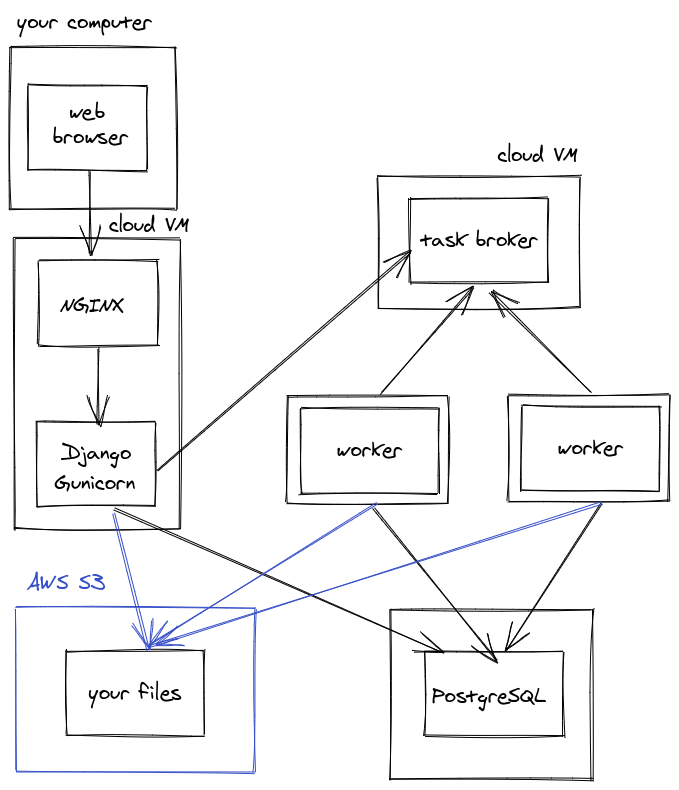
You could potentially swap our your self-managed broker (Redis or RabbitMQ) for a managed queue like Amazon SQS .
External services - final form
If you went totally all-out, your Django app could be set up like this:

As you can see, you can go pretty crazy splitting up all the parts of your Django app and spreading across multiple servers. There are many upsides to this, but the downside is that you now have mutiple servers to provision, update, monitor and maintain. Sometimes the extra complexity is well worth or and sometimes it's a waste of your time. That said, there are many benefits to this setup:
- Your web and worker servers are completely replaceable, you can destroy, create and update them without affecting uptime at all
- You can now do blue-green deployments with zero web app downtime
- Your files and database are easily shared between multiple servers and applications
- You can provision different sized servers for their different workloads
- You can swap out your self-managed servers for managed infrastructure, like moving your task broker to AWS SQS, or your database to AWS RDS
- You can now autoscale your servers (more on this later)
When you have complicated infrastructure like this you need to start automating your infrastructure setup and server config. It's just not feasible to manage this stuff manually once your setup has this many moving parts. I recorded a talk on configuration management that introduces these concepts. You'll need to start looking into tools like Ansible and Packer to configure your virtual machines, and tools like Terraform or CloudFormation to configure your cloud services.
Auto scaling groups
You've already seen how you can have multiple web servers running the same app, or multiple worker servers all pulling tasks from a queue. These servers cost money, dollars per hour, and it can get very expensive to run more servers than you need.
This is where autoscaling comes in. You can setup your cloud services to use some sort of trigger, such as virtual machine CPU usage, to automatically create new virtual machines from an image and add them to an autoscaling group.
Let's use our task worker servers as an example. If you have a thumbnailing service that turns big uploaded photos into smaller photos then one server should be able to handle dozens of file uploads per second. What if during some periods of the day, like around 6pm after work, you saw file uploads spike from dozens per second to thousands per second? Then you'd need more servers! With an autoscaling setup, the CPU usage on your worker servers would spike, triggering the creation of more and more worker servers, until you had enough to handle all the uploads. When the rate of file uploads drops, the extra servers would be automatically destroyed, so you aren't always paying for them.
Container clusterfuck
There is a whole world of container fuckery that I haven't covered in much detail, because:
- I don't know it very well
- It's a little complicated for the targed audience of this post; and
- I don't think that most people need it
For completeness I'll quickly go over some of the cool, crazy things you can do with containers. You can use tools like Kubernetes and Docker Swarm with a set of config files to define all your services as Docker containers and how they should all talk to each other. All your containers run somewhere in your Kubernetes/Swarm cluster, but as a developer, you don't really care what server they're on. You just build your Docker containers, write your config file, and push it up to your infrastructure.

Using these "container orchestration" tools allows you to decouple your containers from their underlying infrastructure. Multiple teams can deploy their apps to the same set of servers without any conflict between their apps. This is the kind of infrastructure that enables teams to deploy microservices . Big enterprises like Target will have specialised teams dedicated to setting up and maintaining these container orchestration systems, while other teams can use them without having to think about the underlying servers. These teams are essentially supplying a "platform as a service" (PaaS) to the rest of the organisation.
As you might have noticed, there is probably too much complexity in these container orchestration tools for them to be worth your while as a solo developer or even as a small team. If you're interested in this sort of thing you might like Dokku , which claims to be "the smallest PaaS implementation you've ever seen".
End of tour
That's basically everything that I know that I know about how Django can be set up in production. If you're interested in building up your infrastructure skills, then I recommend you try out one of the setups or tools that I've mentioned in this post. Hopefully I've built up your mental models of how Django gets deployed so that the next time someone mentions "task broker" or "autoscaling", you have some idea of what they're talking about.
If you enjoyed reading this you might also like other things I've written about deploying Django as simply as possible , how to get started with offline tasks , how to start logging to files and tracking errors in prod and my introduction to configuration management .
If you liked the box diagrams in this post check out Exalidraw .



Studying programming: where to start
Published: 2020-05-16T12:00:00+10:00
Updated: 2020-05-16T12:00:00+10:00
UTC: 2020-05-16 02:00:00+00:00
URL: https://mattsegal.dev/self-study-starting.htmlYou have zero programming knowledge and you want to start learning to code. Where do you start? Maybe you want to learn enough to get yourself a coding job, or you're planning to study computer science in the future and you want to try it out before you start your …Content Preview
You have zero programming knowledge and you want to start learning to code. Where do you start?
Maybe you want to learn enough to get yourself a coding job, or you're planning to study computer science in the future and you want to try it out before you start your course. Maybe you just want to automate a few things here and there.
This post will outline a path to getting comfortable with coding. It's certainly not the only way to learn programming, it's just the advice that I would give anybody who asked me.
Learning the basics
First you'll need to pick a programming language to learn. This won't be the only language you ever learn if you pursue programming long-term, I've been coding for about 5 years and I know roughly three-and-a-half to six languages, depending on what counts as a "language", so this choice isn't forever.
If you haven't already picked something, learn Python. It's one of the easier languages to get started with, has a syntax that almost looks like natural language and you can get a lot done with it. There are also a lot of good beginner resources for learning Python.
You should follow a bare-basics course or book to get started, like Real Python's introductory course or the often-recommended Automate the Boring Stuff with Python book . There are dozens of books and courses you can choose, so just pick one and learn the basics. I've also written about some other tools that you should look into when programming (specifically on Windows).
"The basics", which I have mentioned so far, will include:
- installing Python on your computer
- running Python scripts on the "command line" (CLI)
- variables, data types, simple data structures
- control flow (if, else, for, while)
- printing output to the CLI
- reading user input from the CLI
- reading from and writing to files
It's going to feel very simple and kind of dumb. After a week of messing around you might be able to build a simple text-based calculator. That's pretty normal: your first programs will not be very impressive at all. Maybe you spent your first week just-trying-to-fucking-install-Python, which isn't that abnormal either.
Many small challenges
Once you've read a book or followed a course and gotten the basics down, you need to start setting small challenges for yourself. You can't just do tutorials forever... well you can , but you'll always be dependent on them to learn new things. You need to come up with your own problems and build your own solutions. You might start by building:
- a script that asks your name and prints it back to you
- a text-based calculator that helps you add, multiply, divide
- a script that tells you the number of days between two dates
- a script that prints out your workout for the day
The point isn't that these are particularly useful or impressive programs, it's that you set a challenge for yourself and then build a working solution. This is something you should do over and over. You will get stuck and need to search Google and check Stack Overflow , read the official Python documentation , and ask for help on /r/learnprogramming and /r/learnpython . Getting stuck, and then getting unstuck is a part of being a programmer, and tutorials that hold your hand won't teach you how to solve your own problems. Since you are doing lots of small challenges, it's OK if you need to give up and try something easier before coming back to it later.
Don't get me wrong, tutorials are great resources for learning a specific skill, but you cannot learn from them alone.
If you're having trouble inventing your own challenges, then check out Code Abbey , which has a bajillion problems to solve with a wide range of difficulties.
Once you're comfortable with the basic syntax of Python and solving simple problems, you can slowly ramp up the complexity of the problems and start playing around with third party libraries. You might eventually:
- make a script that pulls data from a webpage and prints it to a screen
- write a simple website that stores your "to-dos" in a database
- write a script that finds and deletes duplicate photos on your laptop
- play around with a new language, like JavaScript, which is the language that you need to program websites
- learn to create webpages with HTML and CSS
- read and write data from a spreadsheet (Excel, Google Sheets)
- learn SQL to manage databases
You won't know how to solve these problems to start, which is part of the process: Googling around until you figure out how to achieve your goal. I don't actually remember very much about the coding tools and languages that I use day to day - I'm just a fucking gun at Googling things. I'm a professional Django developer (most of the time) and when I'm working on Django projects I will check the documentation at least once an hour. Developing your Google-fu and learning how to read documentation will be vital for your programming abilities.
More advanced theory
If you get comfortable with coding and want to get a head start on your studies, then you should try some more advanced online courses. Even if you aren't going to study computer science at school, there are great benefits to learning some theory .
I recommend choosing something that teaches computer science concepts, not just how to use particular tools. I think Principles of Computing is a fantastic course for dipping your toes into computer science, with engaging coursework and a focus on the practical skills that a software engineer needs. Nand2Tetris is awesome, but a little more challenging. There is an absurd number of free online computer science courses, these two aren't the only good ones, they're just the ones I have personally done and recommend.
Learn some more advanced tools and frameworks
Eventually you'll want to do something practical with your coding, and you won't want to build everything from scratch. With a solid grounding in Python and basic programming, you can branch out to learn about:
- scientific computing (NumPy, SciPy)
- data science tools (pandas, matplotlib, Jupyter notebooks)
- web development (Flask, Django)
- web server admin (Linux, SSH, SCP, apt, AWS, etc)
- databases (SQLite, Postgres, SQLAlchemy)
- frontend JavaScript frameworks (React, Vue, Angular)
I recommend that you learn these tools with a small project in mind, to better motivate and guide your study.
Conclusion
So in summary, I recommend you:
- learn the basics of Python by following a beginner's course or book
- do lots of small self-guided coding challenges
- try some more advanced self-guided challenges and new tools
- learn some computer science theory
- learn some advanced tools and frameworks
Studying programming: pace yourself
Published: 2020-05-15T12:00:00+10:00
Updated: 2020-05-15T12:00:00+10:00
UTC: 2020-05-15 02:00:00+00:00
URL: https://mattsegal.dev/self-study-pacing.htmlYou can learn programming all by yourself and get a coding job. Just you, your laptop and the internet. It's great! You don't have to pay thousands of dollars for a degree and you can work at your own pace. There's a problem with this approach though: with no teacher …Content Preview
You can learn programming all by yourself and get a coding job. Just you, your laptop and the internet. It's great! You don't have to pay thousands of dollars for a degree and you can work at your own pace.
There's a problem with this approach though: with no teacher or course to guide you it's not clear how much work you need to do every day. There are no professors giving weekly lectures or tutors setting homework.
You just do as much study as you're motivated to do. Are you doing enough? Could you do more? These questions can eat at you, creating guilt and anxiety when you spend time on non-programming activities. There's no clear line between work, study and play. There's no campus or workplace to go to and no-one is keeping you accountable.
I've written before about how to choose what to study and whether to focus on theory or practice . In this post I want to discuss the question: how much should should you be working?
In general my advice will be to pace yourself. Slow and steady - don't burn out. I can't pin down this quote exactly, but it goes something like:
You overestimate what you can do in a day, and underestimate what you can do in a year
Actual advice
Let's be specific though. I think you should aim for four hours a day of total study. That's what worked for me personally. It might not seem like much, but that's four hours every day . You might think that 8 hours of work per day is the golden standard, but learning is much harder than working.
That four hour figure was for people who are studying full time. Of course not everyone has the luxury to dedicate themselves to learning a new profession. If you're working a job as well then I'd aim for 1-2 hours a day at most.
Study some theory
Of those fours hours I recommend you spend 1-2 hours doing some sort of course work. This might be watching lectures, reasing a textbook or doing assigned coursework. I'm talking about courses from Coursera , Udemy , MIT OpenCourseWare , or even just good old YouTube videos. Passively reading and watching videos is very mentally draining and I doubt you can actively absorb information and take notes for more than two hours a day. You can sit infront of a video like a zombie for as many hours as you want, but I think most people only have a couple of hours of high quality passive learning in them every day. Maybe you're special (good for you!), but if you're not special that's OK.
Do some practice
I think you should spend the rest of your time on some sort of coding project, which I've described elsewhere . I suggest coding after some theory, because learning theory is harder. If you've found a project that you're interested in, then it shouldn't be hard to spend 2-3 hours writing code. Some days you'll get totally stuck and give up a little early - that's normal. Other days you'll be having fun and the next 10 hours will fly by. What's important is that you don't force yourself to sit and code for 8 hours a day when you're not having fun. If you find yourself repeatedly unably to spend 2-3 hours a day working on your code, then you need to take a step back and figure out what's blocking you:
- Do you hate the language you're using? Try a new language
- Is the project you chose for yourself too hard? Try something easier
In general you should be taking a meta perspective on your work. Don't try and just slog through your problems. If 2-3 hours of coding a day isn't fun, then figure out how to make it fun.
Immerse yourself
You can accumulate a lot of passive programming knowledge without doing a lot of work per-se . If you can find programming-related entertainment that you enjoy consuming, then it won't feel like you're studying. For example, I used to really enjoy reading Joel Spolosky's blog and listening to podcasts like Programming Throwdown and Software Engineering Daily . I'd just listen to these podcasts while I was walking around. It was just casual consumption, not a study thing: there were no weekly "podcast goals" that had to be met. Maybe blogs and podcasts aren't your thing, but there are also books and YouTube videos a-plently that are both entertaining and slightly informative. Hell, I even picked up lingo from being subbed to /r/programminghumor .
It's really hard to say how long it takes any given person to get a software job from scratch. There's a lot of variance involved including your local job market plus pure luck and coincidence. In general getting a job will probably take longer than you expect, so it's important to work consistently. You should be in it for the long haul: pace yourself.
Studying programming: tools or theory?
Published: 2020-05-10T12:00:00+10:00
Updated: 2020-05-10T12:00:00+10:00
UTC: 2020-05-10 02:00:00+00:00
URL: https://mattsegal.dev/self-study-tools-vs-concepts.htmlWhen you're studying web development you have a lot to learn and limited time. One of the hard choices that you'll need to make is whether you learn tools or concepts. Should you study data structures and algorithms to be a web developer? It seems kind of esoteric. Do you …Content Preview
When you're studying web development you have a lot to learn and limited time. One of the hard choices that you'll need to make is whether you learn tools or concepts. Should you study data structures and algorithms to be a web developer? It seems kind of esoteric. Do you just need to learn a bunch of the latest tools and frameworks to be productive? I'm going to argue that you need both: learning concepts makes you better at using tools, and using tools motivates you to learn concepts.
The case for learning tools
The case for learning tools and frameworks is the strongest so let's get it out of the way: they make you more productive. I can use Django to build a website with authentication, permissions, HTML templating, database models, form validation, etc. in half a day. Writing any one of these features from scratch would take me days at the very least. You do not want to invent the 2020 programmer's toolchain from scratch, not if you want to get anything done.
In addition, employers want you to know how to use tools. Programmers get paid to ship valuable code, not to know a bunch of stuff. Job advertisments are primarily a list of React , Spring , Webpack , NuxtJS , Django, Rails , etc. Contrary to how it might seem, you can get these jobs without knowing every technology on the list, but you do need to know at least some of them. Good luck getting a coding job if you don't know Git.
Ok, so we're done right? Tools win, fuck ideas. Learn Git, get money.
The case for learning ideas
You can't just learn tools and frameworks. If you do not know how the internet works , then you're going to spend your time as a web developer swimming in a meaningless word-soup of "DNS", "TCP" and "Headers". Django's database model structure is going to be very confusing if you don't know what "database normalisation" is. How will you debug issues that don't already have a StackOverflow post written for then?
Ok cool, so you need to learn some basic internet stuff, but do you really need to learn about computational complexity? Do you have to be able to invert a binary tree ?
Well, no: you don't have to learn these theoretical computer-sciency concepts to get a job as a programmer. That said, I think it's in your interest to learn theoretical stuff. Learning computer-sciency concepts help you learn new tools faster and use them better. If you've learned a little bit of functional programming then you'll find a lot of familliar concepts when reading the Redux documentation :
The reducer is a pure function that takes the previous state and an action, and returns the next state.
If you haven't been exposed to functional programming concepts, then words like "state", "pure function" and "immutability" are going to be complete jibberish. Functional programming is infamous for this kind of techno-babble:
A monad is just a monoid in the category of endofunctors, what's the problem?
The authors of the Redux docs have the curse of knowledge . They either don't know that they need to explain these terms, or they don't care to. You might not have bothered to learn about functional programming, but they did.
Similarly, you don't need to understand hash functions to use Git, but the string of crazy numbers and letters in your history is going to be quite disorienting: what the fuck is e2cbf1addc70652c4d63fdb5a81720024c9f2677 supposed to mean?
Even simple ideas like the idea of a "tree" data structure helps you work with the computer filesystem more easily. You might know that recursion is a good method for "walking" trees. Pattern-matching a programming problem to a data structure will help you come up with solutions much faster.
You can't know beforehand which computer science concepts will be useful. As far as I can tell, functional programming got "cool" and baked into some frontend tools in the last five years or so. I don't know what's next. You need to get a broad base of knowledge to navigate and demystify the programming landscape.
Ok, so you should:
- isolate yourself in a log cabin for four years
- study computer science
- return to civilisation
- learn Git
- get money
...right?
What to learn first?
You can't sit down and just learn all of computer science, downloading it all into your brain like Neo hooked into the Matrix. You'll also struggle to learn new tools and frameworks without some computer science fundamentals. So, what to do?
I think you should try a spiral approach to learning. You should learn a some theory, then explore some new tools, then try to build something practical. Repeat over and over. You won't necessarily learn everything in the "right order", but new ideas from one area will influence another. You might:
- run into performance bottlenecks in your code and get interested in computational complexity
- read about "pure functions" in the Redux docs and explore functional programming
- complete a course on compilers and finally understand what all those pesky .class, .pyc and .dll files are doing on your computer
This might seem like a random and haphazard approach, and it kind of is, but I don't think learning programming should be viewed as a big list of "things you must do". I've written more about that in this post .
If you are learning programming and you have only focused on learning frameworks and tools, then I encourage you to mix in some theoretical online courses as well. If you're immersed in a univeristy-style curriculum and haven't tried any modern programming tools - start using them now!
How to diagnose and fix slow queries with Django Debug Toolbar
Published: 2020-05-09T12:00:00+10:00
Updated: 2020-05-09T12:00:00+10:00
UTC: 2020-05-09 02:00:00+00:00
URL: https://mattsegal.dev/django-debug-toolbar-performance.htmlYour Django views are running slowly and you want to make them faster, but you can't figure out what the issue is just by reading the code. Just as bad is when you're not sure if you're using the Django ORM correctly - how can you know if the code you …Content Preview
Your Django views are running slowly and you want to make them faster, but you can't figure out what the issue is just by reading the code. Just as bad is when you're not sure if you're using the Django ORM correctly - how can you know if the code you write will be slow?
This is where a profiling tool comes in handy. Django Debug Toolbar is great for figuring out why your Django views are going slow. This guide will show you how to use DJDT to find and fix slow database queries in your views.
The demo app shown in the video is available on GitHub .
The DJDT docs explain how to install the toolbar.
Studying programming: what to learn next?
Published: 2020-05-08T12:00:00+10:00
Updated: 2020-05-08T12:00:00+10:00
UTC: 2020-05-08 02:00:00+00:00
URL: https://mattsegal.dev/self-study-mindset-enthusiasm.htmlA lot of people trying to teach themselves programming have an anxiety about what they should be learning. There is an endless array of options - you've seen these ridiculous lists of online courses, right? There's too much to learn and not enough time! You don't want to waste time learning …Content Preview
A lot of people trying to teach themselves programming have an anxiety about what they should be learning. There is an endless array of options - you've seen these ridiculous lists of online courses , right? There's too much to learn and not enough time! You don't want to waste time learning something that doesn't matter.
This dilemma can manifest as a general sense of dread about the task ahead of you, or it can lead you to ruminate over specific technolgies: should I learn Java or Python? Flask or Django? Which framework is best? What should I learn to get myself a job?
Follow your enthusiasm
I recommend you dissolve this question by learning about things that interest you. Stuff that you're enthusiastic about. Stuff that gets you going . You wanted to learn programming for a reason, right? Why was that - what about it seems cool to you? Work on that!
If you don't know what's cool about programming, then you should explore the landscape: sample lots of things until you find something you like. Try lots of small projects: make a webpage in HTML, do some hacking challenges, learn about databases, or functional programming, etc. You can use this "rabbit holes" technique to pose some interesting questions for yourself.
You might have a goal like "I want to be a backend web developer". I think you can work towards this goal while still learning things that interest you. For example, if you're into hacking at the moment, you can learn about hacking webservers.
It's all just practice anyway
Here's the thing, it doesn't really matter what you learn next, at least not early on. As a beginner coder, you're going to fucking suck at everything you do, so you might as well have fun while you're sucking. Your first few months will just be learning to program, in general, and the most important thing to do is to write a lot of code.
If you're interested in the content you're learning and the code you're writing then you will do so much more practice than if you're just grinding. Conversely, you'll burn out if you're forcing yourself to work on something you don't care about. This isn't some airy-fairy feel-good advice telling you to "follow your dreams" - you will do more productive work if you're interested in what you're doing.
Why is practice so important? In programming there are a bunch of meta-skills that you don't learn deliberately, but you'll learn them by writing a lot of code. I'm talking about how to debug your code, how to find solutions to problems online, how to read documentation. There are "coding muscles" in your brain that you need to exercise. Picking up these meta-skills is more important than knowing some specifc web framework, like Ruby on Rails (RoR).
Here's why: if you try to learn RoR early it'll take you weeks to learn the basics of the framework. You'll struggle to navigate the online documentation and command-line tools. You'll make Ruby language syntax errors while trying to learn framework-specific concepts. On the other hand, you can learn the basics of RoR in a weekend after 6 months of programming. You'll only need to pick up the RoR-specific stuff because you already have a solid background in coding.
Just to clarify: I'm not saying that you shouldn't learn Ruby on Rails in your first week of learning to code. I'm saying that you shouldn't force yourself to learn Ruby on Rails because you're trying to optimise for getting a job in the shortest time possible.
There's practice, then there's practice
A note on "practice". I said that it's important for a beginner, and suggested that writing a lot of code is good practice. I think that's mostly true, but there are some things you can do to get better faster:
- Deliberately try out new skills and techniques in your work: "in this project, I'm going to try the 'object oriented' style I just learned". In another project you might try the "functional style".
- Re-visit your old projects and think about how/if you could make them better with your new skills. You'll learn a lot by trying to read the code you wrote a month ago.
- Try to get some feedback on your code from more experienced developers.
Start by building things
When I said "learn about hacking webservers" earlier, you might imagine yourself reading a textbook on hacking and then reading a textbook on webservers. Maybe that works for you, but I don't like that approach. I think you should start your learning journey with a practical challenge. In this hacking example it might be to complete the first stage of the Over the Wire wargames . There are two reasons for this.
Firstly, you do not know what you need to learn. How could you? Having a practical goal grounds you in reality and forces you to confront your ignorance. Here's an example: I literally did not know what "backend web development" was when I was building my first website (this ~v10). Even so, I wanted new list items to remain on the page after I refreshed it in my browser. To get that to work, I learned a lot about backend web dev: HTTP, APIs, Linux, virtual machines, web servers, JSON, web frameworks, WSGI, etc. I had no idea that I needed to know what a "JSON" was when I set out on that path, but my practical project lead me there.
Secondly, it's much easier to learn things when you have an implementation in mind. If you are building something, then when you need to learn a new concept you'll think:
Hmm, I need to learn more about JSON and HTTP are to get this task done.
You'll be motivated because you will quickly be able to use that new knowledge. Contrast that to someone handing you a massive list of web technologies and telling you to study them all. Do you think you'll be motivated to slog through that list?
To clarify: I'm not telling you not to read textbooks. I'm saying that you should read textbooks after you've found a practical problem that inspires you to learn more. Nand2Tetris is a great example of this. It's an online course where they trick you into reading a textbook by first asking you to build a computer.
Conclusion
Next time you catch yourself agonising over your next coding project, new framework or online course, just ask yourself: is this fun? Will I learn something new? If so, go for it!
Keeping your config files valid with Python
Published: 2020-05-03T12:00:00+10:00
Updated: 2020-05-03T12:00:00+10:00
UTC: 2020-05-03 02:00:00+00:00
URL: https://mattsegal.dev/cerberus-config-validation.htmlIt's common to use a config file for your Python projects: some sort of JSON or YAML document that defines how you program behaves. Something like this: # my-config.yaml num_iters: 30 population_size: 20000 cycle_type: "long" use_gpu: true plots: [population, infections, cost] Storing config in a file is nice because it …Content Preview
It's common to use a config file for your Python projects: some sort of JSON or YAML document that defines how you program behaves. Something like this:
# my-config.yaml
num_iters: 30
population_size: 20000
cycle_type: "long"
use_gpu: true
plots: [population, infections, cost]
Storing config in a file is nice because it lets you separate your input data from the code itself, but it sucks when a bad config file crashes your program. What really sucks is when:
- You don't know exactly which bad value is caused the crash, or how to fix it
- The bad config crashes your program minutes or hours after you first ran it
- Other users write invalid config, then tell you your code is broken
A related issue is when you have complex data structures flying around inside your code: lists of dicts, dicts of lists, dicts of dicts of dicts. You just have to pray that all the data is structured the way you want it. Sometimes you forget how it's supposed to look in the first place.
You might have tried validating this data yourself using "assert" statments, "if"s and "ValueError"s, but it quickly get tedious and ugly.
Cerberus
When I run into these kinds of problems, I tend to pull out Cerberus to stop the bleeding. It's a small Python library that can validate data according to some schema at runtime. It's pretty simple to use (as per their docs):
from cerberus import Validator

schema = {'name': {'type': 'string'}}
v = Validator(schema)
v.validate({'name': 'john doe'}) # True
v.validate({'name': 'aaaa'}) # True
v.validate({'name': 1}) # False
v.errors # {'name': ['must be of string type']}
You can use this tool to validate all of your loaded config at the start of your program: giving early feedback to the user and printing a sensible error message that tells them how to solve the problem ("Look at 'name', make it a string!"). This is much better than some obscure ValueError that bubbles up from 6 function calls deep. It's still not a great experience for non-programmers, but coders will appreciate the clarity.
The Cerberus schema is just a Python dictionary that you define. Even so, it's quite a powerful system for how basic it is. You can use Ceberus schemas to validate complicated nested data structres if you want to, even adding custom validation functions and type definitions. It's particularly nice because it allows you to declare how your data should look, rather than writing a hundred "if" statements.
Here's an example: a YAML config file for training a neural network might look like this and you could build a validator for that config like this . Since everything is just dicts, there's no reason you can't also write your schema as a YAML or JSON ( example ). Luckily Cerberus will validate your schema before applying it, so there is no endless recursion of "who validates the validators?".
Schema as documenation
I think that defining data schemas using Cerberus gets really useful when lots of different people need to use your config files. The schema that you've defined also serves as documentation on how to write a correct config file: add a few explanatory comments and you've got some quick-n-dirty docs. It's not a perfect strategy for writing docs but it has one fantasic property: the documentation cannot lie, because it actually runs as code .
I was recently working on an in-house CLI tool for builds and deployment that was written in Python. I had devs from other teams using the file and I couldn't always show them how to use it in-person. Even worse I was constantly updating the tool based on feature requests and the config was evolving over time. Once I had written a Cerberus schema for the tool's config files, I was able to link to the schema from our documentation. In addition, I was able to run regression tests on "wild" config files by pulling them down from our source control and checking that they were still valid.
Limitations
There's no denying that these schemas are very, very verbose: you need to write a lot of text to define even simple data structures. I think this verbosity caused by the fact that the tool uses built-in Python data structures, rather than an object-oriented DSL. It's quick and easy to get started, but that comes at a cost.
Another issue is that you can abuse this tool by using it as half-assed type system. It gives you no type hints or static compilation errors in your IDE: everything happens when the code runs. Some code quality problems are better solved by investing in static analysis and using tools like mypy .
Finally, using Cerberus to validate config files and big data structures can hide underlying issues. I think of it like slapping a bandaid on a problem. It stops the bleeding, but you should also clean up all the broken glass on the floor. Why do you have all these config files in the first place? Why are you shipping around these big crazy data structures in your code? It's good to ask these questions and consider alternative solutions.
Next steps
Give Cerberus a try in your next CLI tool or data science project, you're a quick pip install and a schema definition from validating your config files.
8 helpful tools for programming on Windows
Published: 2020-05-02T12:00:00+10:00
Updated: 2020-05-02T12:00:00+10:00
UTC: 2020-05-02 02:00:00+00:00
URL: https://mattsegal.dev/windows-setup-programming.htmlSoftware development on Windows can be a pain. Not because of any issues with C#, .NET or the operating system, but simply because the tools surrounding your work can be quite clunky by default. I'm talking about the lack of a package manager, PowerShell's ugly blue terminal with no tabs …Content Preview
Software development on Windows can be a pain. Not because of any issues with C#, .NET or the operating system, but simply because the tools surrounding your work can be quite clunky by default. I'm talking about the lack of a package manager, PowerShell's ugly blue terminal with no tabs and a bunch of "missing" tools (git, ssh). It's like a living room where all the furniture is perfectly positioned to stub your toe.
That said, you can get have a pretty nice developer experience if you install a few tools. This post goes over my preferred setup on a new Windows laptop. It's not a definitive guide, just some tips and tricks that I've picked up from other devs that I've worked with. Hopefully you find some of them useful.
The post below summarises everything in this video.
ConEmu console emulator
ConEmu my #1 favourite tool for Windows. It allows you to:
- Open many PowerShell tabs in one window
- Show and hide the terminal with a hotkey (ctrl-`)
- Split your windows into sub-windows using hotkeys (ctrl-shift-(o|e))
- Open different shells in one window (PowerShell, Git Bash, cmd)
- Customise your terminal (different colors etc)
- Open PowerShell as Admin automatically
It's like removing a rock from your shoe: an ugly blue rock. Some people also like to use Cmder for the same use-case.
Everything search
Windows Explorer search is so horribly broken in 2020 that you hope Microsoft is trolling you, because the alternative is just sad. In any case Everything gives you very fast search of all your files and folders, including that pesky InternalToolChain.dll which has gone missing.
I believe it runs in the background all the time, quietly indexing your files. I do not how this affects your workstation's performance.
Chocolatey package manager
Chocolatey is the (unofficial) package manager for Windows. NuGet is good for installing your .NET libraries, while
chocois good for everything else. It's great for quickly installing tools and automating the process. It's quite easy to install .To install a tool like Everything, you can just search for it then run the install from the CLI:
choco install everythingIn fact, once you've got choco installed, you can install all of the other tools on this list with:
choco install git -y
choco install conemu -y
choco install everything -y
choco install poshgit -y
choco install vscode -y
choco install ag -y
Try not to install anything with Chocolatey if it already exists: things can get weird. You can always run
Get-Commandin PowerShell to check for existing executables:Get-Command pythonVisual Studio Code
Visual Studio Code is a text editor that strikes a great balance between being full-featured and overly bloated. This is an obvious proposition to more experienced developers, but there are a lot of beginners out there editing their files in
notepad.exe. I personally prefer it to slimmer alternatives like Sublime Text 3 and hulking behemoths like PyCharm or Visual Studio.A really cool feature of VSCode on Windows is that it's quite command-line friendly. You can open the current folder in VSCode from the CLI with:
code .or you can open a single file like this:
code my-file.txtI'm quite a fan of the Monokai ST3 theme and the Materoal Icon Theme , plus a bajillion other language-specific extensions.
Sublime Text 3 is a popular alternative with a rich plugin ecosystem but less features out-of-the box. Some people also like Notepad++ , a decision I don't really understand, but as the name suggests, it beats the shit out of just using Notepad.
PowerShell setup
There's a few tricks to getting PowerShell into a usable state on a new Windows machine. The first thing is to always open as Administrator, if you can. Once PowerShell is open, I like set the "execution policy", which allows you to run scripts:
Set-ExecutionPolicy -ExecutionPolicy BypassNow you can put some PowerShell in a script, like myscript.ps1:
# myscript.ps1
Write-Host "Hello World!"
and then run it from your PowerShell terminal
./myscript.ps1
# Hello World!
Finally, I like to configure my profile, which is a script that runs before every PowerShell session starts. This is where you can add things like welcome messages, function definitions and module imports. To set up your profile, just open
$profile, add some stuff and then save the file. For example:code $profileOne other handy PowerShell tip while I'm here: you can open folders in explorer with
explorer, and, if you're not using VSCode, you can still edit files usingnotepad:explorer . explorer "C:\Users\mattd" notepad "secret-plot.txt"Git for Windows
This one also seems kind of obvious if you're already using Git , and if you're not using Git then why would you bother? Wait! There's more than just
gitin Git for Windows. The install also gives you:
- Git Bash, which is a bash shell that can run scripts
sshfor logging into Linux servers
scpfor transfering files to Linux servers
ssh-keygenfor generating SSH keysA bunch of nice Unix tools like
findYou'll never need ot use PuTTY again! You might scoff at my promotion of Git Bash:
Fool! Doesn't he know about Windows Subsystem for Linux ?
WSL seems nice, but a lot of workplaces won't let you install it, but they will allow Git.
Posh-Git: a PowerShell environment for Git
Posh-Git gives you a nice little Git status message in your command prompt. It tells you the current branch that you're on and the number un-comitted changes. It's quite convenient. To install it:
Install-Module posh-git -Scope CurrentUser -ForceAnd then to activate it:
Import-Module posh-gitNote that it will only display your Git status when the current directory is a Git repo. Consider placing the import statement into your PowerShell profile so that it loads automatically for you.
The Silver Searcher
The Silver Searcher is a nice little CLI tool for quickly finding all instances of a string in a folder. For example if I want to find all instances of "probably" in my "contents" folder:
ag -i probably contentIts main appeal is speed: it's really fucking fast. Git grep is also a contender if you're working in a Git repository:
git grep probablyNext steps
Despite Steve Ballmer's pro-dev yelling in the 2000s, Microsoft dropped the ball on making Windows nice for developers. Nevertheless you can use these tools, and others, to cobble together an environment where building software isn't like stubbing your toe on every piece of furniture. If you haven't tried these tools already, then I encourage you to install them and have a play around. You might find your coding experience a little less painful.
Run your Python unit tests via GitHub actions
Published: 2020-04-27T12:00:00+10:00
Updated: 2020-04-27T12:00:00+10:00
UTC: 2020-04-27 02:00:00+00:00
URL: https://mattsegal.dev/pytest-on-github-actions.htmlYou've written some unit tests for your Python app. Good for you! There are dozens of us, dozens! You don't always remember to run your tests, or worse, your colleagues don't always remember to run them. Wouldn't it be nice to automatically run unit tests on every commit to GitHub …Content Preview
You've written some unit tests for your Python app. Good for you! There are dozens of us, dozens! You don't always remember to run your tests, or worse, your colleagues don't always remember to run them.
Wouldn't it be nice to automatically run unit tests on every commit to GitHub? What about on every pull request? You can do this with GitHub Actions . You'd be able to hunt down commits that broke the build, and if you're feeling blamey, who broke the build. Sounds complicated, but it's not. Sounds like it might cost money, but the free version has ~30 hours of execution per month. Let me show you how to set this up.
There is example code for this blog post here .
Setting up your project
I'm going to assume that:
- You have some Python code
- You use Git, and your code is already in a GitHub repository
If you're already running unit tests locally you can skip this section. Otherwise, your Python project's folder looks something like this:
.
├── env                     Python virtualenv
├── requirements.txt        Python requirements
├── README.md               Project description
└── stuff.py                Your code
If you don't have tests already, I recommend trying pytest (and adding it to your requirements.txt).
pip install pytestYou'll need at least one test
# test_stuff.py
from stuff import run_stuff

def test_run_stuff():
    result = run_stuff()
    assert result == 1
You'll want to make sure your tests run and pass locally
pytestSet up your Action
You'll need to create new a file in a new folder:
.github/workflows/ci.yml. You can learn more about these config files here . Here's an example file:name: Project Tests on: push: branches: - master pull_request: branches: - master jobs: build: runs-on: ubuntu-latest steps: - uses: actions/checkout@v2 - name: Set up Python 3.6 uses: actions/setup-python@v1 with: python-version: 3.6 - name: Install dependencies run: | python -m pip install --upgrade pip pip install -r requirements.txt - name: Test with pytest run: pytest -vvNow your project looks like this:
.
├── .github                 GitHub hidden folder
|   └── workflows           Some other folder
|       └── ci.yml          GitHub Actions config
├── env                     Python virtualenv
├── requirements.txt        Python requirements
├── README.md               Project description
├── test_stuff.py           pytest unit tests
└── stuff.py                Your code
Commit your changes, push it up to GitHub and watch your tests run!
Sometimes they fail:
Sometimes they pass:
Add a badge to your README
You can add a "badge" to your project's README.md. Assuming your project was hosted at https://github.com/MyName/my-project/, you can add this to your README.md file:
Next steps
Write some tests, run them locally, and then let GitHub run them for you on every commit from now on. If you get stuck, check out this minimal reference or the Actions docs .
Simple Django deployment part six: domain setup
Published: 2020-04-26T18:00:00+10:00
Updated: 2020-04-26T18:00:00+10:00
UTC: 2020-04-26 08:00:00+00:00
URL: https://mattsegal.dev/simple-django-deployment-6.htmlWe're very nearly done deploying our Django app. There's just one more thing we should take care of. Having a raw IP as our website address is kind of yucky, isn't it? You're not going to ask your friend, boss, or mum to visit 23.231.147.88 to check …Content Preview
We're very nearly done deploying our Django app. There's just one more thing we should take care of. Having a raw IP as our website address is kind of yucky, isn't it? You're not going to ask your friend, boss, or mum to visit 23.231.147.88 to check out your cool new Django app. You want a domain name like mycoolwebsite.xyz! Let's finish up our deployment by setting up a domain for our web app.
Here we will learn how to:
- Buy a domain name
- Set up a Cloudflare reverse-proxy
- Adding our domain name to Django prod settings
- Test our setup
A quick note before we start - usually you would do this at the start of the process, right after you create your server, because setting domain name records can take a long time. The reason we're doing it last in this guide is to make sure that you're confident that your app is working before we start fiddling with DNS. If you've never heard of DNS before, I did a short blog post that explains the basics.
Buy a domain name
If you already own a domain name for your app your can skip this step. To get a domain name we need to give someone some money. We're going to go to Namecheap and buy a domain name. Why Namecheap? Domain name registrars exist to sell domains and occasionally fuck you over by raising prices and trying to sell you crap that you don't need. They're generally a pain, so I did a Google search for "site:reddit.com best domain seller", and the good people of Reddit seemed to hate Namecheap the least.
Set up Cloudflare
We're going to use Cloudflare to set up our DNS records. I've written elsewhere on why I like Cloudflare . TLDR it's pretty easy to use and provides some nice bonus features like caching your static files, SSL encryption and analytics.
All requests to our domain (mycoolwebsite.xyz) are going to pass through Cloudflare's servers, which are running NGINX under the hood. This kind of set up is called a " reverse proxy ", because we have a "proxy" (Cloudflare), routing all incoming traffic to our server. This is in contrast to a "forward proxy", which deals will outbound traffic.
... 30 minutes later ...
Next steps
Alright! We're done! Congratulations, you've deployed a Django app. Just as a quick recap, you've learned how to:
- Use ssh, scp and create SSH keys
- Create a cloud virtual machine
- Set up your cloud VM
- Configure your Django project for deployment
- Deploy your Django project to the server
- Run your web app using Gunicorn and Supervisor
- Set up server logging
- Automate the deployment, server setup and database backups
- Set up your web app's domain name plus SSL and caching using Cloudflare
Now I encourage you to take the things you've learned and write your own Django app and try deploying that. It will probably break at some point, it always does, but I hope you're able to use the skills that you've picked up in this guide to debug the problem and fix it.
You've got the basics down, but there is a lot of stuff you can learn about deploying Django and web apps in general. Some things you might want to look into at some point:
- Setting up Django logging in production
- Adding error monitoring
- Adding offline tasks
- Adding offline scheduled tasks
- Start using Git for deployments
- Try using Fabric for deployment scripting
- Implement "continuous delivery" using GitHub actions
- Try using PostgreSQL instead of SQLite
- Try using NGINX instead of (or in addition to) Cloudflare
- Try put your gunicorn server / Django app inside of Docker with Docker Swarm
- Try out media hosting in AWS S3
- Add automated unit tests to your deployment pipeline
- Secure your server fail2ban and a firewall
- Improve your server setup automation with Ansible
- Try a different cloud hosting provider, like AWS or Google Cloud
There's an endless list of stuff you can learn, and there's no need to do it all right now, but it's there if you're interested.
If you have any feedback on this guide, or questions about the steps, you can email me at mattdsegal@gmail.com.
Simple Django deployment part five: deployment automation
Published: 2020-04-26T17:00:00+10:00
Updated: 2020-04-26T17:00:00+10:00
UTC: 2020-04-26 07:00:00+00:00
URL: https://mattsegal.dev/simple-django-deployment-5.htmlDeploying our Django app involved a lot of different commands, right? It would suck to have to do all that over again, wouldn't it? Having to manually type all those commands again would be tedious, slow and easy to screw up. Even worse, the harder it is to deploy, the …Content Preview
Deploying our Django app involved a lot of different commands, right? It would suck to have to do all that over again, wouldn't it?
Having to manually type all those commands again would be tedious, slow and easy to screw up. Even worse, the harder it is to deploy, the less often you are going to do it. If you deployments are infrequent, then they'll contain more features in one big batch and they'll be risker, because there's more things that could go wrong, and it's harder to tell what caused any issues that crop up. Frequent, small deployments are key to pumping out lots of valuable code with lower risk. The Phoenix Project is a great book that talks more about this idea (srsly give it a read).
So, if we want to deploy fast and often, we're going to need to automate the process. Hell, even if we want to do this again in a week we need to automate the process, because we're definitely going to forget what-the-fuck we just did. No need to get fancy, we can do the whole thing with a bunch of bash scripts. You can get fancy later.
Our goal is that you can run a single bash script and your whole deployment happens.
We'll write these scripts in stages:
- Uploading new code to the server
- Installing the new code
- Single deploy script
- Backing up the database
- Automating the server setup
Uploading new code to the server
If you recall, we uploaded code to the server by creating a "deploy" directory locally, then uploading that directory to our server. After that we did some clean up work on that directory to deal with Python bytecode (pyc) files and Windows line endings.
Let's automate the upload first. The files that we need to copy over are:
- requirements.txt for our Python packages
- tute for our Django code
- scripts for our bash scripts
- config for our Gunicorn and Supervisor config
Installing the new code
Now we have automated the process of getting our code onto the server, let's script the bit where we install it in the project dir and run Gunicorn
So, you might have noticed that we stop Gunicorn at the start of the deployment and start it again it at the end. That means your site will be offline during the deployment and if something goes wrong, it'll stay down. You have to log in and manually fix the problem to get it running again.
This is fine for personal projects and low traffic websites - nobody will notice. If you're running some important, high traffic website, then there are techniques to make sure that your website is always running - but we won't go into that here. We're keeping it simple for now.
Single deploy script
Alright we're basically done with this section, now all we need to do is combine our two scripts into a master deploy script.
That's it, now we can deploy our code over and over in seconds.
Backing up the database
This section is optional, it's nice to have, but not a core part of the guide. Skip it if you like. Here I'll show you how to back up your database on the server. It's very, very simple to do with SQLite because the database is just a single file.
Automating the server setup
This section is also optional, it's nice to have, but not a core part of the guide. Skip it if you like.
You will get to a point where you want to move you app to a new server, or maybe you've broken your server really badly, or maybe you want to set your server up again slightly differently. When that time comes, you will not remember how you set this one up: that's why we want to automate our server setup.
Automating your server setup also allows you to do things that were inconceivable before:
- run hundreds of servers that are all configured the same way
- create a new server for every new deployment (allowing for "blue-green" deployments), allowing for zero downtime during deploys
- create servers for testing that are identical to your "live" production server
I talk more about this topic in my video on configuration management .
So, we want to be able to blow away our server and make a new one with minimal work required. The good news is we're already most of the way there. Our Django app in prod is defined by 3 things at the moment:
- our code (we have our code already)
- our database (we have automatic backups already)
- the server (we know how to set it up, we just need to automate this)
Our goal in this section is to run a single script on a new DigitalOcean droplet and it all just works. In addition, we want this script to be "idempotent" - this means we want to be able to run it many times on the same server and get (mostly) the same result.
This script can get kind of long and hairy, especially as your deployments get more complicated. At some point, you're going to want to use something other than a bash script to automate this process. When you're ready, I recommend you take a look at Ansible , which is a great tool for writing scripts to automatically setting up servers. Packer is also a good tool for using scripts like the one we just wrote to "bake" a single virtual machine image, which can then be used to instantly create multiple copies of the same virtual machine.
Next steps
There's one last thing to do before our website is really deployed - give our app a domain name .
Simple Django deployment part four: run a service
Published: 2020-04-26T16:00:00+10:00
Updated: 2020-04-26T16:00:00+10:00
UTC: 2020-04-26 06:00:00+00:00
URL: https://mattsegal.dev/simple-django-deployment-4.htmlSo we've got a problem. Our Django app only runs when we're logged into the server via SSH and running Gunicorn. That's not going to work long term. We need to get Gunicorn running even when we're not around. In addition, if our Gunicorn server crashes because of some bug …Content Preview
So we've got a problem. Our Django app only runs when we're logged into the server via SSH and running Gunicorn. That's not going to work long term. We need to get Gunicorn running even when we're not around. In addition, if our Gunicorn server crashes because of some bug, we want it to automatically restart.
In this section we're going to cover:
- Setting up Supervisor
- Adding Gunicorn config
- Setting up basic logging
- Running as root
Setting up Supervisor
We're going to solve our process supervison problem with Supervisor . It's a program that we can use to run Gunicorn in the background. I chose this tool because a lot of other Django devs use it, plus it's pretty easy to install, configure and run.
We can install it into our virtualenv with pip, which is handy:
pip install supervisorSupervisor has several parts that we should know about:
- supervisord : the " daemonized " program that will run Gunicorn as a "child process"
- supervisorctl : the tool that we will use to send commands to supervisord
We'll also be writing some config files to help automate how Supervisor and Gunicorn run
- supervisord.conf : a file that we'll need write to configure how supervisord works
- gunicorn.conf.py : a file we'll need to write to configure how Gunicorn works
Finally, we need to start configuring basic logging. We didn't really need logging before because when we ran "runserver" or "gunicorn", we could just read the console output on our terminal. We can't do that anymore because we cannot see the terminal. So we need to ask gunicorn and supervisord to write their logs to a file somewhere, so we can read them later if we need to. Once we're done, our Django project will look like this when we deploy it:
/app
├── env                     Python 3 virtualenv
├── requirements.txt        Python requirements
├── db.sqlite3              Production SQLite database
├── scripts                 Bash scripts
|   └── run-gunicorn.sh     Script to run Gunicorn
├── config                  Config files
|   ├── supervisord.conf    Supervisor config
|   └── gunicorn.conf.py    Gunicorn config
├── logs                    Log files
|   ├── supervisord.log     Supervisor logs
|   └── gunicorn.access.log Gunicorn access logs
|   └── gunicorn.app.log    Gunicorn application logs
└── tute                    Django project code
    ├── tute                Django app code
    ├── counter             Django app code
    ├── staticfiles         Collected static files
    └── manage.py           Django management script
It's coming to be a lot of stuff isn't it? When I said this would be a "simple" deployment guide, I meant that in a relative sense. ¯\_(ツ)_/¯
Let's get started by setting up Supervisor to run our Django app using Gunicorn. Unfortunately we can't test this new setup completely on our Windows machine, so we're going to have to upload our files to the server to try this out.
You can find the scripts and config referenced in the video here .
Adding Gunicorn config
Next we want to tweak how Gunicorn runs a little bit. In particular, we want to set the number of "workers". The Gunicorn process runs as a sort of "master", which then co-ordinates a bunch of child "worker" processes. The Gunicorn docs suggest using 2-4 workers per CPU core (we have 1 on our DigitalOcean VM), but the default is 1.
If we only have 1 worker, and two people send our site a HTTP request, then one of them will need to wait for the other to finish. If we set more workers, it means we can handle more HTTP requests at the same time. Too many workers are kind of pointless because they'll just end up fighting for access to the CPU. So let's pick 3 workers, because we have 1 CPU core, nothing else happening on this machine, and 3 is half way between the recommended 2-4 (which is a very arbitrary way of deciding).
We could apply this config change by just adding it as a command line parameter when we run Gunicorn:
gunicorn tute.wsgi:application --workers 3But this will become unweildy when we configure more and more settings. It's kind of just an aesthetic thing, but I'd rather write this config to a file than as command line parameters. So instead, we can write a configuration file called "gunicorn.conf.py" and put all our config in there:
# gunicorn.conf.py

bind = "0.0.0.0:80"
workers = 3
# Add more config here
and then when we run gunicorn we can just do this:
gunicorn tute.wsgi:application -c config/gunicorn.conf.pyLet's set up our Gunicorn config.
Now that our Gunicorn config has been created, we can set up logging.
Setting up basic logging
As I mentioned earlier, we need logging because Gunicorn is now running in the background and we can't see its terminal output. This is important when something goes wrong on in our code and we need to figure out what happened. In this section we'll set up logging so we can see:
- what supervisord is doing
- what requests Gunicorn is receiving
- what Gunicorn is doing, plus Django logs
This isn't the perfect logging setup, I go into more detail on how we can improve Django logging in production in this blog post , but it's good enough for now.
When we're done, our logs on the server will look like this:
/app
...
└── logs                    Log files
    ├── supervisord.log     Supervisor logs
    └── gunicorn.access.log Gunicorn access logs
    └── gunicorn.app.log    Gunicorn application logs
Ok we've got logging all set up, looking good! Later on, you might want to also add error monitoring to your app, which alerts you when errors happen.
Running as root
Before we move on to automating our deployments, there's an elephant in the room that I'd like to address. This whole time we've been running Gunicorn as the Linux root user. In Windows terminology we'd call this an "admin" account.
This setup is a potential security risk. Here's the problem: we've given Gunicorn permission to do anything to our VM. It can delete all the files, install any programs they want, terminate other processes, whatever. This will be a problem if a hacker figures out how to execute arbitrary code on our Django app, or manipulate our Django app in some other way (like writing to any part of the filesystem). Any vulnerability that we accidentally write in our Django app can do maximum damage to our server, because we've allowed Gunicorn to do everything. The two biggest risks that I see are:
- a hacker could trash our server and delete all our shit
- a hacker could gain control of our server and use it to mine Bitcoin, DDoS another server, etc.
This is why people say "don't run Gunicorn as root", because if you fuck up your code somewhere, or if Gunicorn itself is vulnerable somehow, then control of your server and data could be compromised.
So why does this guide have you run Gunicorn as root?
- It makes it easier for us to access port 80
- It removes some extra work around managing file permissions
- It avoids some extra config work around creating new users and assigning user roles
- Our server, app and data are all pretty trivial and if they're compromised it's not a big deal
As you learn more about deploying web apps and managing infrastructure, you'll need to learn to make your own decisions about the security risks you're willing to take vs. the extra work you'll need to do. For now I think running as root is OK. In the future, especially if you think your app is important, you may want to run Gunicorn as a non-root user and research other security measures.
Next steps
Now that we've got our Django app up-and-running, all on its own, we can look forward to automating the deployment , so we can deploy our code again and again, quickly and easily.
Simple Django deployment part three: deploy code
Published: 2020-04-26T15:00:00+10:00
Updated: 2020-04-26T15:00:00+10:00
UTC: 2020-04-26 05:00:00+00:00
URL: https://mattsegal.dev/simple-django-deployment-3.htmlWe've got our server set up, and our Django code is ready. Now we can actually deploy Django to our server. The goal of this section is to get a basic deployment done. We'll do some automation and introduce some extra tools later. In this section we'll cover: Windows line …Content Preview
We've got our server set up, and our Django code is ready. Now we can actually deploy Django to our server. The goal of this section is to get a basic deployment done. We'll do some automation and introduce some extra tools later.
In this section we'll cover:
- Windows line endings
- Uploading and running your Django app
Windows line endings
A quick aside before we start deploying: Windows line endings. These are the curse of every Django developer running Windows. This is one of those technical details that you never want to know about, but they'll bite you in the ass if you ignore them.
The TLDR is that in Linux and MacOS, lines end with the "\n" character. On Windows lines end with "\r\n", because fuck-you-that's-why. The problem is that your Windows Python files will fail on Linux because they have the wrong line endings.
There are several ways to fix this, including writing our own custom bash or Python scripts to convert these line endings, but for simplicity we'll just use an off-the-shelf tool called dos2unix , which I'll show you later.
You can help avoid this problem in VSCode by selecting the "LF" option instead of "CRLF" for the "End of Line Sequence" setting, which is visible in the toolbar on the bottom right hand corner of your screen.
Uploading and running your Django app
Let's upload our code to the server and set up our app so we can run it. There are lots of ways to do get your code onto the server: scp, rsync, git. I'm going to stick to using scp to limit the number of new tools needed to do this.
Currently our Django project, on our local machine, looks like this:
/django-deploy
├── env                     Python 3 virtualenv
├── requirements.txt        Python requirements
├── db.sqlite3              Local SQLite database
└── tute                    Django project code
    ├── tute                Django app code
    ├── counter             Django app code
    └── manage.py           Django management script
When we upload our code, we're going to put it in the root user's home directory - /root/. It'll look like this:
/root
└── deploy                  All uploaded code
    ├── requirements.txt    Python requirements
    └── tute                Django project code
        ├── tute            Django app code
        ├── counter         Django app code
        └── manage.py       Django management script
Then we'll be creating a directory called /app/, which will be the final resting place of our code, and we will set up our project like this:
/app
├── env                     Python 3 virtualenv
├── requirements.txt        Python requirements
├── db.sqlite3              Production SQLite database
└── tute                    Django project code
    ├── tute                Django app code
    ├── counter             Django app code
    ├── staticfiles         Collected static files
    └── manage.py           Django management script
A key idea is that every time we re-deploy our code in the future, we want to delete and re-create the folder /app/tute, but we want to keep the database (db.sqlite3), or else we lose all our production data.
What I'm going to show you now is a very manual process, we will automate this later.
So to recap, the testing we just did looks like this:

We're most of the way there! We've got our Django app running our server. There's just a bit more to go before it's fully deployed.
Next steps
To really say that our app is "deployed", we need it to run even when we're not around. In the next section, we'll learn how to run Django in the background
Simple Django deployment part two: local setup
Published: 2020-04-26T14:00:00+10:00
Updated: 2020-04-26T14:00:00+10:00
UTC: 2020-04-26 04:00:00+00:00
URL: https://mattsegal.dev/simple-django-deployment-2.htmlWe've got our server set up and ready to host our Django app, now let's focus on preparing our app for deployment. The goal of this section is to set up and test as much of the stuff that we'll be using in production. That way, we can debug issues …Content Preview
We've got our server set up and ready to host our Django app, now let's focus on preparing our app for deployment. The goal of this section is to set up and test as much of the stuff that we'll be using in production. That way, we can debug issues on our computer, instead of on the server.
For this guide I'm going to be creating a Django app from scratch. I recommend you follow along and set up your project like I do, rather than trying to deploy an existing Django project. You can try deploy your existing app after you've finished the guide. Remember: new skills on easy terrain.
In this section we'll cover:
- Setting up our Python environment
- Creating a basic Django app
- SQLite limitations
- Preparing Django for production
- Serving static files in production
- Preparing our WSGI server
- Windows line endings
Setting up our Python environment
I assume you've got Python 3 already installed on your computer. If you don't install it now .
We're going to be installing some Python packages for our app and we also will want to install the same packages on our server. To keep things consistent, we're going to use a "virtual environment" (virtualenv) for this project. In general it's good practice to always use a virtualenv, for these reasons:
- It helps maintain consistency between our local project and the deployed project
- It helps you keep track of what packages you need to run the project
- It helps minimise the number of packages that we need to install when we deploy
- It keeps other apps on the same computer from overwriting our packages with different versions
Here's how to start our project with a virtualenv.
Creating a basic Django app
Now that we've got Django installed let's create our Django project. This guide covers some of the same ground as the Django tutorial , but we're going to skim through it, because the point isn't to teach you Django basics, it's to teach you how to deploy Django. If you're not familliar with Django then try out the tutorial first.
In addition some of my code (ie. the views) is going to be a little half-assed, since the purpose of the guide is not to show you how to write "good" Django views, it's just to get something basic working so we can deploy it.
I've put the reference code for this guide onto GitHub , which you might want to look at while you're following along.
This video will show you how we're going to set up our Django project, and importantly, it will show you how to implement the key features that we want to test later, namely:
- A view which interacts with a database model
- Some static files (eg. CSS, JS)
- Our database setup
- The admin panel
Now we've created our app and it's working locally. The next step is to get it ready for production. Here's a diagram of how we've been running our app and serving requests so far.

Is SQLite OK for production?
Before we move on, I want to talk about SQLite quickly. You can skip this bit if you don't care. We'll be using SQLite as our database in development and in production. It'll be two separate databases - we're not going to copy our local SQLite file to the server. The main reason that I'm using SQLite instead of a more advanced database like PostgreSQL or MySQL is because I want to keep this guide as simple as I can.
Is it bad practice to use SQLite in production? Are we taking some shitty shortcut that will bite us in the ass later? Mostly no. Here's what the creators of SQLite have to say about running it for webservers:
SQLite works great as the database engine for most low to medium traffic websites (which is to say, most websites).
For our needs, the performance of SQLite is totally fine. There are some limitations to SQLite that are worth mentioning though ( discussed here ). One concern is that only one change to the database can happen at a time . Multiple concurrent reads, but only one write:
Multiple processes can have the same database open at the same time. Multiple processes can be doing a SELECT at the same time. But only one process can be making changes to the database at any moment in time, however.
Most website traffic is reads, not writes, so it's not as bad as it sounds. Still, what happens in Django when two users try to write to an SQLite database at the same time? I think this will happen:
- One user will get a lock on the database, and will write their changes, while the other user will be forced to wait
- If the first user finishes quickly enough, then the second user will get their turn - no problem here
- If the first user takes too long, then the second user gets an error "OperationalError: 'database is locked'"
You can increase the wait time if you need to . I really don't think this is a big issue for low-volume learning projects, or small basic websites with medium traffic.
The other issue worth mentioning is switching from SQLite to another database like PostgreSQL. This probably will be annoying to do, where you need to dump your data to disk as a JSON or something then reload it into Postgres. If this seems like a huge issue for you, then I suggest you follow this guide, then learn how to switch SQLite for Postgres before you fill your database with valuable data. Take small steps.
One thing worth noting is that SQLite is really easy to back up. You just make a copy of the file - done!
Preparing Django for production
We need to make some changes to our Django settings to prepare our project for production, mostly for security reasons. The big 3 are:
- DEBUG : needs to be set to False to prevent Django from leaking information like error messages
- SECRET_KEY : needs to be set to something that's actually secret: you can't put it on GitHub
- ALLOWED_HOSTS : needs to be set to a whitelist of the IP addresses / domain names that your app can use, to prevent cross site request forgery attacks... or something like that
Our server seems to be mostly working with our new production settings... other than our static files mysteriously breaking. Let's fix that next.
Serving static files in production
So your static files (CSS, JS, images, etc) work fine when DEBUG=True, but they're broken when DEBUG=False. This doesn't seem like a "debug" thing... what the fuck? Right? They were working before!?!? Whose ideas was this?
Aren't you glad you found out about this problem before you tried to deploy your app?
Many Django developers have been slapped in the face by this surprise. If you want to go outside and scream now's a good time.
AIIIIIIIIIIIIIIEEEEAAAAAAAAAAAAHHHH!!!!
Computers can be frustrating! I like Django and the people who built it. That said, this is one of the few times where I feel like the framework lets you down. Django's docs on the subject of deploying static files are somewhere between cryptic and infuriating. They're usually good docs too!
The reason that the static files break when DEBUG=False is that there are lots of different ways to serve static content. When you are in DEBUG=True mode, Django helpfully serves your static files for you. When you set DEBUG=False, you're on your own - Django forces you to figure out how you're going to serve static files in production.
There are several options available: most of the choices that are made around hosting costs, the other tech tools you're using bandwidth, performance - shit we don't care about right now. We want the simplest solution for serving static files in production.
As far as I know Whitenoise is the simplest way to serve static files in production:
Radically simplified static file serving for Python web apps... None of this is rocket science, but it’s fiddly and annoying and WhiteNoise takes care of all it for you.
Sounds good right? It basically just does what runserver was doing before we set DEBUG=False, except maybe a bit better, or something. Their documentation and FAQ goes over what it does for you. We're going to use the CloudFlare CDN in a later part of this guide to cache our static files, so that will solve most of our performance concerns.
Let's follow their guide and set up Django to use Whitenoise for static files. Before we get to the video let's go over the important bits.
First we have to install it
pip install whitenoiseWe also have to set STATIC_ROOT in our Django settings. STATIC_ROOT is a folder where Django will dump all of your static files when you run the "collectstatic" management command. Whitenoise looks inside this folder when DEBUG=False, so it's important we set it, and run "collectstatic" when we deploy. We'll go over this more in the video.
Alright, let's set up Whitenoise and solve our static files problem.
Preparing our WSGI server
So far we've been using the "runserver" management command to run our Django code and serve HTTP requests. It works pretty well for development - the way it auto restarts when files change is pretty handy. There's some trouble with running runserver in production though -the Django docs say it best :
DO NOT USE THIS SERVER IN A PRODUCTION SETTING. It has not gone through security audits or performance tests. (And that’s how it’s gonna stay. We’re in the business of making Web frameworks, not Web servers, so improving this server to be able to handle a production environment is outside the scope of Django.)
Why exactly is using runserver in prod a bad idea? Honestly I don't know, I've never tried. Something about security and performance... here's the thing: when the people writing the software tell you not to use it production (in all caps no less), it's best to just listen to them, unless you're confident that you understand the risks and benefits.
So... what do we use to run our Django app instead? We're going to use Gunicorn , basically because it's a popular WSGI server and I'm familliar with it and it seems OK. Another widely used contender is uWSGI . I've seen Waitress recommended for running on Windows, but I've never tried it myself.
You might be wondering what " WSGI " ("Web Server Gateway Interface") means. WSGI is a type of "interface". I think it's much easier to explain with examples than to get too theoretical.
Here are some WSGI compatible web frameworks:
- Django
- Flask
- Pyramid
- web2py
Here are some WSGI compatible web servers:
- Gunicorn
- uWSGI
- CherryPy
- Apache's mod_wsgi module
Web frameworks (eg. Django) are just some Python code, you need a web server to actually run the code and translate incoming HTTP requests (which are just text) into Python objects. The WSGI specification makes it so that any WSGI compatible webserver can run any WSGI compatible web framework, which means:
- Gunicorn can run Django
- Gunicorn can run Flask
- CherryPy can run web2py
- mod_wsgi can run Django
- ... etc etc etc ...
This is a good thing because it means that if you are using a particular web framework (eg. Django), you have a lot of choices for which web server you run (eg. Gunicorn). It's also good for web server developers, because lots of people with different web frameworks can use their tools.
With that out of the way, let's get stuck into using Gunicorn instead of runserver to run our Django app.
So before we were doing this:
Now we're doing this (hypothetically if Gunicorn actually worked on Windows):

Nothing too crazy.
Next steps
Now that we've done our local setup, we're ready to deploy Django to the server
Simple Django deployment part one: infrastructure
Published: 2020-04-26T13:00:00+10:00
Updated: 2020-04-26T13:00:00+10:00
UTC: 2020-04-26 03:00:00+00:00
URL: https://mattsegal.dev/simple-django-deployment-1.htmlIn order to deploy our Django app, we need a somewhere to run it: we need a server. In this section we'll be setting up our server in "the cloud". Doing this can be fiddly and annoying, especially if you're new, so we want to get it right first before …Content Preview
In order to deploy our Django app, we need a somewhere to run it: we need a server. In this section we'll be setting up our server in "the cloud". Doing this can be fiddly and annoying, especially if you're new, so we want to get it right first before we involve our Django app. By the end of this section we will learn how to:
- Install ssh and scp on Windows
- Create a SSH key
- Set up our cloud web server
- Learn how to access our server, upload files
- Test our setup
Installing our tools
We'll need some tools to access the server:
- the "bash" shell for scripting
- the "ssh" tool for logging into our web server
- the "scp" tool to transfer file to our server
We need to install these tools on Windows and the fastest and easiest way I know of is to just install Git . We won't be using Git, just some of the tools that get installed with it. You can learn Git some other time. If you're using a Mac or Linux you can skip this step and open up a terminal window.
Creating a SSH key
We'll be using an "SSH key" a way to authenticate ourselves when we log in to the server with ssh. We need this key for when we create our server, so we're doing this bit first. It's possible to just use a username / password when logging in via SSH, but creating a key is more convenient in the long run. In particular, using a key means you don't have to type in a password every time you want to access the server.
In this video, we'll be creating an SSH key using the "ssh-keygen" command in bash:
ssh-keygen -C "mattdsegal@gmail.com"Now that we've created our key, we're ready to use it to log into web servers. To recap: the SSH key we just created has two parts, a public key (id_rsa.pub) and a private key (id_rsa). Both keys will be stored in ~/.ssh by convention. You can read your public key like this:
cat ~/.ssh/id_rsa.pubA public key is like your "username" when logging in - it's public information and it's OK to share it. It looks like this:
ssh-rsa AAAAB3NzaC1yc2EAAAADAQABAAABAQCVtWYN+uDbdG6RtmU8vcaj1cxYM0kK6565LFa
MMkolZZlSA6MhfWfGUmIGswIHJ/yjQCRQRihlEdm0VQJgsFBtK36J/U2/u+cMjGXwN/9swYBsnj
8bSMRzYc2s6PeshYmefpD80dWsvW550zqHmOwnKxeiwpz1q+rqUgT/xd0nOATw92nx5CS7ozhnL
t0FA0r0fk9LGih473Ho4/22fsAGXTcnMV5VoDgeBP4z8BLt16pKD8fgSGB8OG3/bN6udY54TcM2
rFjfN8yP+Vcbs5xBd3HaTu8Z42IPdC46Z25WMt285FLLZyUqWY36CrQZoTEf9F6aCkFgwtOCN81
u0Qr1 foo@bar.com
It's usually all just long one line of text. The "ssh-rsa" part means it's a key for SSH and uses RSA encryption. The "AAAAB3N...u0Qr1" part is your actual key, it uniquely identifies your keypair. The "foo@bar.com" part is just a comment, it can be anything, but by convention it's your email.
A private key is like your password - do not share it with anyone. Private keys look like this:
-----BEGIN RSA PRIVATE KEY-----
MIIEowIBAAKCAQEAlbVmDfrg23RukbZlPL3Go9XMWDNJCuueuSxWjDJKJWWZUgOj
IX1nxlJiBrMCByf8o0AkUEYoZRHZtFUCYLBQbSt+if1Nv7vnDIxl8Df/bMGAbJ4/
G0jEc2HNrOj3rIWJnn6Q/NHVrL1uedM6h5jsJysXosKc9avq6lIE/8XdJzgE8Pdp
8eQku6M4Zy7dBQNK9H5PSxooeO9x6OP9tn7ABl03JzFeVaA4HgT+M/AS7deqSg/H
4EhgfDht/2zernWOeE3DNqxY3zfMj/lXG7OcQXdx2k7vGeNiD3QuOmduVjLdvORS
y2clKlmN+gq0GaExH/RemgpBYMLTgjfNbtEK9QIDAQABAoIBAQCAtWwAKOiYxAkr
jTyMdDwLLwx359+sW9YiLVRbRAErFaYzNJ1TdZV6k+ljCRN9Q4uYbtTJjwe7nRUm
TM+2gN8kfHhV+kiVxt5lk28wj3Qx9EqNF5/5vR3odPV26vPEhypB8V6FfYHO+S25
3zg6y+Z75jhz3g1DyYI14j4aB+qSg+5YSQ56vG+vhutYD41XVp3bkgD76kL8QFxd
q2cTpF5WSoZF49CaPhE2PnHoMZibLRQUOG+wJWkrQHcU+UnoWQvQUkqGNeRYpmI5
49Umk3b+/MQr0Dj6vuT2ZKqgFjr2FEu8AoA0tCZu8GUXWS1LshuZuqb1D0ZY+KOj
1SpEY48hAoGBAMXAbA8iNeON93yhOf7GqRCecL/wuyn6KqifCtEg8HbhbafcWBsd
/prEnEJHGRTU+omfLx7uVJmAgkVhj/uHl8K9L2qvlqkbBqF/rWPwWBi94G/cszn4
tYb91sTnnOk+QRjs/bGSCcv6kGlv2Bv0YYie0K6oQNPD9SqXCAit5hCDAoGBAMHO
Qv2+JcrrfLjoCbUaPaJ2sblO6Bq1RpUsltE1lL8nldTu/MgUIA3dEExg/hl7YLYW
vQVgNZkJQxHf1UJgZF/FTfw8yYaN4CKX4lOXDeKW8kN8xTtQQCPi77w/jxz5DUau
wmhqYOVwrCeqvLI4qUoEp6oOsQ83GxjHKXPfNK0nAoGAQD5aHLSFg068xz1tpOqP
RDnk8UZY17NRJoS8s+IanNRxlmYMLYsaCtey2AlXCaCDYDBZ05ej3laUe8vNRe7w
C7EAdY1jyb5g8hiTkPMk+6y7/Dtb8optFtTicAe6vz+dUGa1qHmEO0NEpSxTrgk/
om3N59/7Z5Cy1kpIruEn69cCgYBgRYCboVgOq9nB1Gn2D3nseT+hiKPdmIzeT07/
z7j7F8PjCXCCRxUBLf4Joui2acZJzZPJ1tfpFGO/vkumdFGIDW/Gy79j2pgrNv2T
fmbEVy0y/wjOhPfHm9Rw07XYs5K3uNoTmjxV3Rl3fuXLNkBJ53QOEsw7fak1LsHV
sFvvYwKBgDTRNKz3217jYjuAzeluHQHsfrUKn73DzckivDHr35m1JR37rlNXGWRE
JlN82KNevAqrDabwYPZnkDrPMGpLQi1A1icUtiBXRRskeR6ULxOASVyAJ3N1WV8T
1/g0+hahPeNFGQG649Z1d5WYSJeVbz7is3MiVGYaQu+iNz9VXNq5
-----END RSA PRIVATE KEY-----
... I'm not actually using this one so it's OK to share.
Creating the server
You've probably heard the word "server" used to refer to a dozen different things, so let me be specific. Our server will be a Linux virtual machine (VM), which we are going to rent from DigitalOcean, a cloud hosting company. DigitalOcean will run our VM in one of their datacenters, which is a big building that is full of computers . For our purposes, this VM is a stand-alone computer that is for our private usage, with a static IP address which we can use to find it online.
The first thing you need to do is create an account with DigitalOcean . The only reason I've chosen this company is because they have a nice web user interface and I already use them. Other than that, there's no reason you couldn't also use Linode, AWS, Google Cloud or Azure to do the exact same thing. They all provide Linux web servers for rent.
Once you've created your account, you can follow this video for the rest of the setup. I'm not sure exactly when they're going to ask you to put your credit card details it, but have a credit card ready.
By the end of this video we'll have created our server and we'll have an IP address, which we can use to log into the server.
Setting up the server
The main tools that we'll need to run our Django app on this server are Python 3 and pip, the Python package manager. You'll find that Python 3 is already installed on our Ubuntu server, but we need to install pip. We'll be using the apt package manager to download and install pip.
By the way, it turns out that "LTS" stands for Long Term Support and refers to Ubuntu's policy of how they plan to provide patches in the future (not super relevant to this guide).
Uploading files and troubleshooting HTTP
So now we know how to create a server, log in with ssh and install the software we need to run Django. Next I will show you how to upload files to the server with scp. In addition, I'll show you how to run a quick and easy HTTP web server, which can be useful for debugging later. You will need Python 3 installed on your desktop for this step.
If you want to take a 40 minute side-quest I recommend checking out Brian Will's "The Internet" videos to learn more about what HTTP, TCP, and ports are: part 1 , part 2 , part 3 , part 4 .
I'll recap on the HTTP troubleshooting, so you understand why we just did that. The main purpose was to get us ready to troubleshoot our Django app later.
We ran a program (http.server) on our Linux VM using Python. That program was listening for HTTP requests on port 80, and when someone sends it a GET request, it responds with the contents of the index.html file that we wrote and uploaded.
If we use our web browser and visit our web server's IP address (64.225.23.131 in my case), our web browser will send an HTTP GET request to our server on port 80. Sometimes this works and gets the the HTML, but under some circumstances it will fail. The point of our troubleshooting is to figure out why it is failing. It could be that:
- Our computer is not connected to the internet
- Our web server is turned off
- We cannot access our web server over the internet
- A firewall on our web server is blocking port 80
- etc. etc. etc
One way we can figure out what's going on is to log into the VM using ssh and make a HTTP GET request using curl. If the curl request works, then we know that the our HTTP server program is working and serving requests inside the VM, and the problem is something between our computer and the VM. Once we've narrowed down the exact problem, then we can figure out how to fix it.

This style of troubleshooting will become useful when we start setting up our Django app on the server.
Next steps
Now our server is ready to serve Django and we know how to troubleshoot HTTP connections. Next we will prepare and test Django locally .

Simple Django deployment: a guide
Published: 2020-04-26T12:00:00+10:00
Updated: 2020-04-26T12:00:00+10:00
UTC: 2020-04-26 02:00:00+00:00
URL: https://mattsegal.dev/simple-django-deployment.htmlYou're learning web development with Django. You've followed the official introductory tutorial and you can get a Django app working on your local computer. Now you want to put your web app onto the internet. Maybe it's to show your friends, or you actually want to use it for something …Content Preview
You're learning web development with Django. You've followed the official introductory tutorial and you can get a Django app working on your local computer. Now you want to put your web app onto the internet. Maybe it's to show your friends, or you actually want to use it for something, or maybe you just want to learn how to deploy Django apps. This guide has five parts:
- Server setup
- Prepare and test Django locally
- Deploy Django to the server
- Run Django in the background
- Automate the re-deployment
- Domain setup
You can start the guide with part 1 now. If you're interested, read on to learn more about what motivated me to write this.
Stuck, frustrated, confused
You've probably tried tutorials like this which give you a bunch of steps to follow, commands to type, files to configure. This is how I learned to deploy Python web apps: with online tutorials and a lot of Googling. When you follow these guides, you have no fucking idea what you're actually doing. Why do you use that tool? Why do you type that command? You may as well be learning magic at Hogwarts . You could easily swap:
What is apt? Why am I using it to install postgresql-contrib and libpq-dev?
with
Why do I have to say Wingardium Levios aaa not Leviosa rrr to get my spell to work?
It's not your fault. These kinds of guide throw a lot of unfamilliar tools and concepts at you without taking the time to teach you about them. The DigitalOcean guide above smacks you with:
- apt package manager
- PostgreSQL installation
- PostgreSQL database admin
- Python virtual environments
- Prod Django settings
- Running a gunicorn WSGI server
- Firewall configurations
- Systemd configuration
- Socket file setup
- NGINX reverse proxy setup
It also requires that you know:
- How to spin up a new a web server
- How to login via SSH
- How to set DNS records
- How to get your Django code onto the server
Some of these tools and skills are necessary, some of them are not. If you don't follow their instructions perfectly then you can get stuck and have no idea how to get unstuck. Then you get frustrated, discouraged and embarrassed that you suck so much at deployment. It's pretty common for new developers to struggle for days, even weeks to get their first web app deployed.
Hitting a wall when trying to deploy your Django app isn't inevitable. I used to work as a ski instructor (software pays better) and I was taught a saying:
Teach new skills on easy terrain. On hard terrain, stick to the old skills.
This means that you shouldn't try teaching a fancy new technique on the steepest, hardest runs. Deploying web applications is hard . It gets easier with time, but it's got a nasty learning curve. It's easier to learn if we minimise the number of new skills and try to keep you in a familiar environment.
Minimal new tools, small steps
That's the focus of this guide. I want to help you achieve lots of small, incremental wins where you gain one small skill, then another, until you have all the skills you need to deploy your Django app. I want to you to understand what the fuck is going on so you don't get stuck. I want to introduce as few new tools as possible.
Here are the new technologies that I propose we learn to use:
- A Linux virtual machine in the cloud for hosting (DigitalOcean)
- SSH and SCP for accesing the server
- git-bash shell scripting
- Python virtual environments
- Gunicorn WSGI server for running your app
- Supervisor for keeping Gunicorn running
- Whitenoise Python library to serve static files
- Cloudflare SaaS tool for DNS, static file caching, SSL
That's still a lot of tools, despite trying to keep it small an simple. Here are some things we will not be using:
- PostgreSQL database
- NGINX reverse proxy
- Containers (eg. Docker, Kubernetes)
- Config management tools (eg. Ansible, Fabric)
- Git version control
You should give them a try sometime... just not yet.
But don't professional web developers use NGINX/Docker/Postgres/etc? That's what people on Reddit say! I don't want to learn bad practices :(
It's true that these are all great tools. I use them often, but I think they will make learning to deploy Django unnecessarily complicated. The good news is that you can always add them to your infrastructure later on. Once you've got this simple deployment down then you can mix it up: you can add NGINX, Postgres and Docker if you like.
The guide
I am going to assume that you are using Windows for the guide, partly because it's what most new developers use, and partly because it's the worst-case scenario. That's right: doing this stuff on Windows is hard-mode. If you have a Mac or Linux desktop, then you can still follow along - there will just be slightly fewer things for you to do.
Also, just so you know, this guide will involve buying a domain name ($2 - $10 USD / year) and using a paid cloud service (5 bucks / month). If you're not willing (or unable) to get your credit card out and pay for some stuff, then you will not be able to complete every step.
I said this was a "simple" guide, but I didn't say it's short: it's surprisingly long in fact. This guide has five steps, which I suggest you do in order:
Never think about Python formatting again
Published: 2020-04-24T12:00:00+10:00
Updated: 2020-04-24T12:00:00+10:00
UTC: 2020-04-24 02:00:00+00:00
URL: https://mattsegal.dev/python-formatting-with-black.htmlAt some point you realise that formatting your Python code is important. You want your code to be readable, but what's the right way to format it? You recognise that it's much harder to read this: some_things = {"carrots": [1,2 ], "apples":[ 3,3, 3 ], "pears": [] } than it is to read …Content Preview
At some point you realise that formatting your Python code is important. You want your code to be readable, but what's the right way to format it? You recognise that it's much harder to read this:
some_things = {"carrots": [1,2 ],
"apples":[
3,3, 3
], "pears": [] }
than it is to read this:
some_things = {
    "carrots": [1, 2],
    "apples": [3, 3, 3],
    "pears": [],
}
or... wait should it be like this instead? Hmm...
some_things = {
    "carrots": [1, 2],
    "apples":  [3, 3, 3],
    "pears":   [],
}
nah, nah, wait a sec maybe would be better if we kept in on one line to save space...
some_things = {"carrots": [1, 2], "apples": [3, 3, 3], "pears": []}Umm, is that line too long though? We could do this for hours.
Formatting your code is important, but it's easy to get lost in the details. You want your code to look professional, but it can be a time-sink. It's easy to:
- spend time experimenting with different formatting styles
- spend ages twiddling with linter (eg. PyLint) rules, and then spend cumulative hours tweaking your code to make the linter stop yelling at you
- fight a co-worker to the death on top of a castle tower in a thunderstorm over the proper way to lay out brackets
This is all just incidental bullshit though. It's a distraction from your real work: laying out brackets one way or another isn't going to make your software run any better (but if the closing bracket isn't on its own new line then I'll gut you like the dog you are!).
Is there a way to avoid this mess? How can we get rid of all this incidental work?
Give black a try
Black is a tool that auto-formats your Python code. You run black over all your .py files and the correct formatting is applied for you. It's like prettier , but for Python instead of JavaScript.
Importantly, Black has minimal configuration. You basically only get to choose the maximum line length that you want, and everything else is decided by the formatter. It's the "uncompromising Python code formatter". This means you don't get to choose what formatting style you use, but it also means you don't need to decide either: once you've adopted Black, you never need to think about Python formatting again . No more config files, no more arguing with your coworkers. Spend your time on more valuable things, like what your code is doing.
Is it safe to just run your whole codebase through this tool? I think so. Black compares the Python abstract syntax tree of the code before and after the changes, just to make sure it didn't change or break anything. In the last few jobs I've worked, I've walked in, made the case for Black (politely), and run it over the whole codebase. It's never caused any issues.
Here's some of the other benefits of Black:
- Less work when coding : all the time you spend manually formatting your code can now be spent elsewhere.
- More productive pull requests : the person reviewing your code can't bikeshed your formatting, because it's out of your hands - instead they'll need to actually look at what your code is doing.
- Smaller diffs : there will be no formatting changes in your diffs, so the only changes left are meaningful ones. In addition, the Black formatting style is optimised around minimising diffs.
- Keep the linter off your back : if you are also using a linter like flake8, then Black will help you avoid basic PEP 8 errors.
- Auto format on save in your IDE : This one is huuuuge. You can set up Black to reformat your code as you write it . I've found this helps me write code much faster.
Running Black
You have to install it.
pip install blackThen you run it with a path as an argument
black .Then it mangles all of your code!
reformatted /home/matt/code/redbubble/colors.py
reformatted /home/matt/code/redbubble/fuzzer.py
reformatted /home/matt/code/redbubble/image.py
reformatted /home/matt/code/redbubble/sierpinski.py
All done! ✨ 🍰 ✨
4 files reformatted, 2 files left unchanged.
You can mess around a little bit with the line length config, or using pyproject.toml, but that's basically it.
If you're running CI and you want to check for correct formatting, you can use
black --check .It returns exit code 0 if the formatting is correct, and exit code 1 if it's not.
Format on save
Format on save is incredible, it's been a big productivity boost for me. In VSCode you can add the following settings to format on save with black:
{
  "python.formatting.provider": "black",
  "editor.formatOnSave": true
}
I don't know about other editors, but I've set this up in PyCharm as well. Once that's done then any save will format the document. Here's an example:
Limitations
Black is a just formatter, not a linter, so it does not do some linting functions. It will not complain about unused variables, imports and other linty stuff.
It will also not do import sorting like isort . In fact, Black and isort can fight over how imports should be formatted, if you're running both of them. You can resolve it by running isort then black, or vice versa, but it can make CI tests a little awkward.
Finally, it's "in beta", which as far as I can tell just means "you should expect some formatting to change in the future".
Summary
Black is awesome, it'll save you time and brain cycles, go forth and use it on all your Python code.
Cloudflare makes DNS slightly less painful
Published: 2020-04-18T12:00:00+10:00
Updated: 2020-04-18T12:00:00+10:00
UTC: 2020-04-18 02:00:00+00:00
URL: https://mattsegal.dev/cloudflare-review.htmlWhen you're setting up a new website, there's a bunch of little tasks that you have to do that suck. They're important, but they don't give you the joy of creating something new, they're just... plumbing. In particular I'm thinking of: setting up your domain name with DNS records encrypting …Content Preview
When you're setting up a new website, there's a bunch of little tasks that you have to do that suck . They're important, but they don't give you the joy of creating something new, they're just... plumbing.
In particular I'm thinking of:
- setting up your domain name with DNS records
- encrypting your traffic with SSL
- compressing and caching your static assets (CSS, JS) using a CDN
No one decided to learn web development because they were super stoked on DNS. The good news is that you can use Cloudflare (for free) to make all these plumbing tasks a little less painful.
In the rest of this post I'll go over the pros and cons of using Cloudflare, plus a short video guide on how to start using it.
What is Cloudflare
Cloudflare is a reverse proxy service that you put in-between you website visitors and your website's server. All requests that hit your website are routed through Cloudflare's servers first. This means that they can provide:
- DNS record configuration : allowing you to set up A records, CNAMEs etc for your domain.
- HTTP traffic encryption using SSL : All HTTP traffic between the end-user and Cloudflare's servers are encrypted with SSL (making it HTTPS)
- Caching of static assets : Cloudflare will cache static assets like CSS and JS depending on the "Cache-Control" headers set by your origin server.
- Compression of static assets : Cloudflare will compress static assets like CSS and JS so that your pages load and render faster.
This is a whooole lot of bullshit that I don't want to set up myself, if I can avoid it, so it's nice when Cloudflare handles it for me.
Cloudflare pros
In addition to the features I listed above, there are a few nice I've found when using Cloudflare:
- Free : It has a free plan which is sufficient for all the projects I've worked on so far
- Easy to use : I think it's uncommonly easy to set up and use for tools in its field
- CNAME flattening : They provide a handy DNS feature called "CNAME flattening", which means you can point your root domain name (eg. "mattsegal.dev") to other domain names (eg. an AWS S3 bucket website "mattsegal.dev.s3-blah.aws.com"). As far as I know only Cloudflare provides this feature.
- Flexible SSL : Their "flexible SSL" feature is both a pro and a con. It works like this: traffic between you users and Cloudflare are encrypted, but traffic between Cloudflare are your servers are not encrypted. As long as you trust Cloudflare or intermediate routers not to snoop on your packets, this is a nice setup. In this case setting up flexible SSL is as simple as toggling a button on the website. You can set up end-to-end encryption but that's a little more work. Let's Encrypt has made setting up SSL much easier and cheaper for developers, but it's still relatively complex compared to Cloudflare's "flexible" implementation.
- Faster DNS updates? : I might be imagining things, but I find that updates to DNS records in Cloudflare seem to propagate faster than other services.
- Analytics : They provide some basic analytics like unique visitors and download bandwidth, which is nice, I guess
Cloudflare cons
The biggest main con I see for using Cloudflare is that you're not learning to use open source alternatives like self-hosted NGINX to do the same job. If you are an NGINX expert already then you're a big boy/girl and you can make your own decisions about what tools to use. If you're a newer developer and you've never set up a webserver like NGINX and Apache, then you're robbing yourself of useful infrastructure experience if you only ever use Cloudflare for everything .
That said, I think that newer developers should start deploying websites using services like Cloudflare, and then learn how to use tools like NGINX.
Another, more abstract downside, is that some double-digit percentage of the internet's websites use Cloudflare. If you're worried about centralization of control of the internet, then Cloudflare's growing consolidation of internet traffic is a concern. Personally I don't really care about that right now.
How to get started
This video shows you how to get set up with Cloudflare.
What now?
Once you've set up Cloudflare, you'll need to start creating some DNS records. I've written a guide on exactly this topic to help you get set up. I suggest you check it out so you can give your website a domain name.
Nand to Tetris is a great course
Published: 2020-04-17T12:00:00+10:00
Updated: 2020-04-17T12:00:00+10:00
UTC: 2020-04-17 02:00:00+00:00
URL: https://mattsegal.dev/nand-to-tetris.htmlEveryone who learns programming at some point stops and asks - how does this actually work? You might know how to write and run code, but what's actually happening inside the computer? It can seem unfathomable. Some people don't care about what's happening under the hood. Their code works, it gets …Content Preview
Everyone who learns programming at some point stops and asks - how does this actually work? You might know how to write and run code, but what's actually happening inside the computer ? It can seem unfathomable.
Some people don't care about what's happening under the hood. Their code works, it gets the job done, why would you bother drilling into the details? I'm like that sometimes, and you can get a long way coding without knowing the fundamentals of computing, but there is a certain clarity and confidence that you can only get from knowing that you could build a computer from scratch ... if you had the time.
You too can build a computer
I'm glad to say that you may well have the time to build a computer from scratch, since that's what you do in the online course Nand to Tetris ( website , Coursera ). The course takes you through 12 projects, about 1 week each, where you incrementally build:
- a CPU
- a RAM chip
- a full computer
- an assembly language
- a virtual machine
- a high-level language
- an operating system
All of this is done on your computer using tools provided by the course. Once you've done these projects you will understand the building blocks of a computer from the RAM and CPU, to assembly up to the compiler that executes your programming language of choice. It's a powerful course that will unlock a whole new perspective on computer programming for you. I believe that bang-for-buck it's probably the best online course for someone who is a self-taught programmer. It's practical, fun and mostly oriented around building things.
I found that the course took a few weeks to really get into gear. The intial content on boolean logic and arithmetic can be a little dry, but if you can get through that, the course becomes more interesting and rewarding. It's a pretty cool feeling to run a program that is executed by a system that you wrote, from the compiler to the VM to the assembly code to the CPU.
What you need
The course description is a little over-optimistic in my opinion:
This is a self-contained course: all the knowledge necessary to succeed in the course and build the computer system will be given as part of the learning experience.
It's mostly self-contained, but really you either need to be an intermediate programmer, or very gung-ho. I'm not trying to talk you out of the course if you're new to coding, just know it's going to be challenging and you might get stuck from time-to-time. I believe that anyone can get through it if they are determined.
The whole course consists of projects and there's automated testing of your work. If you're not in the habit of doing it already, I strongly recommend learning how to write unit tests in your programming language of choice. It's 1000x faster to write your own tests and run them on your computer than to upload your code to Coursera and let them verify whether your code works. You will write bugs, and you want to minimise the feedback loop required to find them.
If you have lots of free time and you want to line up a 1-2 punch of theory and practice, you could also watch Harry Porter's Theory of Computation videos, which teach you the mathsy theoretical underpinnings of computer science.
Do it! (if you can)
Not everyone has the spare time to commit to 12 weeks of programming projects, but if you do, I encourage you to give this course a try. Knowing how a computer works from chip-to-compiler is a nugget of knowledge that will be useful for your whole life. I can't say the same for learning the latest JavaScript toolchain. Give it a try !
DNS for beginners: how to give your site a domain name
Published: 2020-04-13T12:00:00+10:00
Updated: 2020-04-13T12:00:00+10:00
UTC: 2020-04-13 02:00:00+00:00
URL: https://mattsegal.dev/dns-for-noobs.htmlYou are learning how to build a website and you want to give it a domain name like mycoolwebsite.com. It doesn't seem like a real website without a domain name, does it? How is anybody going to find your website without one? Setting up your domain is an important …Content Preview
You are learning how to build a website and you want to give it a domain name like mycoolwebsite.com. It doesn't seem like a real website without a domain name, does it? How is anybody going to find your website without one? Setting up your domain is an important step for launcing your website, but it's also a real pain if you're new to web development. I want to help make this job a little easier for you.
Typically you go to namecheap or GoDaddy or some other domain name vendor and you buy mycoolwebsite.com for 12 bucks a year - now you need to set it up. When you try to get started you are confronted by all these bizzare terms: "A record", "CNAME", "nameserver". It can be quite intimidating. The rest of this blog will show you the basics of how to set up your domain, with a few explanations sprinkled throughout.
Contents:
- What the fuck is DNS?
- I want my domain name to go to an IP address
- I want my domain name to go to a different domain name
- I want to give control of my domain name to another service
What the fuck is DNS?
I'll keep this short. I think CloudFlare explains it best :
The Domain Name System (DNS) is the phonebook of the Internet. Humans access information online through domain names, like nytimes.com or espn.com. Web browsers interact through Internet Protocol (IP) addresses. DNS translates domain names to IP addresses so browsers can load Internet resources.
DNS is a worldwide, online "phonebook" that translates human-friendly website names like "mattsegal.dev" into computer-friendly numbers like 192.168.1.1. You use the domain name system every day:
- You type "mattsegal.dev" into your web browser and press "Enter"
- Your computer will reach out into the domain name system and ask other computers to find out which IP address "mattsegal.dev" points to
- Your computer eventually finds the correct IP address
- Your web browser fetches a web page from that IP address
So, how do we get our website into this "phonebook"?
I want my domain name to go to an IP address
Sometimes you have an IP address like 11.22.33.44 and you want your domain name to send users to that IP. You want a mapping like this:
mycoolwebsite.com --> 11.22.33.44You will need this when you are running software like WordPress, or your own custom web app. Your website is running on a server and that server has an IP address. For example, I have a website mattslinks.xyz which runs on a webserver which has a public IP of 167.99.78.141. My users (me, my girlfriend) don't want to type in 167.99.78.141 into our browsers to visit my site. We'd prefer to type in mattslinks.xyz, which is way easier to remember. So I need to set up a mapping using DNS:
mattslinks.xyz --> 167.99.78.141So how do we set this up? We need an A record ("address record") to do this. An A record maps a domain name to an IP address. To set up an A record you need to go onto your domain name provider's website and enter the subdomain name you want plus the IP address that you wanto to point to.

What I've set up here is:
mattslinks.xyz --> 167.99.78.141
www.mattslinks.xyz --> 167.99.78.141
At this point you may yell "What the fuck is a subdomain!?" at your monitor. Please do, it's cathartic. The idea is that when you own mattslinks.xyz, you also own a near-infinite number of "child domains" which end in mattslinks.xyz. For example you can set up A records (and other DNS records) for all these domain names:
- mattslinks.xyz ("root domain", sometimes written as "@")
- www.mattslinks.xyz (a subdomain)
- blog.mattslinks.xyz (a different subdomain)
- cult.mattslinks.xyz
- super.secret.clubhouse.mattslinks.xyz
Apparently you can do this to up to 255 characters (including the dots) so this.is.a.very.long.domain.name.but.i.advise.against.doing.this.mattslinks.xyz is technically possible, but a stupid idea.
If you're serving a normal website, then it's pretty standard to add A records for both your root domain (mattslinks.xyz) and the "www" subdomain (www.mattslinks.xyz), because some people might put "www" in front of the domain name and we don't want them to miss our website.
Just in case this all seems a little too abstract and theoretical for you, here's a video of me setting some A records:
And then, 30 minutes later, checking if I've gone mad or not...
Finally, the record updates and I add a www subdomain
You might also be wondering about the TTL value. It's not that important, just set it to 3600. If you care to know, TTL stands for "time to live" and it represents how long your DNS records is going to hang around in the system before anybody checks the records you set. So if it's 3600 (seconds), it means it takes at least an hour for changes that you make to your DNS records to update on other people's computers.
So you have an A record set up, how do you check that it's working? The easiest way is to wait an hour or so and then use a 3rd party website like DNS checker . If you're a little more technical and have a bash shell handy you can also try using dig from your local machine.
I want my domain name to go to a different domain name
Sometimes your DNS needs are a little more complicated than just mapping a domain name to an IP address. Sometimes you want to do this instead:
prettyname.com --> ugly-name-for-pretty-site.ap-southeast2.amazon.aws.comThat is to say, you want users to type in www.prettyname.com, but you want them to see the website which is hosted on ugly-name-for-pretty-site.ap-southeast2.amazon.aws.com, but you never want them to know about the hideous name that lies beneath.
For this problem you need a CNAME record ("canonical name"). A CNAME record is used to map from one domain name to another.
Here's an example of me setting up a CNAME record in CloudFlare:
I want to give control of my domain name to another service
Sometimes you you want to give control of a domain to another service. This can happen when you're using a service like Squarespace or Webflow and you want them to set up all your DNS records for you, or if you want to use a different service (like CloudFlare) to manage your DNS.
The way to set this up is to use set the name servers of your domain. Changing the name servers, as far as I can tell, gives the target servers full control of your domain. In this video, I'll show you some examples.
Conclusion
So there you go, some basic DNS-how-tos. With A records, CNAMES and name servers under your belt, you should be able to do ~70% of DNS tasks that you need in web development. Get a handle on TXT and MX records, and you're up to ~95%. DNS is horrible to work with, but it doesn't need to be confusing.
This certainly isn't the definitive guide on DNS, and I expect I made some technical errors in my explanations, but I hope you now have the tools to go out an setup some websites.
4 tips for debugging in Django
Published: 2020-04-12T12:00:00+10:00
Updated: 2020-04-12T12:00:00+10:00
UTC: 2020-04-12 02:00:00+00:00
URL: https://mattsegal.dev/django-debug-tips.htmlYou've got a bug in your Django code and you can't quite figure out what's wrong. You know there's a problem, but you can't quite pin down where it's coming from. This post will share 4 tips which will help you speed up your bug catching. Dig deeper in your …Content Preview
You've got a bug in your Django code and you can't quite figure out what's wrong. You know there's a problem, but you can't quite pin down where it's coming from. This post will share 4 tips which will help you speed up your bug catching.
Dig deeper in your print statements
Using
Basic print usage for debugging looks like this:
# views.py

def my_view(request):
    thing = Things.objects.last()
    print("Check thing:", thing)
    return HttpResponse(f"The thing is called {thing.name}")
The problem is that when you're looking at Python objects, you might only see a string representing the object, rather than the data you want. For example the above code will print this:
Check thing: <Thing: 1>This is not helpful for our debugging, but there's a better way. We can use
pprint, which "pretty prints" dictionaries, and the__dict__attribute, which is present on every Python object, to dig into the data in more detail:# views.py def my_view(request): thing = Things.objects.last() from pprint import pprint pprint(thing.__dict__) return HttpResponse(f"The thing is called {thing.name}")With this method we will see a nicely formatted dict, showing all the data attached to the
thingobject:{ "_state": <django.db.models. ...>, "id": 1, "name": "the thing", "weight": 12, }Now you can dig deeper into your objects when printing.
Leaving a bunch of print statements in your code can pollute your app's console output. You can keep the printing but reduce the noise by setting up logging , which then enables you to toggle how noisy your logs are using log levels .
Python's built-in debugger
Finding bugs via print works, but it can be a slow and tedious process. You might have to run the same code dozens of times to find the problem. Wouldn't it be nice to just stop the code on a particular line and then check a bunch of variables? You can do this with Python's built-in debugger. You can get started with it by following this guide on using pdb .
Check your insanity with assertions
At some point during debugging you start to question your sanity - you don't know what to believe anymore. You start to question everything you've ever known about programming.
When debugging, you must first accept that something you believe is true is not true. If everything you believed about this system were true, it would work. It doesn't, so you're wrong about something. ( source )
Using Python's
assertstatement is a quick and easy way to check if something that you believe is true, is acutally true .assertis pretty simple:
- You whack
assertin your code with an expression- If the expression is truthy then nothing happens
- If the expression is falsy then
assertthrows anAssertionErrorSimple, but quite useful. Here are some quick examples:
# All OK, nothing happens
assert True
assert 1 == 1
assert [1, 2, 3]
a = 1
b = 1
assert a == b

# All throw AssertionError
assert False
assert 1 == 2
assert []
a = 1
b = 2
assert a == b

# You can include messages
assert False, 'This is forbidden'
# Throws AssertionError: This is forbidden
So how do you use this practically? Well, in a Django view, you can check all sorts of things that you believe are true. Check the assertions that you believe maybe aren't true, even though they should be.
# views.py

def my_view(request):
    assert Thing.objects.exists(), 'there must be at least 1 thing in db'
    thing = Things.objects.last()
    assert thing, 'thing must exist'
    assert thing.name, 'thing must have name'
    assert type(thing.name) is str, 'thing name must be a str'
    return HttpResponse(f"The thing is called {thing.name}")
Deciding when to use print vs. assert vs. pdb comes with experience, so I recommend you give them all a try so that you can get a feel for them. These three methods are quick and simple to implement, wheras this final tip is the most useful, but also requires the most labour.
Reproduce the bug with tests
Some bugs can be quite tricky to reproduce. To trigger the line of code that causes the bug you might need to create a new user, log in as that user, verify their email, sign in, sign out, sign in again, buy their first product... etc. etc. etc. you get the idea.
Even worse, you might have to do this series of steps dozens of times before you've fixed the bug. To avoid all of this hard work... you're going to have to do a little bit of hard work and write a test.
The bad thing about tests is that they take some time to write. The good thing about tests is that you set up the data required to run the test once, and then you've automated the process forever. Tests become more valuable the more you run them, and you can run them a lot :
- You can quickly re-run them to reproduce the issue
- You can run them to check that the issue is solved
- You can run them in the future to make sure that the issue never comes back
I'll give you a quick example. Say your issue is that when you call the view
my_view, you get an error:# views.py def my_view(request): thing = Things.objects.last() return HttpResponse(f"The thing is called {thing.name}")The error is
AttributeError: 'NoneType' object has no attribute 'name'A quick test to run this view (using pytest ) is:
# tests.py

@pytest.mark.django_db
def test_my_view__with_thing(client):
    """
    Check that my_view returns thing name when there is a Thing
    """
    Thing.objects.create(name="a thing")
    url = reverse("my-view")
    response = client.get(url)
    assert response.status_code == 200
    assert response.data == "The thing is called a thing"


@pytest.mark.django_db
def test_my_view__with_no_thing(client):
    """
    Check that my_view returns no thing name when there is no Thing
    """
    url = reverse("my-view")
    response = client.get(url)
    assert response.status_code == 200
    assert response.data == "The thing is called "
Note that even just writing these tests will show you where the code is broken, but this is just an example, so let's ignore that.
When you run these tests, you'll notice that:
test_my_view__with_thingpassestest_my_view__with_no_thingfails, with anAttributeErrorNow that we've nailed down the issue with a test, we can fix the bug, update the test and re-run it to make sure the bug is fixed. Now we've automated the process of reproducing the bug and checking that it's fixed.
Conclusion
So there you go, four tips for debugging Django:
- better print statements with
__dict__- Python's pdb debugger
- assert statements
- reproducing the issue with tests
Of all these four, I recommend you invest time into learning how to write tests. Effective testing has huge bang-for-buck, not just for debugging, but also for preventing bugs in the first place.
Quickly fix bugs in Django with Python's debugger
Published: 2020-04-11T12:00:00+10:00
Updated: 2020-04-11T12:00:00+10:00
UTC: 2020-04-11 02:00:00+00:00
URL: https://mattsegal.dev/django-debug-pdb.htmlThere's a bug in your Django code. You've tried to track down the problem with "print" statements, but it's such a slow, tedious process: Add a "print" statement to your code Refresh the page in your browser to re-run your code Look at the runserver console output for the "print …Content Preview
There's a bug in your Django code. You've tried to track down the problem with "print" statements, but it's such a slow, tedious process:
- Add a "print" statement to your code
- Refresh the page in your browser to re-run your code
- Look at the
runserverconsole output for the "print" resultsRepeat this 100 times, maybe you find the issue. Is there a faster way to find and fix bugs in Django?
Python's built-in debugger
Python's standard library comes with a debugging tool and it is easily the most efficient tool for diving into your code and figuring out what's happening. Using the debugger is as simple as taking a Django view like this:
# views.py

def some_view(request):
    """Shows user some stuff"""
    things = Thing.objects.all()
    stuff = get_stuff(things)
    return HttpResponse(f"The stuff is {stuff}")
... and then whacking a single line of code into the view:
# views.py

def my_view(request):
    """Shows user some stuff"""
    things = Thing.objects.all()

    # Start debugging here
    import pdb;pdb.set_trace()

    stuff = get_stuff(things)
    return HttpResponse(f"The stuff is {stuff}")
That's it, you're now using Python's debugger.
Yeah, but, what's it do?
Here's a short video I made showing you an example of using pdb in a Django view:
Quick reference
The Python pdb docs tell you all the commands, but for completeness, here are the commands I used:
__dict__- print Python object attributes as a dictionarytype()- print object typel / ll- show the current line of coden- execute next lines- step inside functionc- exit debugger, continue running codeq- quit debugger, throw an exceptionSome extra commands worth trying, which I didn't show you:
help- print debugger helpdir()- print Python object functions availablelocals()- print local variablesglobals()- print global variablesWhy the command line?
You might be wondering why I insist on using pdb from the command line rather than using some fancy integrated IDE like PyCharm or Visual Studio. Basically I think these tools take too long to set up. Using pdb requires no set up time with nothing to install. If you use an IDE-based debugger, then anytime you switch editors you'll need to set up your debugging tools. You don't want to waste time debugging your debugger. No thanks!
Bonus tip: run debugger on any exception
You can also set up pdb to start running anytime there is an exception:
python -m pdb -c continue myscript.pyThis doesn't work for Django, because of the way
runserverhandles exceptions, but you can use it for your other Python scripting.If you're testing Django with pytest you can force the testing tool to drop into the pdb debugger when it hits an error:
pytest --pdbNext steps
Go out there and use pdb - it's one line of code! If you really want to step up your debugging, then I recommend learning how to write tests that reproduce your issue, and then use pdb in concert with your tests to find a fix, and make sure it stays fixed.
How to view Django logs with Papertrail
Published: 2020-04-10T12:00:00+10:00
Updated: 2020-04-10T12:00:00+10:00
UTC: 2020-04-10 02:00:00+00:00
URL: https://mattsegal.dev/django-logging-papertrail.htmlYou have a Django app running on a webserver and hopefully you're writing your logs to a file. If anything goes wrong you can search back through the logs and figure out what happened. The problem is that to get to your logs, you have to log into your server …Content Preview
You have a Django app running on a webserver and hopefully you're writing your logs to a file . If anything goes wrong you can search back through the logs and figure out what happened.
The problem is that to get to your logs, you have to log into your server, find the right file and search through the text on the command line. It's possible to do but it's kind of a pain. Isn't there an easier way to view your Django app's logs? Wouldn't it be nice to search through them on a website?
This post will show you how to push your Django logs into Papertrail . Papertrail is a free web-based log aggregator that is reasonably simple to set up. It stores ~6 days of searchable logs. It's best for small, simple projects where you don't want to do anything complicated.
Create an account
You can start by going to the Papertrail website and creating an account. Once that's done, you can visit this page , where you'll see a message like this:
Your logs will go to logs2.papertrailapp.com:41234 and appear in Events.
You need to note down two things from this page:
- The hostname: logs2.papertrailapp.com
- The port: 41234
These two peices of information will determine where Papertrail stores your logs, and they're essentially secrets that should be kept out of public view. Keep the page open, because it'll be useful later.
Install Papertrail's remote_syslog2
Papertrail uses some tool they've built called
remote_syslog2to ship logs from your server into their storage. Assuming you're running Ubuntu or Debian, you can download the .deb installation file for remote_syslog2 from GitHub. As of the writing of this post, this is the latest release deb file .# Download installation file to /tmp/ DEB_URL=" https://github.com/papertrail/...deb" curl --location --silent $DEB_URL -o /tmp/remote_syslog.deb # Install remote_syslog2 from the file sudo dpkg -i /tmp/remote_syslog.debYou can read more about remote_syslog here .
Create logging config
You can configure what logs get sent to Papertrail using a config file. This uses the YAML format and should live at
/etc/log_files.yml# /etc/log_files.yml files: - /tmp/papertrail-test.log destination: host: logs2.papertrailapp.com port: 41234 protocol: tlsRun Papertrail with a test log file
Start by testing out whether remote_syslog is setup correctly by running it in non-daemonized mode:
remote_syslog -D --hostname myappNote that "hostname" can be whatever name you want. You should see some console output like this:
... Connecting to logs2.papertrailapp.com:41234 over tls
... Cannot forward /tmp/papertrail-test.log, it may not exist
Make sure you have this page open in your web browser (or open it now). In another bash terminal, write some text to papertrail-test.log:
echo "[$(date)] Test logline" >> /tmp/papertrail-test.logNow you should see, in your remote_syslog terminal, a new message:
... Forwarding file: /tmp/papertrail-test.logWhen you look at the page you have open, you should see something like:
Logs received from myapp
If you head to your dashboard you should now see a new system added called "myapp". You should be also able to see your test log messages in the search panel for myapp .
Run Papertrail with real log files
Now that you're happy that Papertrail is able to upload log messages, you can set it up to ship your log files. In this example, I'm going to upload data from the Django and gunicorn log files I created in this post :
# /etc/log_files.yml
files:
  - /var/log/django.log
  - /var/log/gunicorn/access.log
  - /var/log/gunicorn/error.log
destination:
  host: logs2.papertrailapp.com
  port: 41234
  protocol: tls
When you are not testing with remote_syslog, you want to run it in daemonized mode:
sudo remote_syslog --hostname myappYou can check that it's still running by looking up its process:
ps aux | grep remote_syslogIf you need to stop it:
pkill remote_syslogThat's it! Now you have remote_syslog running on your server, shipping log data off to Papertrail.
How to save Django logs in production
Published: 2020-04-10T12:00:00+10:00
Updated: 2020-04-10T12:00:00+10:00
UTC: 2020-04-10 02:00:00+00:00
URL: https://mattsegal.dev/file-logging-django.htmlYou've deployed Django to a webserver and something has broken. There's an error somewhere. What happened? When you're debugging Django on your local computer, you can just throw a print statement into your code and check the output in the runserver logs. What about in production? Where do the logs …Content Preview
You've deployed Django to a webserver and something has broken. There's an error somewhere . What happened? When you're debugging Django on your local computer, you can just throw a print statement into your code and check the output in the runserver logs. What about in production? Where do the logs go there? How can I set up Django so it's easy to see what is happening?
Write your logs to a file
You need to get your deployed Django app to write its logs to a file, so that you can look at them later. You can do this by configuring Django's settings. You will also need to use Python's logging library, rather than print statements. Why use logging over print? The logging library generally makes it easier to manage logs in production. Specifically, it makes it easier to:
- write logs to a file
- track extra data like the current time and function
- filter your logs
You might be thinking that using "print" works fine when you're using Django's dev web server. It's true! Using "print" works fine locally, but when you're in production with DEBUG=False, you won't be able to see your print statements anymore in Django's log output. Log messages will still show up when you're working locally so there's nothing to lose by ditching print for logging.
How to use logging in Django
Before you set Django up to write logs to a file, you need to use Python's logging framework to write any log messages that you want to record. It's pretty easy, you just need to set it up in each module that needs it. For example, in one of your views:
# views.py
# Import logging from Python's standard library
import logging

# Create a logger for this file
logger = logging.getLogger(__file__)

def some_view(request):
    """
    Example view showing all the ways you can log messages.
    """
    logger.debug("This logs a debug message.")
    logger.info("This logs an info message.")
    logger.warn("This logs a warning message.")
    logger.error("This logs an error message.")
    try:
        raise Exception("This is a handled exception")
    except Exception:
        logger.exception("This logs an exception.")

    raise Exception("This is an unhandled exception")
    return HttpResponse("this worked")
Most of the time I just use:
- logger.info for events I want to track, like a purchase being made
- logger.error for logical errors, like things that should never happen according to business rules
- logger.exception for when I catch an exception
Once you've configured your logging in your settings (shown further below), you'll see messages like this appear in your log file (thanks to the info, warn and error methods):
2020-04-10 03:35:05 [INFO    ] (views.some_view) This logs an info message.
2020-04-10 03:35:05 [WARNING ] (views.some_view) This logs a warn message.
2020-04-10 03:35:05 [ERROR   ] (views.some_view) This logs an error message.
And you'll see your message plus a stack trace when you log using the exeption method:
2020-04-10 03:35:05 [ERROR   ] (views.some_view) This logs an exception.
Traceback (most recent call last):
  File ".../myproj/views.py", line 14, in log_view
    raise Exception("This is a handled exception")
Exception: This is a handled exception
And you'll still get an error log and stack track for your unhandled exceptions:
2020-04-10 03:35:05 [ERROR   ] (log.log_response) Internal Server Error:
Traceback (most recent call last):
  File ".../exception.py", line 34, in inner
    response = get_response(request)
  File ".../base.py", line 115, in _get_response
    response = self.process_exception_by_middleware(e, request)
  File ".../base.py", line 113, in _get_response
    response = wrapped_callback(request, *callback_args, **callback_kwargs)
  File ".../myproj/views.py", line 18, in log_view
    raise Exception("This is an unhandled exception")
Exception: This is an unhandled exception
Importantly, you won't see any results from print statements, which is why you can't use them for production logging.
How to set up file logging
Now that you're sold on logging and you know how to use it in your code, you can set it up in your Django settings.
I like to do this by splitting my settings module up into two files - one for dev and one for production. Usually your Django project's main app will have your settings set up something like this:
myapp
├── settings.py
├── urls.py
└── wsgi.py
I recommend turning settings into a folder, and moving the original settings.py file into the folder's __init__.py file:
myapp
├── settings
|   ├── __init__.py
|   └── prod.py
├── urls.py
└── wsgi.py
So that __init__.py has all your original settings
# __init__.py
# Base settings for myapp
import os

BASE_DIR = os.path.dirname(os.path.dirname(os.path.abspath(__file__)))
SECRET_KEY = "xxx"
DEBUG = True
ALLOWED_HOSTS = []
# ... all the regular Django settings ...
and prod.py has your production-only settings:
# prod.py
# Production settings for myapp
from . import *  # Import base settings from settings/__init__.py

ALLOWED_HOSTS = ["www.myapp.com"]
DEBUG = False
# ... whatever else you need ...
In this prod.py settings file, I recommend adding the following logging config:
LOGGING = {
    "version": 1,
    "disable_existing_loggers": False,
    "root": {"level": "INFO", "handlers": ["file"]},
    "handlers": {
        "file": {
            "level": "INFO",
            "class": "logging.FileHandler",
            "filename": "/var/log/django.log",
            "formatter": "app",
        },
    },
    "loggers": {
        "django": {
            "handlers": ["file"],
            "level": "INFO",
            "propagate": True
        },
    },
    "formatters": {
        "app": {
            "format": (
                u"%(asctime)s [%(levelname)-8s] "
                "(%(module)s.%(funcName)s) %(message)s"
            ),
            "datefmt": "%Y-%m-%d %H:%M:%S",
        },
    },
}
This is, admittedly, a horrific clusterfuck of configuration. It burns my eyes and I imagine it makes you want to slam your laptop shut and run away screaming. If you want to know how it all works, I recommend watching this presentation . If not, feel free to blindly copy now and figure it out later.
The relevant area for you is in
LOGGING["handlers"]["file"]. This dict defines the bit that acutally writes our logs to the file. The important key is "filename", which defines the filepath where your logs will be written. You might want to change this depending on your preferences.Use prod settings in production
The last little trick you need is to tell Django to use your prod settings in production. You can do this a few ways, I like to do it by setting the DJANGO_SETTINGS_MODULE environment variable.
When I launch gunicorn, I do this:
# Set Django settings to use prod.py
export DJANGO_SETTINGS_MODULE=myproj.settings.prod

# Launch gunicorn as-per-normal
gunicorn myproj.wsgi:application
Bonus round: gunicorn logs
If you're using gunicorn as your WSGI app server in production, you might also want to track your gunicorn logs. This will give you information about incoming web requests, and the app starting and stopping, which can be useful when debugging. To do this, you just need to set some command-line flags:
# Set Django settings to use prod.py
export DJANGO_SETTINGS_MODULE=myproj.settings.prod

# Create logging folder for gunicorn.
mkdir -p /var/log/gunicorn

# Launch gunicorn with access and error logging.
gunicorn myproj.wsgi:application \
    --error-logfile /var/log/gunicorn/error.log \
    --access-logfile /var/log/gunicorn/access.log
Gunicorn's access logs look something like this, telling you about incoming web requests:
127.0.0.1 - - [10/Apr/2020:02:46:09 +0000] "GET /logs/ HTTP/1.1" 400 143 ...
127.0.0.1 - - [10/Apr/2020:02:46:43 +0000] "GET /logs/ HTTP/1.1" 500 145 ...
And the error logs are mostly information about the app booting up and stopping:
[2020-04-10 12:45:57 +1000] [14814] [INFO] Starting gunicorn 20.0.4
[2020-04-10 12:45:57 +1000] [14814] [INFO] Listening at: http://127.0.0.1:8000
[2020-04-10 12:45:57 +1000] [14814] [INFO] Using worker: sync
[2020-04-10 12:45:57 +1000] [14817] [INFO] Booting worker with pid: 14817
[2020-04-10 12:46:38 +1000] [14814] [INFO] Handling signal: int
[2020-04-10 02:46:38 +0000] [14817] [INFO] Worker exiting (pid: 14817)
[2020-04-10 12:46:38 +1000] [14814] [INFO] Shutting down: Master
Both of these can be pretty useful when debugging issues in production.
Next steps
Once you've conifgured all of this, you'll be able to log into your webserver and see all your info events, error messages, access logs and gunicorn events. Finding and fixing an error in prod will be much easier with these logs.
Wouldn't it be nice if you didn't have to log into production to see these messages though? Even better, wouldn't it be great to search through your logs? That's when log aggregation tools like Papertrail or SumoLogic come in handy. I've written a guide on how to set up Papertrail here .
In addition, if you're running a professional operation, wouldn't it be good to get alerts when you have errors? That's when you need to set up error reporting as well as logging.
How to customise a class based view in Django
Published: 2020-04-09T12:00:00+10:00
Updated: 2020-04-09T12:00:00+10:00
UTC: 2020-04-09 02:00:00+00:00
URL: https://mattsegal.dev/customise-class-based-view-django.htmlYou've spend a little bit of time working on your Django app and you want to dip your toes into class-based views. The basic examples are simple enough, but once you want to do something more complicated, something more custom, you get stuck. How do you customise a class-based view …Content Preview
You've spend a little bit of time working on your Django app and you want to dip your toes into class-based views. The basic examples are simple enough, but once you want to do something more complicated, something more custom, you get stuck. How do you customise a class-based view?
You've written some function-based views before, and they seem pretty straightforward, it's just a function! If you want to change how it works, you just change the code inside the function. Simple - no magic, no mystery, it's just code. Customising class based views seems much less user-friendly.
In this post I'll take you through a worked example, showing you how to customise class-based views.
Example problem
Let's start with an example problem. Say we've got a model called Article, used for publishing news online:
# models.py

class Article(models.Model):

    created_at = models.DateTimeField(default=timezone.now)
    published_at = models.DateTimeField(blank=True, null=True)
    title = models.CharField(max_length=512)
    body_html = models.TextField()
We have a function-based view that lists all the articles:
# views.py

def article_list_view(request):
    articles = Article.objects.all()
    context = {'articles': articles}
    return render(request, 'news/article_list.html', context)
As I mentioned earlier, this function-based code is pretty easy to customise - you just change the code! Let's say we only want to list all the published articles and list them from newest to oldest:
# views.py

def article_list_view(request):
    articles = (
        Article.objects
        .filter(published_at__isnull=False)
        .order_by('-published_at')
    )
    context = {'object_list': articles}
    return render(request, "news/article_list.html", context)
Now let's try doing the same thing with a class-based view. Listing all Articles is super simple. It's like 3 lines of code:
# views

class ArticleListView(ListView):
    model = Article
    template_name = "news/article_list.html"
Cool, cool, and now we need to do the next bit: list all the published articles and list them from newest to oldest. How the fuck do we do that? Where do you even start? Are you stressed? I'm stressed.
The fix
The fix is to read some documentation. Not the Django docs , which are great for a lot of topics. No, you are going to need to refer to Classy Class-Based Views to keep your sanity. Let's take a peek at the documentation for ListView .
I'm going to cut to video to show you the rest of the fix.
You can use the techniques of overriding on any of the class-based view methods, depending on what you need to do.
A common method to override is get_context_data:
class ArticleListView(ListView):
    model = Article
    template_name = "news/article_list.html"

    def get_context_data(self, **kwargs):
        context = super().get_context_data(**kwargs)
        return {
            **context,
            'now': timezone.now()
        }
In summary, when you're stuck on a class-based view:
- Go to Classy Class-Based Views
- Take a peek at the attributes of the class
- Scan over the methods of the class
- Dig into the methods to figure out what you need to change
- Set any attributes that are necessary
- Override any methods that you need to change
9 commands for debugging Django in Docker containers
Published: 2020-04-08T12:00:00+10:00
Updated: 2020-04-08T12:00:00+10:00
UTC: 2020-04-08 02:00:00+00:00
URL: https://mattsegal.dev/docker-container-debugging.htmlYou want to get started "Dockerizing" your Django environment and you do a tutorial which shows you how to set it all up with docker-compose. You follow the listed commands and everything is working. Cool! A few days later there's an error in your code and you want to debug …Content Preview
You want to get started "Dockerizing" your Django environment and you do a tutorial which shows you how to set it all up with docker-compose. You follow the listed commands and everything is working. Cool!
A few days later there's an error in your code and you want to debug the issue. What caused your dev environment to break? Is it your code? Is it a dependencies issue? Is it a Docker thing? How can you tell?
I've compiled a list of handy Docker commands that I whip out in these "what the fuck is happening!?!?" situations to help me get to the bottom of the issue:
- Rebuild from scratch
- Run a debugger
- Get a bash shell in a running container
- Get a bash shell in a brand new container
- Run a script
- Poke around inside of a PostgreSQL container
- Watch some logs
- View volumes
- Destroy absolutely everything
Rebuild from scratch
Sometimes you want to rebuild you Docker image from scratch, just to make sure. Rebuilding with the --no-cache flag ensures that your Dockerfile is executed from start to finish, with no intermediate cached layers used.
For docker:
docker build --no-cache .For docker-compose, assuming you have a "web" service:
docker-compose build --no-cache webRun a debugger
You might notice that using docker-compose, Django's runserver and the pdb debugger together doesn't really work.
If you've plopped your debugger into a Django view for example:
def my_view(request):
    things = Thing.objects.all()
    result = do_stuff(things)
    # Launch Python command-line debugger
    import pdb;pdb.set_trace()
    return JsonResponse(result)
... and your
docker-compose.ymlfile is something like this:services: web: command: ./manage.py runserver # ... more stuff ...... and you start your services like this:
docker-compose up webThen your Python debugger will never work! When the view hits the pdb.set_trace() function, you'll always see this horrible error:
 # ... 10 million lines of stack trace ...
  File "/usr/lib/python3.6/bdb.py", line 51, in trace_dispatch
    return self.dispatch_line(frame)
  File "/usr/lib/python3.6/bdb.py", line 70, in dispatch_line
    if self.quitting: raise BdbQuit
bdb.BdbQuit
This is an easy fix. The debugger, which is inside the Docker container, is trying to communicate with your terminal, which is outside of the Docker container, via some port, which is closed - hence the error. So we need to tell Docker to keep the required port open with --service-ports. More info here :
docker-compose run --rm --service-ports webNow when you hit the debugger you will get a functional, interactive pdb interface in your terminal.
Get a bash shell in a running container
Sometimes you want to poke around inside a container that is already running. You might want to
cata file, runlsor inspect the output ofps auxww. To get inside a running container you can use docker'sexeccommand.First, you need to get the running container's id:
docker psWhich will get you and output like
CONTAINER ID    ...    NAMES
0dd3d893u8d3    ...    web
518f741c4415    ...    worker
0ce1cfd9c99f    ...    database
Say I wanted to poke around in the "worker" container, then I need to note its id of "518f741c4415" and then run bash using
docker exec:docker exec -it 518f741c4415 bashIt's a little easier if you're using docker-compose. If you want to get into an already running "web" container:
docker-compose exec web bashGet a bash shell in a brand new container
Sometimes you want to poke around inside a container that is based on an image, to see what is baked into the image. You can do this using docker or docker-compose.
For a service set up like this:
services:
  web:
    image: myimage:latest
    # ... more stuff ...
You can run the image
myimageusing docker:docker run --rm -it myimage:latest bashOr via docker-compose:
docker-compose run --rm web bashNote the
--rmflag, which will save you from having all these single use containers lying around, using up disk space.Run a script
If you just want to run a script in a single-use, throw away container, you can use the
runcommand as well. This is particularly useful for running management commands or unit tests:docker-compose run --rm web ./manage.py migrateNote: this only works if your container's default working dir is contains
./manage.py.Poke around inside of a PostgreSQL container
If you're using Django and docker-compose then you're likely running a PostgreSQL container, set up something like this:
services:
  database:
    image: postgres
    # ... more stuff ...
    environment:
      POSTGRES_HOST_AUTH_METHOD: "trust"

  web:
    command: ./manage.py runserver
    # ... more stuff ...
    environment:
      PGDATABASE: postgres
      PGUSER: postgres
      PGPASSWORD: password
      PGHOST: database
      PGPORT: 5432
Then you can use the psql command line from the web container to check out your database tables:
docker-compose run --rm web psqlWatch some logs
Sometimes you have a container, like a Celery worker or database, which is running in the background and you want to see its console output. Even better, you want to watch its console output in realtime. You can do this with
logs. For example, if I want to follow the output of the "worker" container:docker-compose logs --tail 100 -f workerView volumes
Sometimes when you're having issues with volume you want to double check what volumes you have and how they're set up. This is relatively straightforward.
To see all volumes:
docker volume lsWhich gets output like
DRIVER              VOLUME NAME
local               docker_postgres-data
And then to drill down into one volume:
docker volume inspect docker_postgres-dataGiving you something like
[
  {
    "CreatedAt": "2020-04-08T12:44:34+10:00",
    "Driver": "local",
    "Labels": {
      "com.docker.compose.project": "docker",
      "com.docker.compose.version": "1.23.1",
      "com.docker.compose.volume": "postgres-data"
    },
    "Mountpoint": "/var/lib/docker/volumes/docker_postgres-data/_data",
    "Name": "docker_postgres-data",
    "Options": null,
    "Scope": "local"
  }
]
If that doesn't help you, there's always the next step.
Destroy absolutely everything
There's a Docker command that removes all your "unused" data:
docker system pruneThat's nice, it might free up some disk space, but what if you want to go full scorched-earth on your Docker envrionemnt? Like tear down Carthage and salt the fields so that nothing will ever grow again?
Here's a script I use occasionally when I just want to get rid of everything and start afresh:
# Stop all containers
docker kill $(docker ps -q)

# Remove all containers
docker rm $(docker ps -a -q)

# Remove all docker images
docker rmi $(docker images -q)

# Remove all volumes
docker volume rm $(docker volume ls -q)
Burn it all down I say! From the ashes, we will rebuild!
If this doesn't fix your issue, I recommend that you throw your laptop out a window, sell all your worldy possesions and start a new life in the wilderness .
Introduction to configuration management
Published: 2020-04-08T12:00:00+10:00
Updated: 2020-04-08T12:00:00+10:00
UTC: 2020-04-08 02:00:00+00:00
URL: https://mattsegal.dev/intro-config-management.htmlThis is a talk I gave at the Melbourne Junior dev meetup: Have you ever found a bug in prod, which wasn't caught earlier because of a missing folder, library, or file permission? It sucks! This talk goes over some practices and tools that you can use to keep your …Content Preview
This is a talk I gave at the Melbourne Junior dev meetup :
Have you ever found a bug in prod, which wasn't caught earlier because of a missing folder, library, or file permission? It sucks! This talk goes over some practices and tools that you can use to keep your environments consistent and share knowledge with the rest of your team.
Sentry is great for tracking Django errors
Published: 2020-04-08T12:00:00+10:00
Updated: 2020-04-08T12:00:00+10:00
UTC: 2020-04-08 02:00:00+00:00
URL: https://mattsegal.dev/sentry-for-django-error-monitoring.htmlYou've deployed a Django app to a webserver and now it's not working. Your app is throwing 500 Internal Server Errors - what's wrong? Why is this happening? It worked on my laptop!? Even worse is when a customer experienced an error 12 hours ago and you need to figure out …Content Preview
You've deployed a Django app to a webserver and now it's not working. Your app is throwing 500 Internal Server Errors - what's wrong? Why is this happening? It worked on my laptop!?
Even worse is when a customer experienced an error 12 hours ago and you need to figure out what went wrong.
Error reporting
You need something to alert you when errors happen in production, otherwise you're flying blind. How can you fix a bug if you don't know what happened? Error reporting is important if you're a new developer, because you're going to write a lot of bugs, or if you're experienced, since other people are likely relying on your code to work.
Django allows you to set up email reports , which requires some fiddling with mail servers, but it's a totally OK way to track errors.
My favourite way to monitor errors is using Sentry . It's a SaaS product that's been used at every Django job I've worked at and I use it for my personal projects. Here's why I like it so much.
Easy to set up
Sentry used to be a little harder to install, but now there are only 3 things you need to do in order to get started.
Install the Python package
pip install sentry-sdkSet an environment variable
export SENTRY_DSN="https://xxx@sentry.io/yyy"And run a line of Python in your production settings.py
import sentry_sdk
from sentry_sdk.integrations.django import DjangoIntegration

sentry_sdk.init(
    dsn=os.environ.get("SENTRY_DSN"),
    integrations=[DjangoIntegration()],
    environment="prod"
)
Rich reporting
You want as much information as possible on the incident:
- when did it happen?
- how many times did it happen?
- what URL was requested?
- what cookies were set?
- was it for a particular user?
- was it in a particular browser?
- what line of code triggered the error?
- what's the stack trace?
Sentry captures an incredible amount of info when it logs an error, sometimes including the values of variables in scope and the database queries that were run.
Free for multiple apps
I host all my personal projects in Sentry for free. I think as long as you stick to one user you don't have to pay for it.
Handles frontend errors
You can use Sentry in your frontend JavaScript as well, which gives you a much more complete picture of what went wrong.
Slack integration
Some people might not like this, but if you pefer Slack to email, you can set up Sentry to post to a Slack channel when an error crops up.
Deployment tracking
If you're willing to do a little more legwork, you can configure Sentry to track your deployments. You give it a Git commit hash and it is able to correlate errors with particular deployments, making it easier to track down the offending code. This is particularly useful if you/your team are shippng multiple deployments per day.
Wrapping up
As you might have noticed, I'm pretty happy with Sentry, even after a few years of using it. There are a few little issues with it, like the overly-complex settings panel in the web UI, but overall it offers a low-friction user experience. Hopefully you'll get some use out of it.
Now, just because you have error monitoring set up, that doesn't mean you've done everything you need to in order to monitor your production environment. Application logging is essential as well! If you haven't already set up your Django app to write logs in production you can find out how here .
3 ways to deploy a Django backend with a React frontend
Published: 2020-04-07T12:00:00+10:00
Updated: 2020-04-07T12:00:00+10:00
UTC: 2020-04-07 02:00:00+00:00
URL: https://mattsegal.dev/django-spa-infrastructure.htmlYou're developing a web app with a Django REST backend and some sort of single page app frontend using React or Vue or something like that. There are many ways for you to run this app in production. There are a lot of choices that you need to make: Do …Content Preview
You're developing a web app with a Django REST backend and some sort of single page app frontend using React or Vue or something like that. There are many ways for you to run this app in production. There are a lot of choices that you need to make:
- Do you serve your frontend as a stand-alone static site or via Django views?
- Do you put the backend and frontend on different subdomains?
- Do you deploy the backend and frontend separately, or together?
How do you choose? What is "the right way"?
Well, the bad news is that there is no "right way" to do this and there are a lot of different trade-offs to consider. The good news is that I've compiled three different options with their pros and cons.
Option 1 - Cram it all into Django
This is the "default" approach, where you have a Django site and you just add React to it. All your HTML is served via Django views, and all your JavaScript and CSS is bundled by Django and served as static files. All your code, frontend and backend, is in one Git repository. You serve the app from a single domain like www.myapp.com.
When you deploy your code using this setup, you will need to:
- Use webpack , or something similar , to build your JavaScript and CSS assets and put them into a Django static files directory
- Deploy Django like you usually would
You will need to use a setup like this or django-webpack-loader to integrate Webpack's build assets with Django's staticfiles system and templates. Other than that, it's a vanilla Django deployment.
The pros are:
- Simplest infrastructure. Other than setting up django-webpack-loader and adding a Webpack build to the start of your deployment process, there's nothing else you need to do to your production infrastructure. Nothing extra to set up, pay for, configure, debug or tear your hair out over.
- Cross-cutting changes. If you need to make a change that affects both your frontend and backend, then you can do it all in one Git commit and get your changes into production using a single deployment.
- Tighter integration. With this setup you can use Django's views to pass context data from the backend to the frontend via templates. In addition, you can do server side rendering (with additional messing around with NodeJS).
The cons are:
- Single deployment for frontend and backend. Often you want to just deploy a small CSS or content change to the frontend, or a backend-only change. With this setup, you are forced to always deploy the backend and the frontend together. This means that you need to wait for the frontend to build, even if you didn't make any frontend changes! Even worse, a broken test, or linter error in the other codebase can fail a deployment, if you're using continuous integration practices. You don't want your database migration deployment to fail just because someone forgot to use semicolons in their JavaScript.
- Tangled tech stack. Backend devs will need to know a little React, and frontend devs will need to know a little Django for this system to work.
- Tricksy django-webpack-loader. Setting up the integration between Webpack and Django has been a painful process for me in the past. I don't remember why, I just remember pain. Truthfully, every option on this list will involve you wanting to throw your computer out of a window at some point, and this one is no exception.
Choose this when:
- You want to keep your infrastructure simple
- You don't care about deployment times
- You typically deploy the frontend and backend together
- You need a tight integration between the frontend and backend (eg. data passing, server-side rendering)
Option 2 - Completely separate infrastructure
This is an approach that has become more popular over the last several years. In this setup you have two separate codebases, one for the frontend and one for the backend, each with their own Git repository.
The frontend is deployed as a "static site" of just HTML CSS and JavaScript assets. It is hosted separately to Django, in an AWS S3 bucket , Netlify , or something similar. The frontend is built, tested and deployed independently of the backend. The frontend gets data from the backend soley through REST API calls.
The backend is a Django REST API with no HTML views (other than the admin pages), and hosts no static content (other than what's needed for the admin). It is built, tested and deployed independently of the frontend.
Importantly, since the frontend and backend are on different servers, they will also have different domain names. The backend might live on something like api.myapp.com and the frontend on www.myapp.com.
The pros are:
- Independent deployments. No waiting on the backend to deploy the frontend and vice versa.
- Separation of concerns. Backend developers only need to think about the API, not views or CSS. Frontend developers only need to think in terms of the API presented by the backend, not the internal workings of Django. You can achieve this using option 1, but this method enforces it more strictly.
- If the backend goes down, the frontend still works. Your users will still experience errors, but the site won't appear as broken.
- Security permissions can be split up. You can split up who is allowed to deploy the frontend vs the backend, typically meaning more people will have the power to deploy, making your team more productive.
The cons are:
- More infrastructure. You will need to set up and maintain the static site plus an extra deployment process, which is more work, more complexity.
- Cross-domain fuckery. You run into several problems because your frontend is on a different subdomain to your backend. You need to do some extra configuration of your Django settings to allow the frontend to talk to the backend properly. It's a security thing apparently. If you don't fix this you can have issues with making API requests to the backend, receiving cookies, and stuff like that. I don't understand it super well. I don't want to understand it super well. I have better shit to do than figure out the correct value of SESSION_COOKIE_DOMAIN, CORS_ORIGIN_REGEX_WHITELIST and friends. Even worse, cross-domain issues do not crop up on your local machine, because everything is served from localhost, so you need to deploy your configuration before you know if you got it right.
Here are some cross domain Django settings that I hope you never need to think about:
- SESSION_COOKIE_DOMAIN
- CSRF_COOKIE_DOMAIN
- CSRF_TRUSTED_ORIGINS
- CORS_ORIGIN_ALLOW_ALL
- CORS_ALLOW_CREDENTIALS
- CORS_ORIGIN_REGEX_WHITELIST
Choose this when:
- You have separate dedicated frontend and backend developers
- You want to deploy the backend and frontend separately
- You want to completely decouple your backend and frontend infrastructure
- You don't mind a little more operational complexity and configuration
Option 3 - One server, separate deployments
This approach is an attempted fusion of options 1 and 2. The idea is to still deploy the frontend as a separate static site, but you deploy everything to one server, under a single domain name:
- You have two separate codebases for the backend and frontend respectively
- Both codebases are deployed indepdently, but to the same server
- Both codebases are hosted on a single domain, like wwww.myapp.com
You manage this by using a webserver, like NGINX, which handles all incoming requests. Requests to the URL path /api/ get sent to the WSGI server which runs your Django app (traditional reverse-proxy setup), while all other requests are sent to the frontend, which is set up as a static site and served from the filesystem (eg. /var/www/).
The pros are:
- Most of the benefits of Option 2. Separation of concerns and independent deployments are still possible.
- No "cross-domain fuckery". Since all requests are served from one domain, you shouldn't need to mess around with all those horrible cross-domain settings in Django.
The cons are:
- More infrastructure. This setup is still more complex than the "Cram it all into Django" option.
- Requires control over host webserver. You need to be able to install and configure NGINX, deploy files to the filesystem etc. to get this done. This is straightforward if you're using a typical cloud virtual machine, but might be more tricky if you're using something like Heroku (not sure).
Choose this when:
- You want to split up frontend and backend, but you don't need completely separate infrastructure
- You have sufficient control over your host webserver
I'll be honest here. I actually have never tried option 3 (I've used 1 + 2 before). I thought it up when replying to a Reddit post. I think it'll work though. Good luck!
How to restart Celery on file change
Published: 2020-04-07T12:00:00+10:00
Updated: 2020-04-07T12:00:00+10:00
UTC: 2020-04-07 02:00:00+00:00
URL: https://mattsegal.dev/restart-celery-on-file-change.htmlI use Celery and Django together a lot. My biggest pain when doing local development with Celery is that the worker process won't restart when I change my code. Django's runserver restarts on code change, why can't Celery? How can you set up your dev envrionent to force Celery to …Content Preview
I use Celery and Django together a lot. My biggest pain when doing local development with Celery is that the worker process won't restart when I change my code. Django's
runserverrestarts on code change, why can't Celery? How can you set up your dev envrionent to force Celery to restart on file change?Watchdog is a nifty little (cross-platform?) Python library that watches for filesystem changes. We can use Watchdog to restart anything on file change.
First, you need to install it in your local Python environment:
pip install watchdog[watchmedo]Let's say you normally start Celery like this:
celery worker --broker redis://localhost:6379 --app myappNow you can start it like this:
watchmedo \
    auto-restart \
    --directory ./my-code/ \
    --recursive \
    --pattern '*.py' \
    -- \
    celery worker --broker redis://localhost:6379 --app myapp
That's it! Watchdog will restart the process on file change. If you like, you can specify:
- multiple code directories using --directory
- different file patterns using --pattern
How to deploy Django migrations
Published: 2020-04-04T12:00:00+11:00
Updated: 2020-04-04T12:00:00+11:00
UTC: 2020-04-04 01:00:00+00:00
URL: https://mattsegal.dev/deploy-django-migrations.htmlYou've started learning Django, you've created a new Django app and you've deployed it to a Linux webserver in the cloud somewhere. It's all set up and running nicely. Now you want to make some more changes and you need to update your models. How do you deploy those model …Content Preview
You've started learning Django, you've created a new Django app and you've deployed it to a Linux webserver in the cloud somewhere. It's all set up and running nicely. Now you want to make some more changes and you need to update your models.
How do you deploy those model changes? How do you get those changes into your production database?
First I'll show you a simple way to run your migrations on a deployed Django app with a worked example, then I'll discuss some more advanced considerations.
Simple method
This simple method is how I like to run migrations. It's for when your web app:
- is a personal project
- has low traffic
- is only used by internal staff members
Basically any situation where a few seconds of downtime isn't that important.
Update your model
First you need to make the changes you want to your model class.
class Person(models.Model):
    """A human person"""
    name = models.CharField(max_length=128)
    height = models.FloatField()
    # Add new attribute "weight"
    weight = models.FloatField()
Create the migration script locally
Once that is done, you want to use Django's command-line managment script
makemigrationsto auto-generate the migrations script../manage.py makemigrationsYou should see a new file in your app's migrations folder. It'll have some whacky name like
0002_auto_20170219_2310.py. If you're using Git, don't forget to commit this file.Run the migration script locally
The
makemigrationscommand only generates a script which applies your models changes to the database. To actually run that code and apply the changes, you need to run themigratescript:./manage.py migrateCheck nothing broke
After you've done that, you should do some testing to make sure that the migrations actually worked. Check the admin panel to see that the model has changed in your local database, test out your app to see that you haven't broken any existing functionality. If you've got automated tests, run them. Once you're happy that it's all good, move on.
Deploy the migrations
Now that you've generated your migration script it's time to apply it to the production database:
- Copy all your new code onto the server. Ideally instead of just picking single files, just copy all the .py files in your project to make sure you didn't miss anything
- Stop your WSGI server
- Delete all of the old code on the server, including any .pyc files
- Move the new code to where the old code was
- Apply your migrations with
./manage.py migrate- Start your WSGI server again
Why delete all the old code?
It might seem scary deleting all your deployed code and replacing it, but the alternative of just uploading a few files is even more risky. You could miss:
- The auto-generated migration file
- The model file that you changed
- Any other code that you've updated which depends on the updated model
It's best to just nuke everything and start from scratch. This will ensure that your production code stays the same as your development code.
Is this the best way to do it?
The good thing about this method is that you don't have to worry about keeping your migrations backwards compatible. Sometimes your model changes will break your old code, but not your new code, like when you remove a field from a Django model. This method will keep you from running into that issue.
BUT, following these steps will take your site down for a few seconds, which is fine for a lot of cases, but is bad if any downtime is unnacceptable.
Websites that need to always stay up usually use a method called "blue-green" deployments , where there are many severs running at once.
If you are doing blue-green deployments, this method will not work, and you will need to construct and deploy backwards-compatible migrations .
Don't invent problems for yourself though, keep your process simple if you can.
Fix long running tasks in Django views
Published: 2020-04-02T12:00:00+11:00
Updated: 2020-04-02T12:00:00+11:00
UTC: 2020-04-02 01:00:00+00:00
URL: https://mattsegal.dev/offline-tasks.htmlWhat do you do if you have a Django view that runs too slow? Slow views are a bad user experience. Users hate waiting. Even worse, if the view takes too long to return a response, they will receive a "408 Request Timeout" error, completely ruining the website experience. Sometimes …Content Preview
What do you do if you have a Django view that runs too slow? Slow views are a bad user experience. Users hate waiting. Even worse, if the view takes too long to return a response, they will receive a "408 Request Timeout" error, completely ruining the website experience.
Sometimes you can fine tune your code and improve the performance enough to fix the slow runtime, but sometimes there's nothing you can do to make it faster. What do you do when your code looks like this?
# views.py

def my_slow_view(request):
    """
    Performs a long running task for the user (slow response time).
    """
    long_running_task(request.user) # Takes 30s
    return HttpResponse("Your task is finished!")
This kind of situation can happen when you have to:
- call out to an external API which is slow
- do some computationally expensive data crunching
- make some slow database queries
- any combination of the above
So how do you fix this problem? You can't make your
long_running_taskany faster - that's out of your control, so what can you do? The solution is to push the execution of your long running task somewhere else .Somewhere else?
In Django, when your view function runs, everything is happening on one thread. That is to say, each line of code has to run one after the other. We want to push our long running code into a different thread so that the view doesn't have to wait for our task to finish before it can return a response. We want to do something like this:
# views.py

def my_fast_view(request):
    """
    Performs a long running task for the user (quick response time).
    """
    run_offline(long_running_task, request.user) # Takes 0.01s
    # ... runs for 30s somewhere else.
    return HttpResponse("Your will task be finished soon!")
This is a common problem and Django has a lot of tools that will provide this functionality. There's Celery , Huey , Django Redis Queue . For most projects I recommend using Django Q , for the reasons outlined in this post .
Setting up Django Q
To get started you need Django Q set up. You can skip past this section to the worked example below and do this later.
The first thing to do is install the Django Q package alongside Django:
pip install django-qConfigure settings
Then we need to adjust our Django settings so that Django knows that it should use the Django Q app. We also need to configure Django Q to use the database as the task broker.
# shop/settings.py

# Add Django-Q to your installed apps.
INSTALLED_APPS = [
    # ...
    'django_q'
]

# Configure your Q cluster
# More details https://django-q.readthedocs.io/en/latest/configure.html
Q_CLUSTER = {
    "name": "shop",
    "orm": "default",  # Use Django's ORM + database for broker
}
Apply migrations
Once this is done, we need to run our database migrations to create the tables that Django Q needs:
./manage.py migrateRun the task process
Finally, we need to run the Django Q process. This is the "somewhere else" where our long-running tasks will execute. If you don't run the qcluster management command, your offline tasks will never run. To get this process started, open a new terminal window start the Django Q cluster via the Django management script:
./manage.py qclusterWorked example
Imagine you run a stock-trading website. Your user owns a bunch of stocks - like 60 different stocks. Sometimes they want to click a button to refresh all their stocks so they can see the latest prices. The problem is that you need to hit a 3rd party API to get the new prices. Say each API call takes 500ms, that's 30s of waiting!
Slow version
Consider the following Stock model:
# models.py

class Stock(models.Model):
    code = models.CharField(max_length=16)
    price = models.DecimalField(decimal_places=2, max_digits=7)
    user = models.ForeignKey(User, on_delete=models.CASCADE)
... and this slow view:
# views.py def refresh_stocks_view(request): """ Refreshes a user's stocks (slow version) """ stocks = Stocks.objects.filter(user=request.user) # Go through all stocks and update prices, takes at least 30s for stock in stocks: stock.price = some_api.fetch_price(stock.code) stock.save() return render(request, 'stocks.html', {'stocks': stocks})Fast offline version
We can start by moving the slow code into a task function, which will run inside of Django Q. By convention, I like to put these into a
tasks.pymodule:# task.py def refresh_stocks_task(stock_ids): """ Refreshes all stocks in `stock_ids`, a list of ids. """ stocks = Stocks.objects.filter(id__in=stock_ids).all() # Go through all stocks and update prices, takes at least 30s for stock in stocks: stock.price = some_api.fetch_price(stock.code) stock.save()Note that the task function takes a list of ids (
stock_ids) - why not a list of Stock objects? The reason is that when Django Q stores the task in the database, waiting for execution, the task arguments are serialized as a string (or something like that). A Django model cannot be serialized into a string, so we need to use the ids instead.Now that we've created the task function, we just need to call it from our view:
# views.py from django_q.tasks import async_task from .tasks import refresh_stocks_task def refresh_stocks_view(request): """ Refreshes a user's stocks (fast version) """ stocks = Stocks.objects.filter(user=request.user) stock_ids = stocks.values_list('id', flat=True) # Dispatch task to Django Q - runs in <1s async_task(refresh_stocks_task, stock_ids) return render(request, 'stocks.html', {'stocks': stocks})That's basically it, but there's one level of complexity we can add for a better user experience.
Loading state
In the slow version, the user submits a request, waits 30s and eventually gets a response back with the new stock prices. In the fast version, the user gets a response back much faster, but their stock data isn't updated yet! They'll have to wait 30s and refresh the page to get the latest data, but there's no indication that anything happened. We can add a loading state the Stocks model to help the user understand what is going on:
# models.py class Stock(models.Model): code = models.CharField(max_length=16) price = models.DecimalField(decimal_places=2, max_digits=7) user = models.ForeignKey(User, on_delete=models.CASCADE) is_loading = models.BooleanField(default=False)Then in the view we can set all our pending Stocks to "loading":
# views.py from django_q.tasks import async_task from .tasks import refresh_stocks_task def refresh_stocks_view(request): """ Refreshes a user's stocks (fast version) """ stocks = Stocks.objects.filter(user=request.user) stock_ids = stocks.values_list('id', flat=True) stocks.update(is_loading=True) # Dispatch task to Django Q - runs in <1s async_task(refresh_stocks_task, stock_ids) return render(request, 'stocks.html', {'stocks': stocks})Finally, we can set the Stock state back to "not loading" when the new price is fetched:
# task.py def refresh_stocks_task(stock_ids): """ Refreshes all stocks in `stock_ids`, a list of ids. """ stocks = Stocks.objects.filter(id__in=stock_ids).all() # Go through all stocks and update prices, takes at least 30s for stock in stocks: stock.price = some_api.fetch_price(stock.code) stock.is_loading = False stock.save()Now the user will request a refresh, see that all of their stocks are loading, and when the new prices have been set the user will see them once they refresh the page again.
That's it, hopefully you can now get started doing offline processing in Django. Enjoy!
Simple scheduled tasks with Django Q
Published: 2020-03-30T12:00:00+11:00
Updated: 2020-03-30T12:00:00+11:00
UTC: 2020-03-30 01:00:00+00:00
URL: https://mattsegal.dev/simple-scheduled-tasks.htmlHow do you run some code once a day in Django, or every hour? This post will explain how to set up scheduled code execution in Django using Django-Q. There are a lot of reasons you might want to run code on a schedule. You may want to: Process a …Content Preview
How do you run some code once a day in Django, or every hour? This post will explain how to set up scheduled code execution in Django using Django-Q.
There are a lot of reasons you might want to run code on a schedule. You may want to:
- Process a batch of data every night
- Send out a bunch of emails once a week
- Regularly scrape a website and store the results in the database
If you're running a backend web service, you will need to do something like this eventually.
When you ask around online for help with setting up a scheduler in Django, people will often point you to Celery . If you look at Celery's website:
Celery is an asynchronous task queue/job queue based on distributed message passing. It is focused on real-time operation, but supports scheduling as well.
Asynchronous what? Distributed? Sounds complicated. Do I need that? Celery is intimidating for beginners, and it happens to be pain in the ass to set up. If you happen to need Celery, then it's well worth the effort, but I believe that it's overkill for most people.
The biggest stumbling block is that Celery requires that you set up some kind of " broker ", which is a program which keeps track of all the tasks that need to be done. You will need to install and run a program like Redis or RabbitMQ to run Celery, which makes getting started more complciated, and gives you more infrastructure to worry about.
I think the best solution for beginners is Django-Q . It's simpler to set up and run in production than Celery, and it is perfectly fine for basic scheduling tasks. Django-Q can use just your existing database as a broker, which means you don't have to set up any new infrastructure. If you find that you need to use a different broker later on, then you can swap out the database for something else.
Example project
The Django-Q installation docs are reasonably good, but if you're new to programming you might struggle to put all the pieces together. I've created a worked example to try to give you the full picture. You can check out the full code on GitHub .
Let's say I have a Django app that is and online store which has a Discount model. This model keeps track of:
- when it was created (
created_at)- the amount that should be discounted (
amount)# discounts/models.py class Discount(model.Model): created_at = models.DateTimeField(default=timezone.now) amount = models.IntegerField()And let's say that every minute I want to delete every discount that is older than a minute. It's a silly thing to do, but this is just an learning example. So how do we set up Django-Q to do this?
Install the package
First thing to do is install the Django-Q package:
pip install django-qConfigure settings
Then we need to adjust our Django settings so that Django knows that it should use the Django-Q app. We also need to configure Django-Q to use the database as the task broker.
# shop/settings.py # Add Django-Q to your installed apps. INSTALLED_APPS = [ # ... 'django_q' ] # Configure your Q cluster # More details https://django-q.readthedocs.io/en/latest/configure.html Q_CLUSTER = { "name": "shop", "orm": "default", # Use Django's ORM + database for broker }Apply migrations
Once this is done, we need to run our database migrations to create the tables that Django-Q needs:
./manage.py migrateCreate a task
Next we need to create the task function that will be called every minute. I've decided to put mine in a
tasks.pymodule. You can see below that there's nothing special about this - just a plain old Python function.# discounts/tasks.py def delete_expired_discounts(): """ Deletes all Discounts that are more than a minute old """ one_minute_ago = timezone.now() - timezone.timedelta(minutes=1) expired_discounts = Discount.objects.filter( created_at__lte=one_minute_ago ) expired_discounts.delete()Create a schedule
Now that we have a task ready to run, we need to add a scheduled task to the database. We can do this on the admin site at
/admin/django_q/schedule/add/, or we can create and save a Schedule instance ( docs here ) using the Django shell:./manage.py shell from django_q.models import Schedule Schedule.objects.create( func='discounts.tasks.delete_expired_discounts', minutes=1, repeats=-1 )Run the scheduler
Finally, we need to run the Django-Q process. When using Django, you will usually have one process that is responsible for serving web requests and a separate one that takes care of processing tasks. During local development, these two processes are:
- web requests:
./manage.py runserver- async tasks:
./manage.py qclusterSo if you don't run the qcluster management command, the scheduled task will never run. To get this process started, open a new terminal window start the Django-Q cluster via the Django management script:
./manage.py qclusterNow you should see your scheduled task processing in the console output:
12:54:18 [Q] INFO Process-1 created a task from schedule [2]You can also see what's going on in the Django admin site at
/admin/django_q/....and that's it! You can now run scheduled tasks in Django.