This is a lightning talk I did at PyCon US 2026: Silence is Golden. The
overall message is to leave some quiet time so that reluctant speakers have a
chance to participate. I start with a jokey disclaimer because I followed Simon
Willison who gave an energetic, entertaining, and loud(!) speed-run through a
year of progress in LLMs:
Content Preview
This is a lightning talk I did at PyCon US 2026: Silence is Golden. The
overall message is to leave some quiet time so that reluctant speakers have a
chance to participate. I start with a jokey disclaimer because I followed Simon
Willison who gave an energetic, entertaining, and loud(!) speed-run through a
year of progress in LLMs:
I do these talks and blog posts about how to better interact with people, but
I hope they don’t come off as too preachy. I have to remind myself to keep these
ideas top of mind. I am one of those people who speak easily that I describe in
the lightning talk. I have to remember to hold back, to leave time and space for
other people.
I had the idea for this lightning talk a few years ago at PyCon, while
watching things going wrong. I was in a room with a few dozen people. The goal
in the room was to hear from lots of people, but the leader of the discussion
was a “speaks easily” kind of person, and I could see the dynamic of the room
failing to make space for everyone.
I was really pleased to be able to extend the time-tested and well-known
Pac-Man Rule
from space to time. It made for an
interesting hook, making the talk more interesting than just a scold.
It’s really hard to keep quiet. But it’s important sometimes.
I wrote a tiny language implementation: Calcium.
It’s meant as a demonstration of how languages like Python are implemented. It
has a tokenizer, a parser, an AST, a compiler, bytecodes, and an execution
engine, all in about 300 lines of code.I did it because I often see the question: isn’t Python interpreted? Why do
people say it’s compiled? (BTW, I also answered this in an earlier blog post:
Is Python interpreted or compiled? Yes.) It can be hard to explain
that your Python program never becomes an explicit sequence of native CPU
instructions, which is what people often think “compiled” means.So I coded up Calcium to have on hand the next time
it comes up. I think it will help to be able to show the execution engine code
reading bytecodes and doing what they say.It could also be an interesting starting point for people wanting to play
with a language implementation. It has almost nothing, so there’s lots of
simple things (comments?) to add.
Content Preview
I wrote a tiny language implementation:
Calcium
.
It’s meant as a demonstration of how languages like Python are implemented. It
has a tokenizer, a parser, an AST, a compiler, bytecodes, and an execution
engine, all in about 300 lines of code.
I did it because I often see the question: isn’t Python interpreted? Why do
people say it’s compiled? (BTW, I also answered this in an earlier blog post:
Is Python interpreted or compiled? Yes.
) It can be hard to explain
that your Python program never becomes an explicit sequence of native CPU
instructions, which is what people often think “compiled” means.
So I coded up
Calcium
to have on hand the next time
it comes up. I think it will help to be able to show the execution engine code
reading bytecodes and doing what they say.
It could also be an interesting starting point for people wanting to play
with a language implementation. It has almost nothing, so there’s lots of
simple things (comments?) to add.
I’ve had an idea rattling around to get more detail from coverage
measurement. Can we measure the coverage in a function separately for each
caller of the function?
Content Preview
I’ve had an idea rattling around to get more detail from coverage
measurement. Can we measure the coverage in a function separately for each
caller of the function?
Here’s why I want it: in
Acidica
, my toy
BASIC interpreter, I had code to implement the built-in functions that looked
something like this:
matchfunc_name:
case"LEN": iflen(args)!=1: raiseTypeError(f"Wrong arguments for LEN, got {len(args)}") returnlen(args[0])
case"LEFT$": iflen(args)!=2: raiseTypeError(f"Wrong arguments for LEFT$, got {len(args)}") returnargs[0][:args[1]]
# ... 19 other built-ins ...
I didn’t like the repeated code here: each different
func_name
has to
check that it got its expected number of arguments and perhaps raise an error.
So I refactored:
defexpects(nargs:int,func_name:str,args:tuple)->None: iflen(args)!=nargs: raiseTypeError(f"Wrong arguments for {func_name}, got {len(args)}")
Nice. The code is tighter, easier to read, and common behavior is implemented
in one place.
But the old code had an advantage: because each error condition had its own
raise
line, coverage measurement could tell me whether I had tested every
func_name
for the wrong number of arguments. With the error handling
happening in a helper function, that information is lost. I’ll know that
some
func_name
had a test for the wrong number of arguments, but
not that all of them did.
Here’s where the new idea comes in. What if I could indicate that for the
expects
function, I want separate coverage data for each distinct calling
site? Then I could see that every
func_name
had a test for both the wrong
number of arguments and the right number of arguments. The simple branch inside
expects
would be measured separately for each caller.
I have a quick proof-of-concept. A decorator on
expects
does the work.
Coverage.py already has dynamic contexts which are used for things like tracking
which tests called which code. The decorator starts a new context named for the
calling location, then restores the context when the function returns:
I had to make one tiny (unreleased) change to coverage.py for this:
switch_context
used to return None, but now it returns the previous
context so that we can nest them properly.
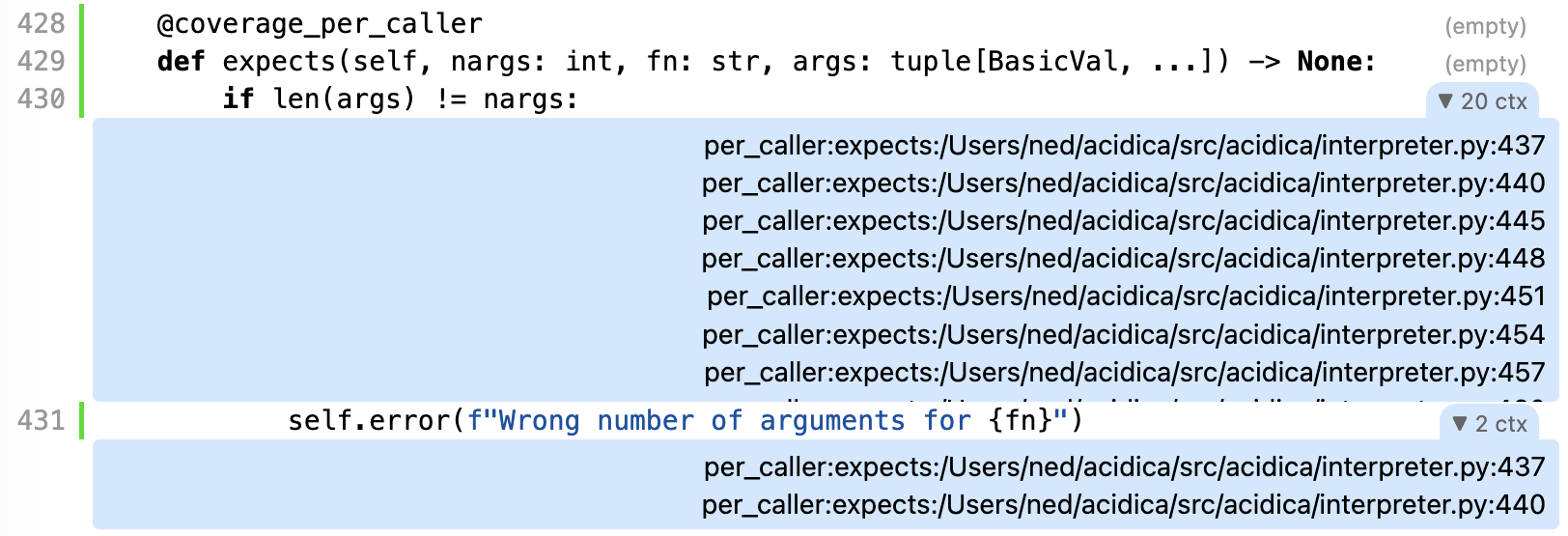
To my delight, this works! I can look at the HTML coverage report and see the
caller contexts for the lines in
expects
. I can see that 20 callers ran
the
if
line, but only 2 ran the
raise
, and the context names show
the file and line number of the callers for each:
This isn’t the whole solution yet. Things to improve:
I’d like to post-process these contexts to show which callers were missing
lines inside
expects
. What I’m looking for is the same kind of “this
line is missing” information that I got from the original inlined logic.
These per-caller contexts overwrite the contexts we were already collecting
(the test names). Ideally we’d have some kind of sub-context so that we could
track both (or many) at once.
It’s not great that I had to add a decorator to the source code. Driving
this through the coverage configuration would keep these kinds of details out of
the source.
But it’s a start, and gives me other ideas. I could use some aspect of the
data passed into a function as the context name. In this example, we could have
used
func_name
as the context instead of the caller’s location. Maybe
you have ideas for other uses.
My latest fun project is a BASIC interpreter called
Acidica. Classic BASIC is an
old-school language first developed in 1964 that saw an explosion of
implementations on microcomputers in the ‘70s and ‘80s. It’s much more primitive
than the Visual Basic that you might be familiar with.
Content Preview
My latest fun project is a BASIC interpreter called
Acidica
. Classic
BASIC
is an
old-school language first developed in 1964 that saw an explosion of
implementations on microcomputers in the ‘70s and ‘80s. It’s much more primitive
than the Visual Basic that you might be familiar with.
A simple BASIC program:
10INPUT"What is your name";U$ 20PRINT"Hello ";U$ 30INPUT"How many stars do you want";N 40S$="" 50FORI=1TON 60S$=S$+"*" 70NEXTI 80PRINTS$ 90INPUT"Do you want more stars";A$ 100IFLEN(A$)=0THEN90 110A$=LEFT$(A$,1) 120IFA$="Y"ORA$="y"THEN30 130PRINT"Goodbye ";U$ 140END
Run it, and you get this:
What is your name? Ned

Hello Ned

How many stars do you want? 10

**********

Do you want more stars? y

How many stars do you want? 20

********************

Do you want more stars? n

Goodbye Ned
The wide variety of BASIC flavors meant I first had to decide what to
implement. I found
Vintage BASIC
and used its spec,
both because it is concisely described, and because it has an implementation I
could run to double-check behavior when I had questions. The site also has a
collection of runnable games
from
Creative Computing magazine
, which I remember
fondly.
This was a perfect vacation-week project. It has no real-world consequences.
It had some interesting problems to puzzle through. It was testable. It
satisfied some nostalgia for my earlier computing days. It was bounded enough to
be “done”.
In those ways, it’s very similar to a vacation project of mine from four
years ago:
Stilted
, an implementation of
PostScript.
Acidica is not useful for writing new programs, only because BASIC itself is
so difficult. There is no scoping beyond single-line functions, variables names
can be as long as you want but only the first two letters and first digit are
significant. Keywords are recognized anywhere, so FACTOR can’t be variable name
because it has TO in the middle. The only control structures are FOR, IF, and
GOTO. It’s something of a testament to human persistence that programs like
three-dimensional tic-tac-toe
can be written in it.
As a side project, I could choose my development style: no real type
checking (partly because BASIC’s values would be awkward to squeeze into static
typing), and very few docstrings. There are lots of tests, but only integration
tests: every test is a BASIC program to run, with a check for the correct output
and/or the expected error.
To be honest, the “only integration tests” approach was kind of a pain, but I
stuck with it and resisted the temptation to add unit tests along the way.
Another choice I made: no AI. I like writing programs. I get a deeper sense
of the thing I am building when I have my fingers in the clay. Since there was
no deadline, or even any reason to ever finish the project, I could take my time
and not be rushed.
But I like the result. I enjoyed the time I spent working on it. I liked
being able to stop and devote pure thinking time while doing other things when I
got to the next hurdle. The next steps here might be to use this project as a
test bed for some development ideas. Or maybe add a BASIC-to-Python transpiler.
Or maybe it’s done.
My mother is 86, and she is declining. Things that used to be easy for her
now seem completely foreign. She was a programmer, writing software before I
could read, so it is very strange to see her like this.
Content Preview
My mother is 86, and she is declining. Things that used to be easy for her
now seem completely foreign. She was a programmer, writing software before I
could read, so it is very strange to see her like this.
She no longer uses a computer. If I mention some photos I found online, she
asks if there’s any way she can see them, as if she has never used the internet.
This is a new reality for me, but is easier than a year or two ago when she
still tried to be constantly online. As things got more confusing for her, she
struggled and complained “the computer is haunted.” Now she doesn’t have the
computer as a source of friction, but also not as a center of activity.
In many ways, she is following a similar path to her own mother, my
Grandma O
. Like her, my mom is accepting
the changes in her relationship to the world. She is able to laugh at it a
bit. But it will still be difficult, especially because we know it is a
progression that is not going to get better and will very likely get worse.
The new her is very different from the original her. She was not timid. She
came out as gay in the mid ‘70s and ran
a feminist
bookstore
. She worked as a programmer. She got a PhD in computational
linguistics just because she was interested in the topic. These were the things
I was used to hearing about from her. She never lacked for enthusiasms, projects
and accomplishments.
She was always energetic and feisty, ready to engage in debate. This picture
does a good job capturing the spirit of many of our interactions in the
past:
Now she is mild and somewhat resigned. She says things like, “I don’t think
much anymore.” I know there are other ways this could go. Some people get very
angry as their abilities fade. In that sense, this is a good trajectory, but I
am still sad to see her shrink.
Last week we had a family gathering at my sister’s house, the usual location
for these big events. My mom has been there many times. But now she didn’t
recognize it. I sat with my mom and sister over lunch. They were discussing the
dining room we were in. It wasn’t familiar to my mom. She wasn’t upset about it,
just looked around and said, “no, I don’t remember this.”
My mom was enjoying her salad, but eating it with her hands. I pointed to
the fork on her plate and asked, “You don’t like the fork?” She looked at it as
if it was some unimportant detail of the tablecloth, and kept eating with her
hands. She wasn’t bothered, just calmly proceeded in her way.
At the end of the party, my mom and her wife Fumiko were getting ready to go.
Fumiko had scheduled a ride-share car, so we went out to the street to wait for
it. We brought out a chair for my mom to sit. The time for the car came and
went, but no car arrived. There were five of us out there: me, my sister and
brother, my mother and Fumiko. My brother and Fumiko were trying to figure out
where the car was. They were looking through the app for information. They
re-read the email confirming the scheduled ride. Should we keep waiting? We
could request a new ride. Would we be charged for the missed scheduled ride? It
was a whole thing, lots of discussion and questions.
In the middle of this, without warning, my mom tried unsteadily to get up
from her chair. Two of us quickly intercepted her. The uneven pavement seemed
particularly treacherous for her. We supported her arms to keep her steady.
“Mom, where are you trying to go?”
“I want a place of certainty. This place seems very uncertain.”
She was right: out there on the sidewalk we were all uncertain. But I have to
wonder if she was also talking about her larger experience in a world that is
less and less understandable for her.
In the back of my mind, I wonder what my own future holds. But that is
decades away, and my mother’s situation is now. I don’t know what her next
steps down will be like. She has already changed a great deal in the last
year.
I think we would all like a place of certainty. I know I would, but I also
know I am not going to get it soon.
I saw this dodecahedron with an Islamic-inspired pattern
designed by Taj Ragoo. As soon as I saw it, I knew I had to make one. I
studied the pattern, wrote some Python, and made myself a PDF. I cut it out,
folded it, glued it together, and now I have one of my own:
Content Preview
I love that this elegantly combines two pure geometric forms: the Platonic
dodecahedron (12 uniform pentagons), and an Islamic pattern using five-pointed
stars.
Looking closely, details emerge:
Each face has ten small stars in a ring. I’ve lightened them a bit in the
front face here. At the center of each face is a ten-pointed star (highlighted
in red), made of two overlaid five-pointed stars.
The real genius of the pattern is at the corners. I’ve highlighted one in
blue. It’s a star made of the same parts as the central ten-pointed star, but
there are only nine points. It works because three pentagons lying flat touching
at a point occupy 324 degrees, leaving a 36-degree gap.
When the dodecahedron is folded together, the gap is closed. 36 degrees is
exactly one-tenth of a complete 360-degree circle, so exactly one point of the
ten-pointed star is missing, leaving a perfect nine-pointed star using the same
shapes, spread over the corners of three pentagons. Beautiful!
If this appeals to you,
follow Taj on Instagram
:
he’s got more Platonic/Islamic mashups to enjoy. The paper versions are just
prototypes of the final versions he makes in wood.
Of course, you can
get my PDF
and make one
for yourself:
The
Python code to draw the net
isn’t great: it
has no real parallels to the structure of each face. It’s a lot of math and
line drawing to get things in the right places. My ideal would be to have a
toolset that used a tile-placing abstraction, to be able to do more interesting
designs. Some day.
It was a joy to work on this though. It was a slow process of studying the
original, working out the math, then mulling over coding approaches. The code was developed in small
steps over weeks. Then printing initial versions, marking them up, working out the tab structure.
Some copies were colored to understand how the lines flowed across the whole dodecahedron.
It was good to be working in both the mental and physical worlds:
Perhaps because 64 is a power of two, and a square and a cube, but also for
other reasons, it pops up in lots of places. Here are some of the things I’ve
associated it with over the years:
Content Preview
Perhaps because 64 is a power of two, and a square and a cube, but also for
other reasons, it pops up in lots of places. Here are some of the things I’ve
associated it with over the years:

Crayola
64-crayon box
: as a kid, this box seemed like the ultimate luxury, the
Rolls-Royce of crayons. So many colors, and the box had a built-in sharpener.
Advanced technology!
¶ A chess board has 64 squares, and is used as the setting for the age-old
question about doubling: would you rather have one billion dollars, or a penny
on the first square, then double the number on each next square? It’s an
eye-opening demonstration of exponential growth and how big numbers can get.
Take the chess board: you’ll have 184 million times more money!
¶ I grew up in New York City too late to visit the
1964
World’s Fair
, but its aura hung over the city. I was always fascinated by
it, and still am. It epitomized the early 60’s optimism about the future. This
Love of Theme Parks
video
does a good job capturing the Fair’s original spirit and the current
state of the location, and explains the important part Walt Disney played in the
whole thing.
¶ As a power of 2, it appears in many tech things: Nintendo 64, Commodore 64,
base-64 encoding, 64-bit integers, 64-bit computing in general, and so on and so
on.
¶ The number famously appears in the Beatles’ song
When I’m
Sixty-Four
. A surprising fact about the song is that it’s one of the first
Paul McCartney ever wrote, when he was about 14 years old. It’s an old-fashioned
tune because he wasn’t aware of rock and roll yet, or maybe it hadn’t even
happened yet. It’s thought they put the song on Sgt Pepper because Paul’s
father was turning 64 that year.
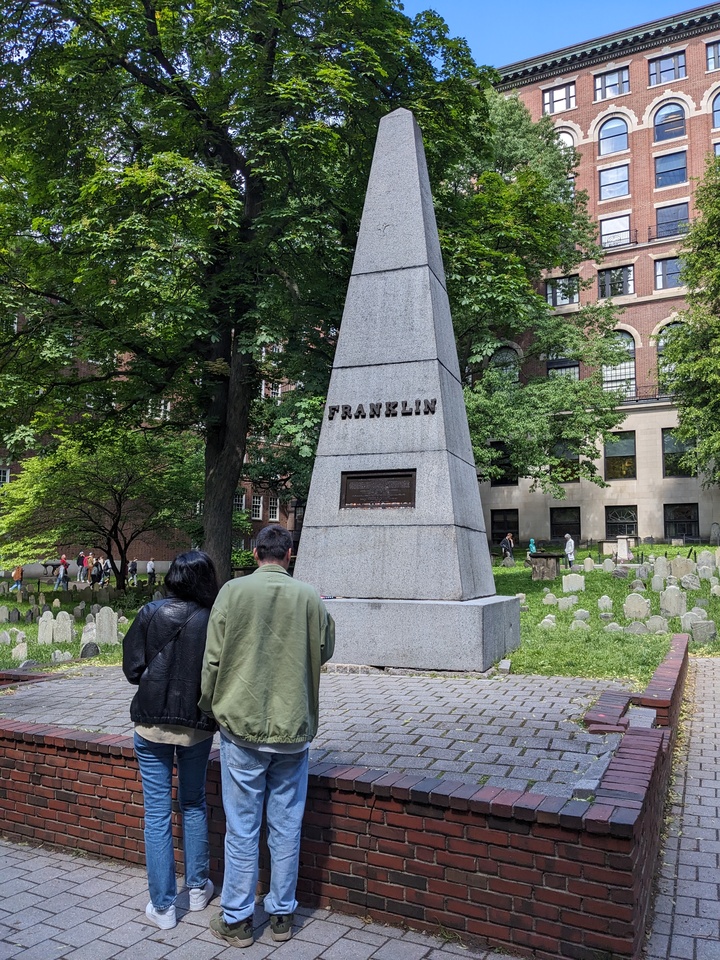
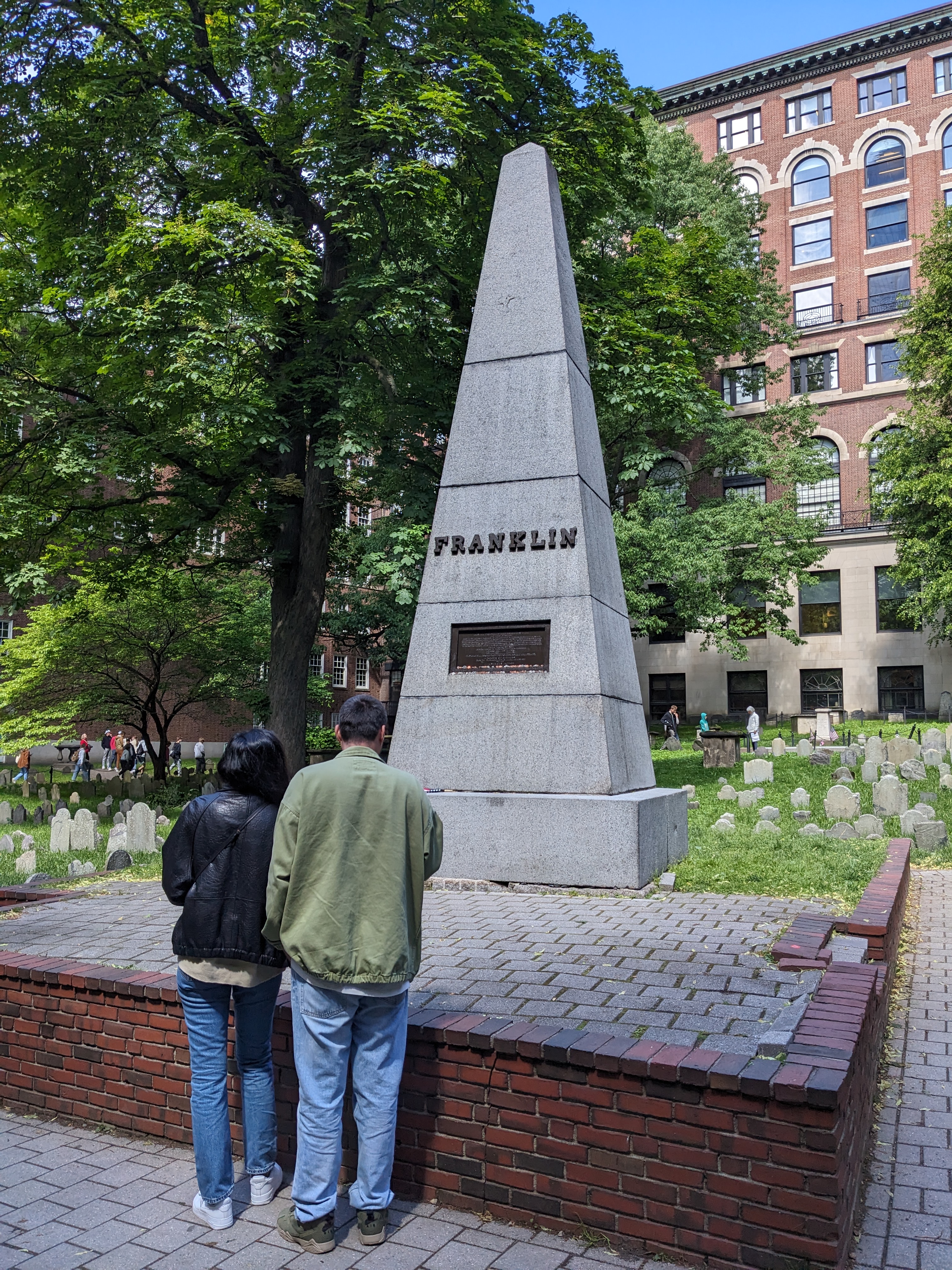
There are many historical artifacts and monuments in Boston. This is one of
my favorites:
Content Preview
There are many historical artifacts and monuments in Boston. This is one of
my favorites:
It’s in the center of the
Granary Burying
Ground
, the third-oldest cemetery in Boston. Casual tourists will assume the
monument marks Ben Franklin’s grave, but they are wrong: it is for his
parents.
Ben Franklin wrote an inscription for his parents’ grave. The marker
deteriorated and in 1827 was replaced with this large obelisk and a new
plaque.
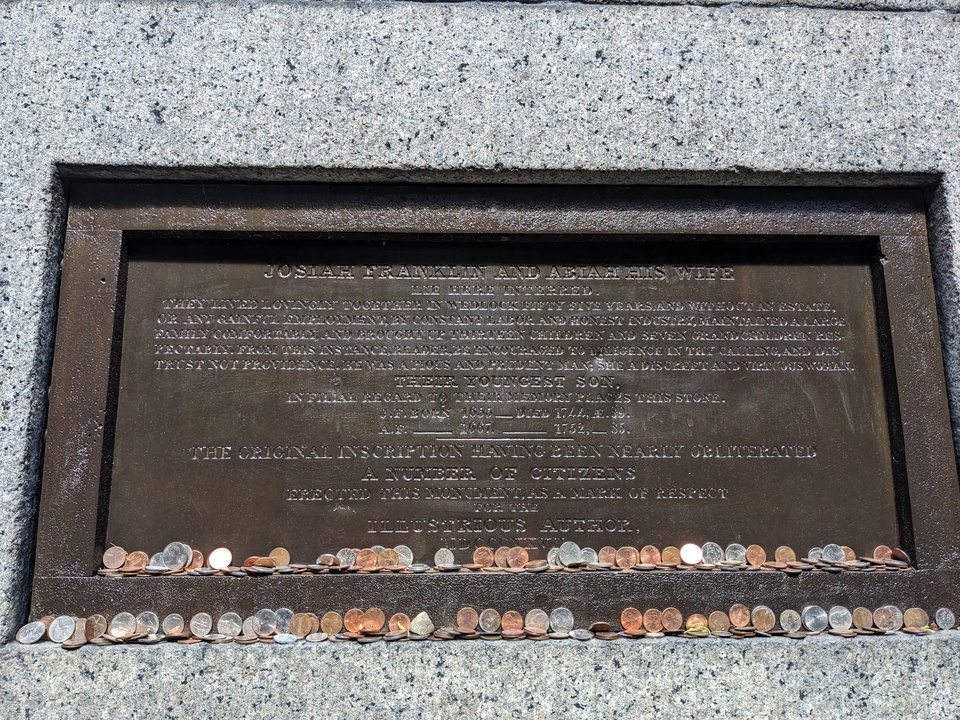
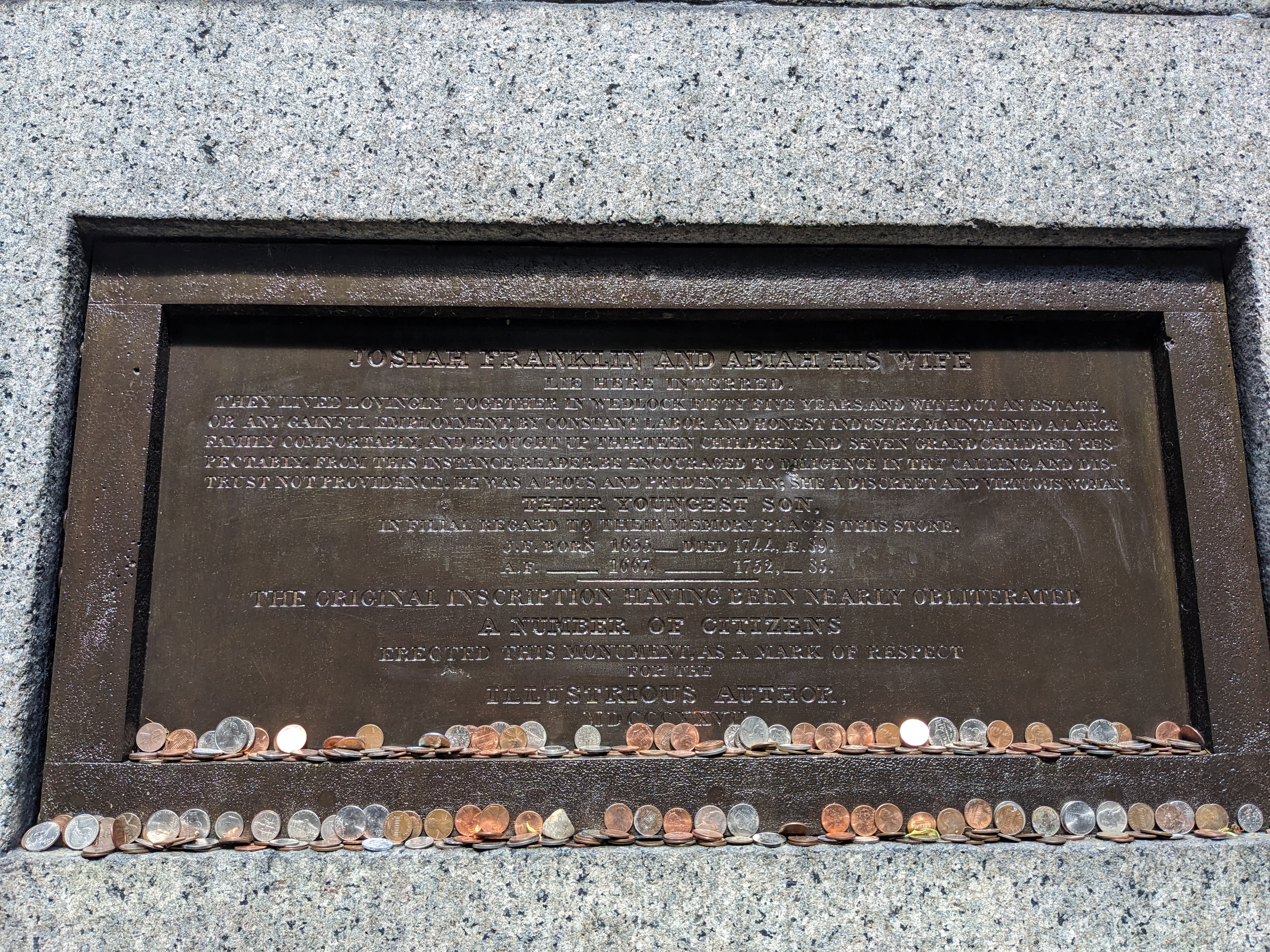
The plaque is far from the walkway and hard to read even up close:
It reads:
JOSIAH FRANKLIN AND ABIAH HIS WIFE
lie here interred.
They lived lovingly together in wedlock fifty five years. And without an estate,
or any gainful employment, by constant labor and honest industry, maintained a large
family comfortably, and brought up thirteen children and seven grandchildren respectably.
From this instance, reader, be encouraged to diligence in thy calling, and distrust
not providence. He was a pious and prudent man; she a discreet and virtuous woman.
THEIR YOUNGEST SON,
in filial regard to their memory places this stone.
J.F. Born 1655 __ Died 1744, Æ. 89.
A.F. ___ 1667 _______ 1752, __ 85.
The original inscription having been nearly obliterated
A number of citizens erected this monument, as a mark of respect for the
ILLUSTRIOUS AUTHOR,
MDCCCXXVII
I love that neither the original inscription nor the re-dedication mentions
Ben Franklin by name. He wanted the focus to be on his parents, and the citizens
of 1827 understood and kept their words in his style. He writes lovingly about
his parents and their lifestyle, and keeps us thinking about them, not him.
I also like the word “reader” in there. Even when writing tombstones, Ben
couldn’t resist his Poor Richard’s Almanac pedagogical style.
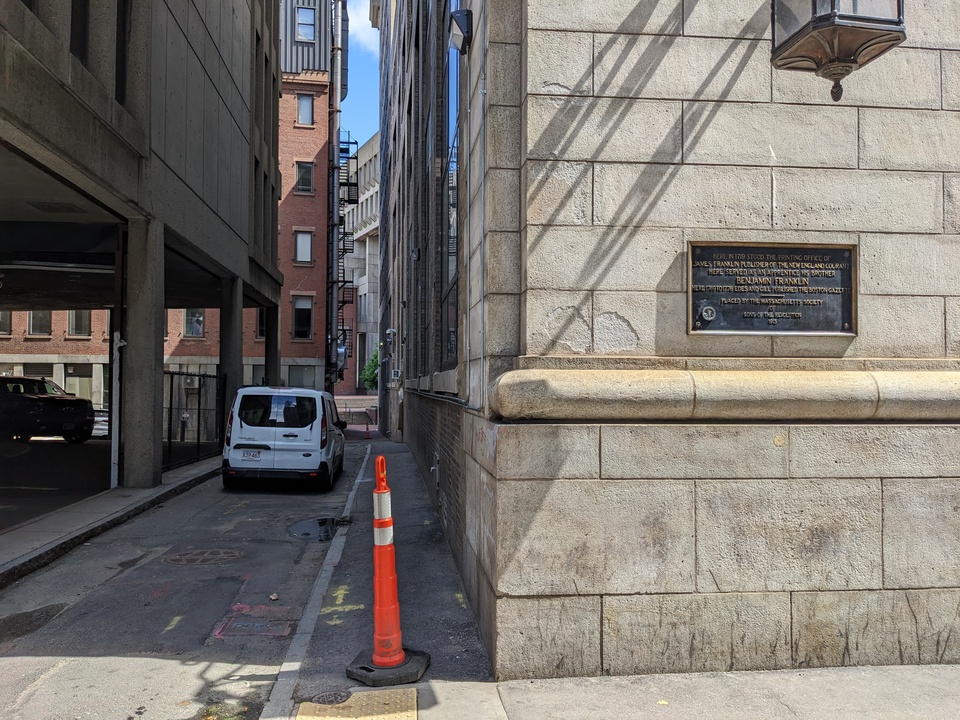
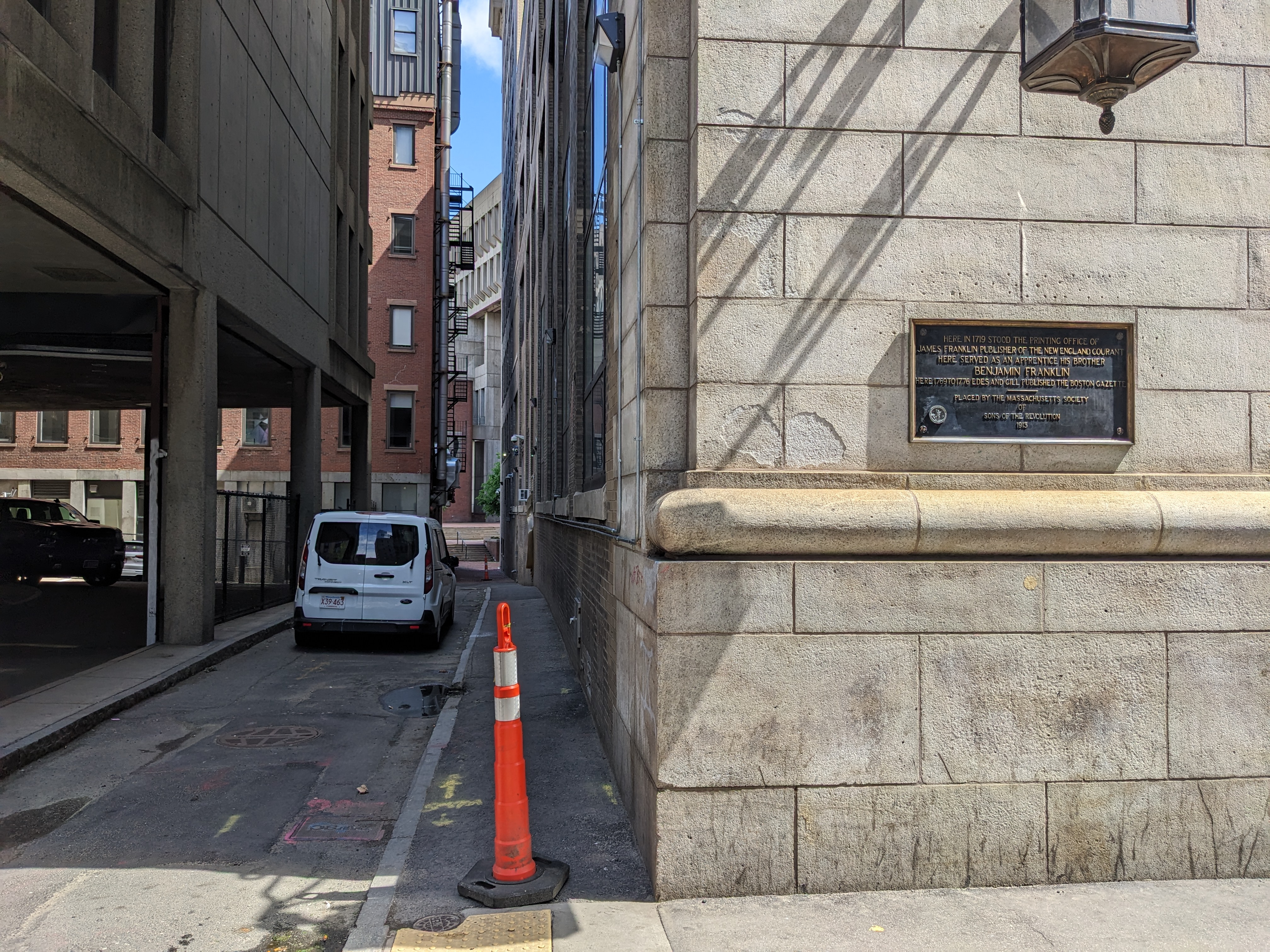
A few blocks from the cemetery is a
plaque on Court St
marking the location of James Franklin’s printing shop where Ben was an apprentice:
You can see in the picture there’s a one-block-long narrow dingy alleyway
typical of downtown areas. It’s used for vans and dumpsters. I guess because
it’s the location of the Franklin printing shop, this unremarkable and
depressing passage is named “Franklin Avenue”. I would have expected something
grander based on the name.
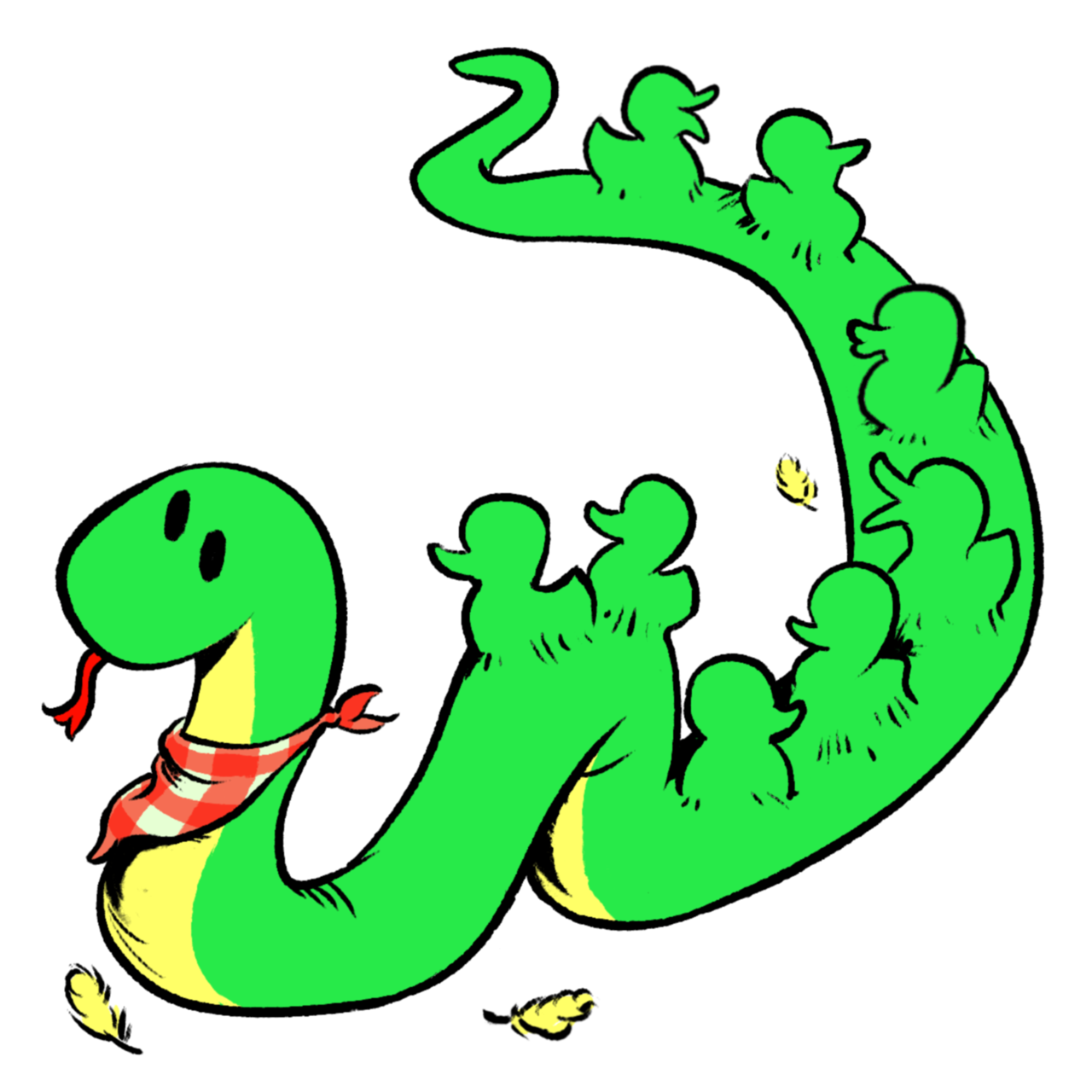
This is the mascot for Boston Python.
It’s called Snake Way for Ducklings:
Content Preview
This is the mascot for
Boston Python
.
It’s called Snake Way for Ducklings:
My son Ben drew it, which makes me very happy. He also drew
Sleepy Snake
. Wearing this image on a
shirt
around PyCon, I had
to explain it a number of times. People in Boston understand it almost
immediately, but others need more background.
In 1941, Robert McCloskey wrote a children’s book called
Make Way for
Ducklings
. It’s a classic, selling millions of copies and never going out
of print. We read it to our own children growing up many times.
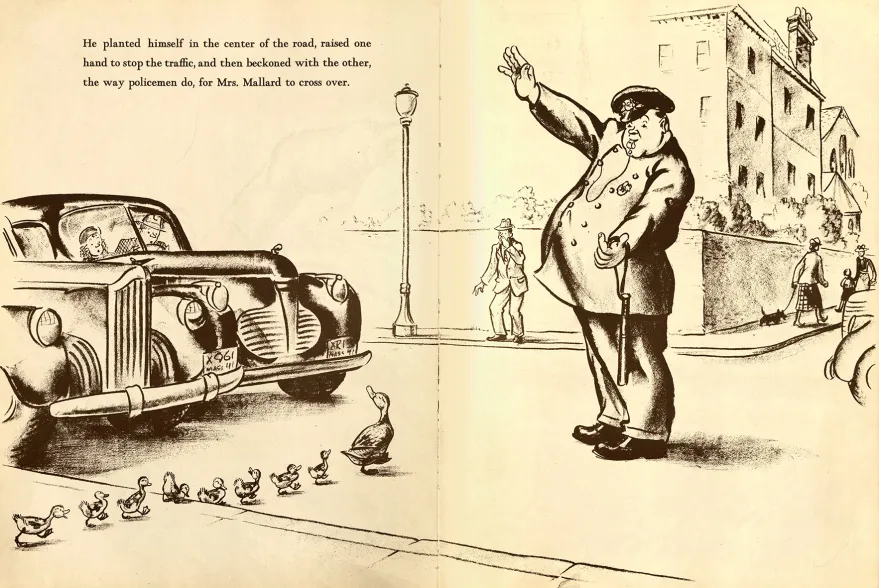
The book is the story of Mrs. Mallard making her way through Boston guiding
her eight ducklings (Jack, Kack, Lack, Mack, Nack, Oack, Pack, and Quack) to a
pond in Boston’s Public Garden. It has charming pencil illustrations:
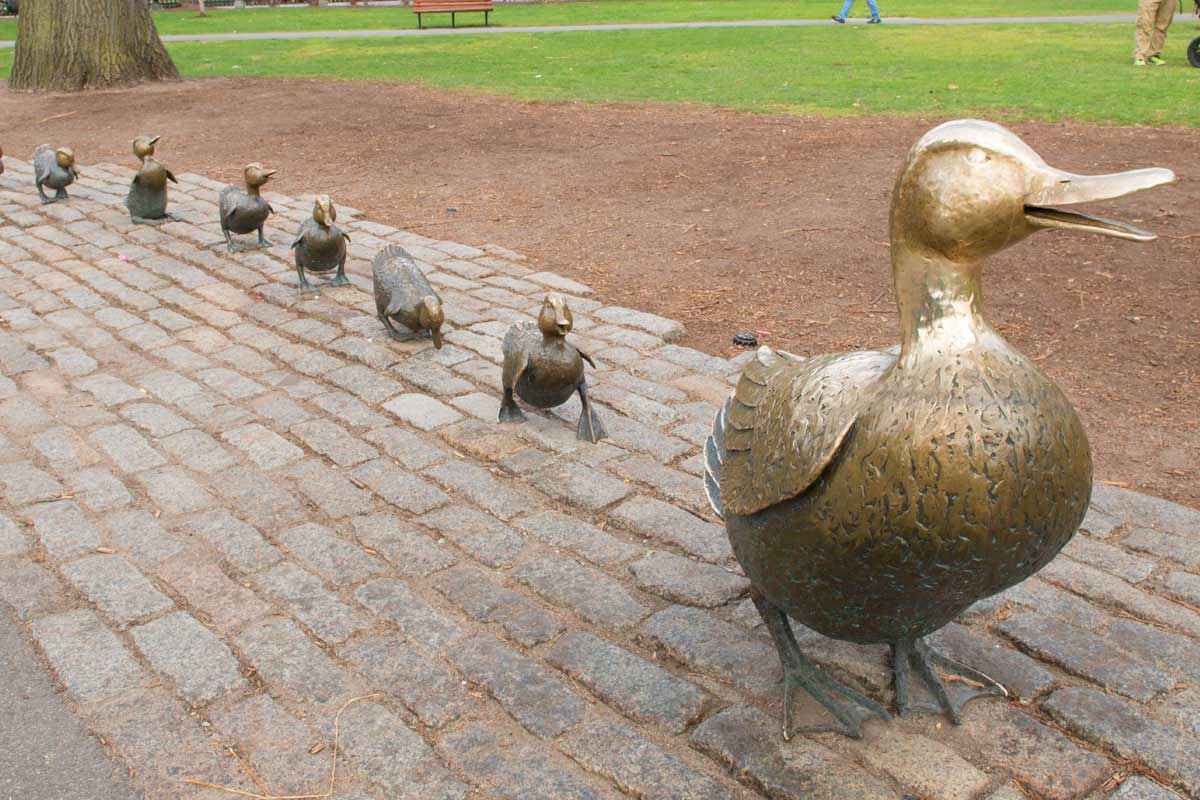
The book led to a
sculpture
in the Public Garden near the actual pond:
The sculpture is sized and placed for kids to play on, and is widely known
and beloved in Boston. The ducks
are
dressed in costumes
for all kinds of occasions: holidays, sports events,
even Star Wars day. On Mother’s Day, there’s a duckling parade: families bring
their children dressed as ducklings. In Boston, the ducklings are a big
deal.
So it seemed natural to Ben to riff on the ducklings for Boston Python. One
observer thought a snake eating the ducklings seemed kind of dark, but you can
see the ducklings are still quacking, so they are fine!
BTW, Boston also has
Duck Boat
tours
, but that’s completely different.
Last week was PyCon US in Long Beach California. As always, it was a
jam-packed intense time. I’ll try to report on my experience. The videos aren’t
uploaded yet, but I’ll link to them later when they are.
Content Preview
Last week was PyCon US in Long Beach California. As always, it was a
jam-packed intense time. I’ll try to report on my experience. The videos aren’t
uploaded yet, but I’ll link to them later when they are.
This recap is longer than I’ve done in the past. I don’t know why, it’s just
how it came out. I want to convey a sense of what I get out of PyCon and what
you can get out of PyCon.
Thursday
Opening reception
I came with five of my colleagues from Netflix. I got to the Thursday night
reception with Anika (first PyCon) and Josey (first PyCon with me). They said,
“we’re going to count how many people Ned says hi to!” They were at 16 after
five minutes and gave up. I don’t blame them. The reception is a very social
time, and I have lots of friends I really enjoy seeing there.
New friends and backpacks
Besides seeing old friends, one of the great things about unstructured time
like the opening reception is meeting new people. Tower Research Capital was
giving away full-size Osprey backpacks at their booth. This was easily the most
appreciated swag at PyCon. At the booth a clump of us were wondering what was
required to get one. While there I met
Maria
,
Camila
, and
Vinícius
. They are from Brazil, and
were very friendly. They will re-appear in this story a few times.
BTW: nothing was required to get a backpack, just ask and you get one.
Everyone was very impressed.
Volunteering
A good PyCon life-hack is to do some volunteer jobs. In particular, being a
session runner is great. Pick a talk you want to go see anyway. Volunteer to be
the session runner. Your duty is to go to the green room 15 minutes before the
talk, meet the speaker, and help them get to the room on time and get set up.
It’s a good way to make a connection with the speaker and help them at a
particularly stressful time. It helps PyCon run smoothly. Also: the green room
has coffee and snacks all day long!
As it happens Vinícius was doing a talk Friday about t-strings I wanted to
see, so I signed up to be his session runner.
Friday
(No) breakfast
Friday morning, I discovered that PyCon was not providing breakfast. This was
unfortunate because conference meals are one of those unstructured times you can
interact with lots of people. My strategy has usually been to look for a table
that has people that don’t seem like me (in whatever ways), and meet people.
Without a provided breakfast, I was instead eating a muffin in the quiet hotel
lobby by myself. I understand why we were on our own for breakfast (conference
food is expensive to provide), but I missed the congregating it encouraged.
Maybe next year there will be a way to get people to gather over breakfast
without paying conference-food prices.
Fireworks disaster
The opening plenary by Deb Nicholson pumped the room up with excitement. But
then came the opening “keynote” by Fireworks CEO Lin Qiao. I use the term
sarcastically because it was not a keynote. It was an undisguised sales pitch
for some kind of AI thing, complete with a QR code for discounts. It was a
tone-deaf disaster of epic proportions. People (including me) walked out in the
middle and were not shy about it.
To make it even worse, Fireworks isn’t a sponsor of the PSF or of PyCon.
Before the keynote, a few sponsors were given a chance to say a word. Anthropic
gave $1.5M and spoke for two minutes about the importance of Python to their
work. Then Fireworks had 45 minutes to sell products without giving anything!?
It was extremely distasteful.
The conference organizers were not at fault. Speaking to them afterwards, it
was clear they were as blindsided as the rest of us. I don’t think anyone blamed
PyCon for it, but it was definitely a missed opportunity. You want an opening
keynote to lift spirits and launch people into the conference. Not a good
start.
Brazilian energy
At Vinícius’ t-strings talk, his
friends were in the
front row
waving Brazilian flags and occasionally blowing an air horn. They
were also audible during large plenaries when Brazil was mentioned. I thought it
was great and would love to hear more groups making noise when their segments or
interests are in focus. It helps to give a sense of the breadth and scope of the
community, and the strong sub-groups you might not have been aware of.
Art open space
Mario Munoz ran an open space all Friday afternoon about Python and Art. I
don’t consider myself an artist, but I’ve enjoyed making math-generated image
projects. I got in touch beforehand to ask if
my
generative art projects
would be on-topic. He said they would, so I dropped
in.
I showed some things I had made like
truchet-tiled
images
or
harmonic pendulums
. The conversation
quickly turned to, “is it art?” and if so, “who is the artist?” I created the
programs, but then either a random number generator or the user clicking
squiggles was making the choices. In the resulting image, who is the artist?
I don’t have an answer, but it was interesting to hear people’s perspectives.
I loved that in the midst of a highly organized conference with lots of
“serious” topics like devops or security or AI, a few of us could sit quietly,
noodle on a guitar and ponder what makes art.
PyCon open spaces allow for all kinds of in-depth discussions and
interactions. This was a perfect example.
Mia’s docs change
At last year’s PyCon, I met Mia, who was very interested to make some
improvements to the Python docs. She landed one change, but then I didn’t hear
from her over the rest of the year. We ran into each other again in the art
open space, and we sat down afterwards to talk some more about contribution.
We settled on a
change to the docs home page
, and she
made that happen. Earlier this year I heard Jack Skinner on a podcast describe
conferences as “co-working spaces with interruptions called talks.” Sitting with
Mia was like a 30-minute sprint to find a change and get started on it enough so
that the rest of the work could happen afterwards.
Lightning talks
Some of my favorite parts of PyCon are the lightning talk sessions. These are
five-minute talks about anything, proposed and selected the day before. Because
they are short, people will talk about all kinds of things. Because they are
not “formal”, the selection process can select for variety rather than
Importance.
I keep coming back to the breadth of how Python is used and what it means to
people. Lightning talks are a concrete way to see that.
This year, some of the talks included:
Adam Silkey’s rousing oration about running for local political office
Choosing the ideal cat emoji
Yapping
Why you should run Python betas
Cumbuca.dev
, promoting diversity in tech in Brazil, run by my new friends Maria and Camila
A PyPI that installs from floppy disks(?)
Of course this is just a small sampling. I encourage you to find the
lightning talks and watch them all.
Lightning talk?
At dinner Friday I mentioned an idea I’d had for a while for a lightning
talk. I’d never given it because I was only excited about it during PyCon, and
didn’t feel like I had the time to do the slides well enough. Stay tuned.
Saturday
Lightning talk!
Saturday morning, I thought more about the lightning talk, and how making the
slides was the blocker. So I tried using Claude to make the slides. I wrote an
outline and tried a bit to get the slides built. When I saw that it seemed
likely to work out, I submitted the talk for consideration. By lunch, I got the
email saying I was on for Saturday night. Fun! I kept tweaking the slides over
the course of the day.
Pablo’s keynote
Pablo Galindo Salgado gave the morning keynote. He spoke in Spanish, with
simultaneous captioning in English. He spoke with heart and passion about the
collective effort to create Python. In particular he lamented the effects of the
AI onslaught on the Python core team and on open source projects in general.
Comparing open source work to building a cathedral, he took a long view on
the skill- and community-building that are natural by-products of open source
work. AI threatens to wash that all away, and maintainers aren’t sure what to do
about it. We want to maintain the interpersonal dynamics that underpin
everything we do, but AI makes it too easy to make all the wrong kinds of
contributions and interactions.
Pablo was emotional, personal, relevant, and inspirational. He connected with
everyone in the room. On Friday I was joking that everyone agreed on two
things: the backpack swag was great, and the Fireworks keynote was awful. Now
everyone agreed on three things, because Pablo’s keynote was a keeper, one for
the ages.
PSF Members lunch
The PSF Members lunch is a place to have a lunch in a smallish room, with
time for questions of the PSF. Two themes emerged from the questions: the first
is that running a conference is very expensive and getting worse. 2027 will be
in Long Beach again, but there’s no location chosen yet for 2028. I got the
sense that the PSF is re-thinking the conference to maybe reshape the costs.
The second theme was about non-US attendance. Many people chose not to travel
to the US because of the current political situation, and I don’t blame them.
When asked why we don’t do the main PyCon outside the US, Deb Nicholson pointed
out that some US people would not be comfortable leaving the US and then
trying to get back in. This is on top of the logistical problems of trying to
run a conference outside your own country.
Juggling
Saturday afternoon, I continued a PyCon tradition: running a juggling open
space. My strategy is to bring a couple dozen beanbags, camp out in a highly
trafficked hallway, and teach anyone who’s interested. This year I had beanbags
shipped to the hotel, and then gave most of those away at the end of the
session. We had a lot of fun, some people learned some basics, and some were
genuinely surprised to be gifted beanbags to take home.
Long walk
It took longer than I thought to wrap up the juggling open space, so I had to
hurry to the big stage for my lightning talk. But for some reason, we weren’t
allowed to walk through the venue as we had that morning. We had to go outside
and around a long block to walk back in a different entrance. That was bad
enough, but I was given the wrong directions, so walked about twice that
distance. I was very stressed and very thirsty, but did manage to get to the
stage in time to get ready.
Silence is Golden
My lightning talk was “Silence is Golden”. It was about leaving quiet time
during discussions so that reluctant speakers can find a place to insert
themselves. What made the talk fun to do was riffing on PyCon’s usual Pac-Man
rule, which says to leave a wedge open when standing in a circle so that new
people can join you. The riff is to make a similar rule for time: if you draw a
clock with a hand sweeping out the time that people are speaking, you can get a
Pac-Man shape, with an open mouth for the time to be quiet so that someone new
can speak.
Making the clock animation was the thing I didn’t know how to do myself but
Claude did for me. That let me focus on how to get the message across and not
get lost in the mechanics of SVG details.
I followed Simon Willison’s extremely energetic, fast-paced, loud lightning
talk summarizing a year of LLM progress in five minutes (pelicans on bicycles),
so it was an interesting contrast.
Afterward people told me they really liked the talk, including Eric Holscher
who had first formulated the Pac-Man rule. Nice. One of the Sunday morning
lightning talks mentioned “Silence is Golden”! That’s one of the great things
about lightning talks: they can be inspired, created, proposed, selected, and
presented all during the weekend.
Sunday
Sunday was low-key for me compared to the first days. Maybe I was really low
on sleep. No, I definitely was. I tend to sleep at most four hours a night at
PyCon.
We had more lightning talks. amanda casari did another good keynote tapping
into concern about AI and how it would affect our work. Rachell Calhoun and Tim
Schilling did a keynote about how they run Djangonauts, an upskilling program
for new contributors. All of the big-audience events helped to reinforce the
overarching themes that bind us together: working with each other, for each
other.
In the final closing session, I was really pleased to see my Boston
co-organizer Fay Shaw be awarded a PyLadies Award! She’s very energetic and
richly deserved it.
Reflections
What I didn’t do
There are always far too many things happening at once to do everything I’d
like. I didn’t attend any of the Security track, the Packaging Summit, the
Maintainers’ Summit, the organizers’ open space, the PyLadies auction, and so on
and so on. I didn’t do anything outside the conference center other than
dinners. Maybe next year I’ll walk over to take a look at the Queen Mary.
People there and people not
I can think of a number of people I didn’t see at PyCon that I expected to.
I know there were many from outside the US who stayed away. I think back to
PyCons of the last decade, and the visible people who seemed central to Python
and PyCon then, but who now no longer are and no longer attend. That’s OK, the
individuals change over time, but the community retains its essential nature.
Some of the visible faces now are actually quite new to PyCon. Someone who
attended for the first time this year might be one of the driving forces next
year.
We live and breathe, we grow and evolve. We remain the same.